图片说明](https://img-ask.csdn.net/upload/201811/20/1542720099_146631.png)
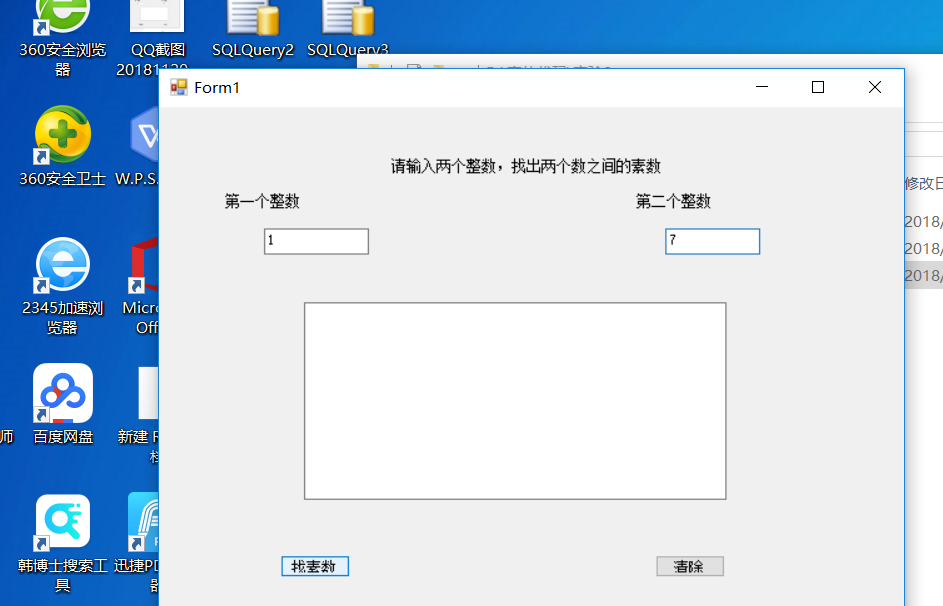
代码和运行窗口已经截图
num1,num2分别为第一个第二个整数,运行代码后,无输出结果,而且窗口卡住

C#的 窗口无法输出值

- 写回答
- 好问题 0 提建议
- 关注问题
 分享
分享- 邀请回答
-

2条回答 默认 最新
 threenewbee 2018-11-20 13:37关注
不能写在Text3_Changed里,要写在按钮的click里
你在Text3_Changed里修改Text3.Text,导致又触发了新的Text3_Changed,如此这般,最后导致堆栈溢出。using System; using System.Collections.Generic; using System.ComponentModel; using System.Data; using System.Drawing; using System.Linq; using System.Text; using System.Windows.Forms; namespace Q714037 { public partial class Form1 : Form { public Form1() { InitializeComponent(); } private void button1_Click(object sender, EventArgs e) { int a = int.Parse(num1.Text); int b = int.Parse(num2.Text); for (int i = a; i <= b; i++) { bool p = true; for (int j = 2; j <= i / 2; j++) if (i % j == 0) { p = false; break; } if (p && i >= 2) num3.Text += i.ToString() + " "; } } private void button2_Click(object sender, EventArgs e) { num3.Text = ""; } } } 窗体设计文件: namespace Q714037 { partial class Form1 { /// <summary> /// Required designer variable. /// </summary> private System.ComponentModel.IContainer components = null; /// <summary> /// Clean up any resources being used. /// </summary> /// <param name="disposing">true if managed resources should be disposed; otherwise, false.</param> protected override void Dispose(bool disposing) { if (disposing && (components != null)) { components.Dispose(); } base.Dispose(disposing); } #region Windows Form Designer generated code /// <summary> /// Required method for Designer support - do not modify /// the contents of this method with the code editor. /// </summary> private void InitializeComponent() { this.label1 = new System.Windows.Forms.Label(); this.label2 = new System.Windows.Forms.Label(); this.num1 = new System.Windows.Forms.TextBox(); this.num2 = new System.Windows.Forms.TextBox(); this.label3 = new System.Windows.Forms.Label(); this.num3 = new System.Windows.Forms.TextBox(); this.button1 = new System.Windows.Forms.Button(); this.button2 = new System.Windows.Forms.Button(); this.SuspendLayout(); // // label1 // this.label1.AutoSize = true; this.label1.Location = new System.Drawing.Point(126, 20); this.label1.Name = "label1"; this.label1.Size = new System.Drawing.Size(115, 13); this.label1.TabIndex = 0; this.label1.Text = "求两个数之前的素数"; // // label2 // this.label2.AutoSize = true; this.label2.Location = new System.Drawing.Point(19, 52); this.label2.Name = "label2"; this.label2.Size = new System.Drawing.Size(67, 13); this.label2.TabIndex = 1; this.label2.Text = "第一个整数"; // // num1 // this.num1.Location = new System.Drawing.Point(92, 49); this.num1.Name = "num1"; this.num1.Size = new System.Drawing.Size(86, 20); this.num1.TabIndex = 2; // // num2 // this.num2.Location = new System.Drawing.Point(279, 49); this.num2.Name = "num2"; this.num2.Size = new System.Drawing.Size(86, 20); this.num2.TabIndex = 4; // // label3 // this.label3.AutoSize = true; this.label3.Location = new System.Drawing.Point(206, 52); this.label3.Name = "label3"; this.label3.Size = new System.Drawing.Size(67, 13); this.label3.TabIndex = 3; this.label3.Text = "第二个整数"; // // num3 // this.num3.Location = new System.Drawing.Point(20, 89); this.num3.Multiline = true; this.num3.Name = "num3"; this.num3.Size = new System.Drawing.Size(344, 177); this.num3.TabIndex = 5; // // button1 // this.button1.Location = new System.Drawing.Point(92, 280); this.button1.Name = "button1"; this.button1.Size = new System.Drawing.Size(70, 22); this.button1.TabIndex = 6; this.button1.Text = "找素数"; this.button1.UseVisualStyleBackColor = true; this.button1.Click += new System.EventHandler(this.button1_Click); // // button2 // this.button2.Location = new System.Drawing.Point(236, 280); this.button2.Name = "button2"; this.button2.Size = new System.Drawing.Size(70, 22); this.button2.TabIndex = 7; this.button2.Text = "清除"; this.button2.UseVisualStyleBackColor = true; this.button2.Click += new System.EventHandler(this.button2_Click); // // Form1 // this.AutoScaleDimensions = new System.Drawing.SizeF(6F, 13F); this.AutoScaleMode = System.Windows.Forms.AutoScaleMode.Font; this.ClientSize = new System.Drawing.Size(390, 323); this.Controls.Add(this.button2); this.Controls.Add(this.button1); this.Controls.Add(this.num3); this.Controls.Add(this.num2); this.Controls.Add(this.label3); this.Controls.Add(this.num1); this.Controls.Add(this.label2); this.Controls.Add(this.label1); this.Name = "Form1"; this.Text = "Form1"; this.ResumeLayout(false); this.PerformLayout(); } #endregion private System.Windows.Forms.Label label1; private System.Windows.Forms.Label label2; private System.Windows.Forms.TextBox num1; private System.Windows.Forms.TextBox num2; private System.Windows.Forms.Label label3; private System.Windows.Forms.TextBox num3; private System.Windows.Forms.Button button1; private System.Windows.Forms.Button button2; } }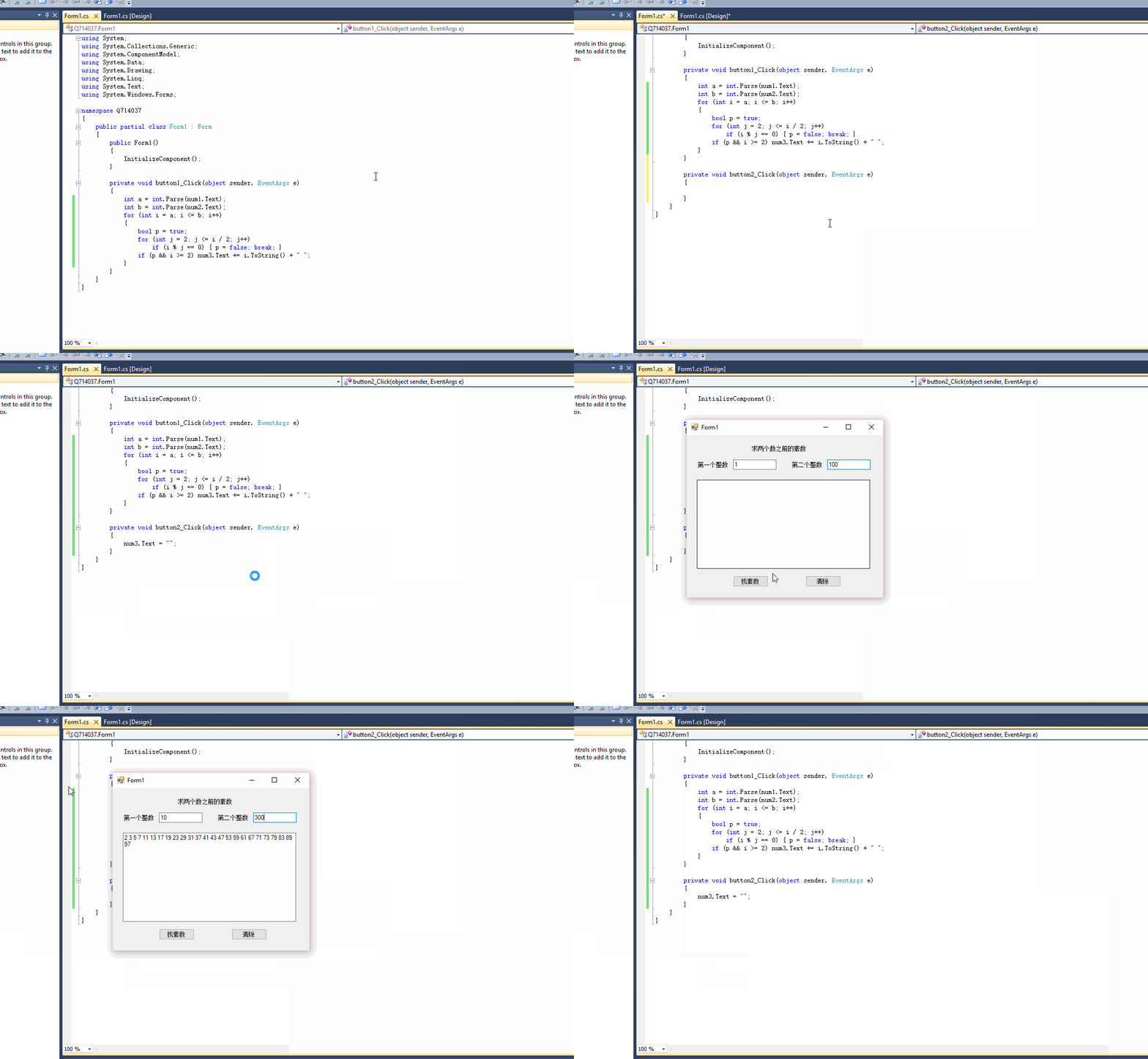 本回答被题主选为最佳回答 , 对您是否有帮助呢?解决 无用评论 打赏举报 分享
- 2022-11-12 20:46【C#语言基础】 C#是一种面向对象的编程语言,由微软...在学习C#和数据库技术基础时,理解这些基本概念至关重要,它们构成了C#编程的基石,也是进一步学习更复杂技术(如数据库操作、图形用户界面、多线程等)的基础。
- 2024-03-26 15:24C#是一种面向对象的编程语言,由微软公司开发,广泛应用于桌面应用和游戏开发。Winform是.NET Framework的一部分,提供了一个创建桌面应用程序的平台,具有丰富的用户界面控件和事件处理机制。 在Winform应用中集成...
- 2021-04-21 11:59你可以选择在控制台窗口输出数据,或者创建一个简单的图形用户界面(GUI)显示实时数值。使用Windows Forms或WPF可以创建GUI,用Label控件显示压力和温度值。 5. **错误处理**: 编程时别忘了考虑错误处理,例如...
- 2025-08-04 16:04开发者可以通过设置断点、启动调试、查看监视窗口中的变量值等步骤来调试程序。 C#语法快速热身:介绍了C#的一些基本语法结构,包括if条件结构、多重if结构和嵌套if结构,这些都是C#编程中控制程序流程的关键元素。...
- 2024-05-06 13:502301_82243626的博客 技术栈比较搭,基本用过的东西都是一模一样的。快手终面喜欢问智力题,校招也是终面问智力题,大家要准备一下一些经典智力题。如果排列组合、概率论这些基础忘了,建议回去补一下。带引号的字符串字面量在同一行上以...
- 2014-01-22 14:104.1 值 类 型 .28 4.2 引 用 类 型 .33 4.3 装箱和拆箱 .39 4.4 小 结 .42 第五章 变量和常量 .44 5.1 变 量 .44 5.2 常 量 .46 5.3 小 结 .47 第六章 类 型 转 换 .48 6.1 隐式类型转换 .48 6.2...
- 2025-06-23 04:07C#的编译环境为.NET,后者是基于Windows平台的技术,包含在.NET Framework中。.NET Framework提供了一个执行环境,让多种编程语言开发的应用程序可以在其上运行。C#语言通过.NET Framework能够实现跨语言的代码共享...
- 2021-10-07 20:58在调试程序时,可以通过设置断点(F9),启动调试(F5),并在监视窗口查看变量值来查找和解决问题。 【C#条件结构】 C#的条件结构主要包括简单的`if`语句、`if-else`语句和多重`if`语句。简单`if`结构仅在条件...
- 2023-09-27 21:11方程式sunny的博客 C# wpf快速入门
- 2020-08-26 08:27微软技术分享的博客 C#(C Sharp)是一种通用、面向对象的编程语言,由微软公司开发。它在语法结构和概念上类似于C和C++,但也借鉴了Java的一些特性。C#是.NET平台的主要编程语言之一,广泛用于Windows应用程序开发、Web应用程序开发和...
- 没有解决我的问题, 去提问

