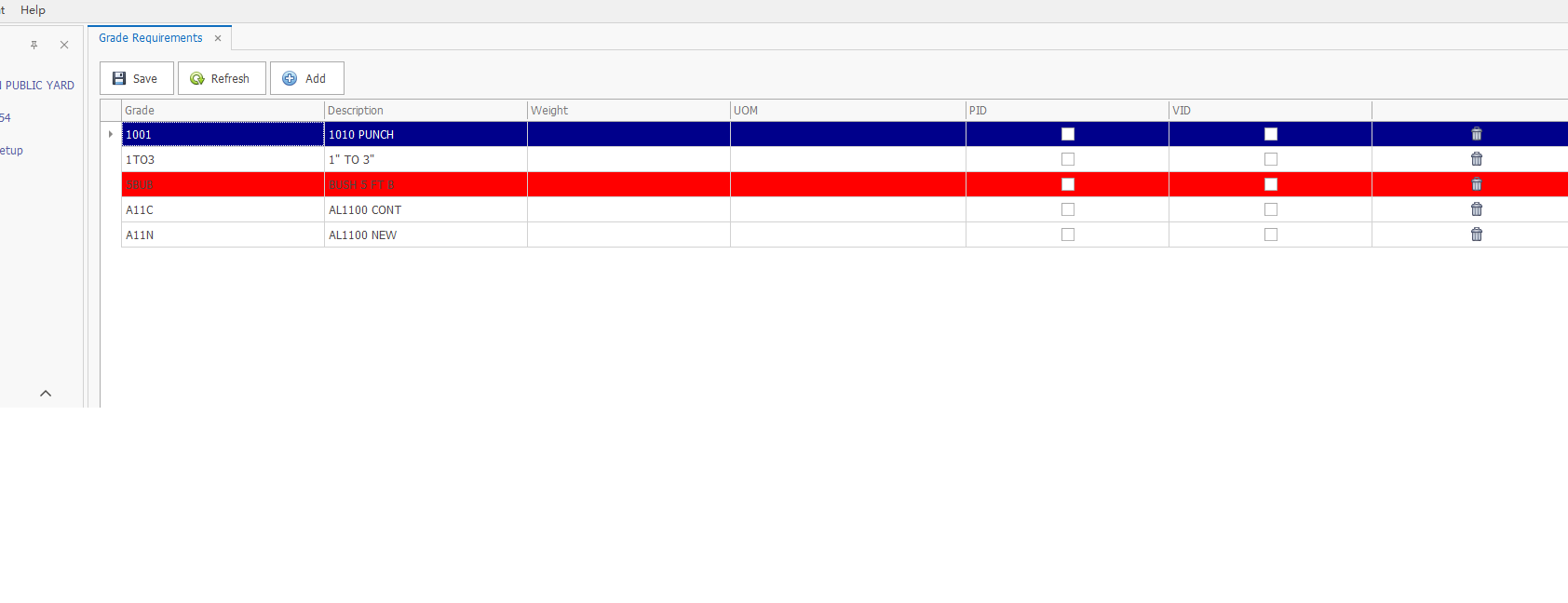
原来row是有红色底色 当FocuedRow(蓝色)移动到红色上, 依旧显示红色。

DevExpress gridControl FocusedRow时候怎么才不会覆盖原来Row的背景颜色?

- 写回答
- 好问题 0 提建议
- 关注问题
 分享
分享- 邀请回答
-

1条回答 默认 最新

 关注
关注让阿豪来帮你解答,本回答参考chatgpt3.5编写提供,如果还有疑问可以评论或留言
问题描述:当行数据中的"row"字段为红色底色,并且当焦点行(FocusedRow)移动到红色底色行上时,需要保持该行显示红色底色。 解决方案:- 明确需求,需要根据"row"字段的值来设置行的底色,同时需要处理焦点行移动的情况。
- 在数据加载或者数据更新时,根据"row"字段的值设置行的底色。
- 监听焦点行移动事件,在焦点行移动时更新行的底色。
- 需要根据具体的前端框架或者技术来实现这个功能,下面是一个简单的例子使用JavaScript和HTML实现。 示例代码:
<!DOCTYPE html>
<html lang="en">
<head>
<meta charset="UTF-8">
<meta name="viewport" content="width=device-width, initial-scale=1.0">
<title>Row Color Example</title>
<style>
    .red-row {
        background-color: red;
    }
    .blue-row {
        background-color: blue;
    }
</style>
</head>
<body>
<table id="data-table">
    <tr>
        <td class="row red-row">1</td>
        <td>Example Data 1</td>
    </tr>
    <tr>
        <td class="row red-row">2</td>
        <td>Example Data 2</td>
    </tr>
    <tr>
        <td class="row red-row">3</td>
        <td>Example Data 3</td>
    </tr>
</table>
<script>
    const rows = document.querySelectorAll('.row');
    // Set row color based on 'row' field value
    rows.forEach(row => {
        if (row.textContent === '3') {
            row.classList.remove('red-row');
            row.classList.add('blue-row');
        }
    });
    // Listen for focus row move event
    document.getElementById('data-table').addEventListener('focus', function(event) {
        const focusedRow = event.target;
        if (focusedRow.classList.contains('row') && focusedRow.classList.contains('red-row')) {
            focusedRow.classList.remove('red-row');
        }
    });
</script>
</body>
</html>
在上面的例子中,我们通过JavaScript代码设置了初始的行颜色,并且监听了焦点行移动事件,在焦点行移动到红色底色行时改变了行的颜色。具体的实现还需要根据具体的项目需求和前端技术进行调整。
解决 无用评论 打赏举报 分享
- 2019-01-19 18:11针对DevExpress GridControl GridView 新增行AddNewRow() 很多人加了代码也无法实现添加行或者添加行后InitNewRow这个事件没有触发, 其中主要原因见附件实例代码!
- 2020-08-31 09:17在C#编程中,DevExpress GridControl是一个强大的数据网格控件,用于展示和操作大量数据。在处理日期和时间数据时,我们可能需要自定义显示格式,以满足特定的用户界面需求。本文将深入探讨如何在DevExpress ...
- 2019-09-04 16:09C# winform DevExpress 使用GridControl组件实现拖动排序功能,此文档中是完整Demo示例,原文参考 https://blog.csdn.net/xiaoid/article/details/95954708#commentBox 文献,加以修改并进行关键代码注释
- 2019-12-19 16:47DevExpress GridControl 控件整理说明 DevExpress GridControl 控件是 DevExpress 公司开发的一款功能强大且灵活的数据网格控件,用于在 Windows Forms 应用程序中显示和编辑数据。下面是 GridControl 控件的详细...
- 2020-09-04 07:23在.NET开发中,DevExpress是一个广泛使用的控件库,提供了丰富的UI组件,包括GridControl,它是一个功能强大的数据网格控件,适用于展示和编辑大量数据。本文将深入探讨如何使用DevExpress的GridControl根据列的特定...
- 2020-09-04 07:23DevExpress GridControl是一款强大的数据网格控件,用于在Windows Forms应用程序中展示和操作数据。在某些情况下,用户可能希望在列头中添加复选框,以便能够对所有行进行批量选择或状态设定。本文将详细解释如何...
- 2020-09-04 07:24在DevExpress的.NET开发环境中,GridControl是一个强大的数据呈现控件,允许用户查看、编辑和操作大量数据。在某些情况下,用户可能需要自定义GridControl的行为和外观,包括修改内置按钮的文字内容,使其更加符合...
- 2019-09-27 16:33在.NET开发中,DevExpress是一个广泛使用的控件库,提供了丰富的用户界面组件,包括GridControl和TreeList等。然而,开发者在使用这些控件时可能会遇到一些特定的问题,尤其是在窗体继承的情景下。标题和描述中提到...
- 2020-09-04 07:43DevExpress GridControl是一款强大的数据网格控件,常用于Windows Forms、ASP.NET、WPF等平台的开发,它提供了丰富的数据操作和展示功能。在使用GridControl时,有时我们需要根据行索引(RowIndex)和可见列索引...
- 2025-05-02 09:05caifox菜狐狸的博客 DevExpress GridControl 是一款功能强大的数据网格控件,广泛应用于各种桌面应用程序中,用于展示和操作数据。数据展示与编辑:支持多种数据源,如数据库表、集合等,可方便地将数据以表格形式展示出来。用户不仅...
- 2019-05-20 10:35DevExpress GridControl GridView是一款强大的数据网格控件,常用于Windows Forms和ASP.NET应用程序中,提供丰富的数据展示和操作功能。在开发过程中,我们可能会遇到在GridView中添加新行数据时遇到数据为空或者...
- 2020-09-04 07:47DevExpress GridControl 是一款强大的数据网格控件,广泛应用于Windows Forms和WPF等.NET框架下的开发。在实际应用中,为了确保用户输入的数据符合业务规则,通常需要对单元格的编辑内容进行验证。本文将详细讲解...
- 2017-02-16 21:16在DevExpress的GridControl中,合并单元格是一种常见的需求,它能帮助我们更好地组织和展示数据。GridControl提供了多种方法来实现单元格的合并,这些方法适用于不同的场景和需求。以下将详细阐述如何在DevExpress ...
- 2020-12-31 15:17在一些项目的实际开发过程中,我们有时候需要对GridControl中列值进行转义,譬如1转义成“完成”等等,一般在诸如CustomColumnDisplayText事件中能够轻松完成,为了提高代码复用性,所以需要对...具体方法如下: ...
- 2020-09-04 07:44DevExpress GridControl 是一款强大的数据网格控件,常用于Windows Forms或ASP.NET应用程序中展示和编辑大量数据。在某些场景下,我们可能需要在GridControl中实现列头复选框与列内复选框状态的同步,以便用户可以...
- 2025-12-31 08:06本文档通过代码示例和详细步骤说明,为开发者提供了实用的技术参考,有助于他们快速掌握DevExpress GridControl的高级应用。无论是数据绑定、选中数据处理、列显示顺序控制、分页功能实现,还是数据导出操作,都有...
- 2020-05-14 19:27dfliuwei的博客 笔者在开发一个MES系统看板模块时采用的是Devexpress GridControl (10.1版 ) 的控件,希望使用GridControl的Header的背景颜色和内容的一致在网上查找了一下使用如下一段代码 public static void ...
- 2025-05-04 17:12caifox菜狐狸的博客 在本教程中,我们深入探讨了DevExpress的GridControl控件在C#开发中的应用,从基础设置到高级功能,为开发者提供了全面的指导。我们首先介绍了GridControl的基本概念和初始化方法,帮助读者快速搭建起数据展示的基础...
- 没有解决我的问题, 去提问

