以下回答参考 皆我百晓生、券券喵儿 等免费微信小程序相关内容作答,并由本人整理回复。
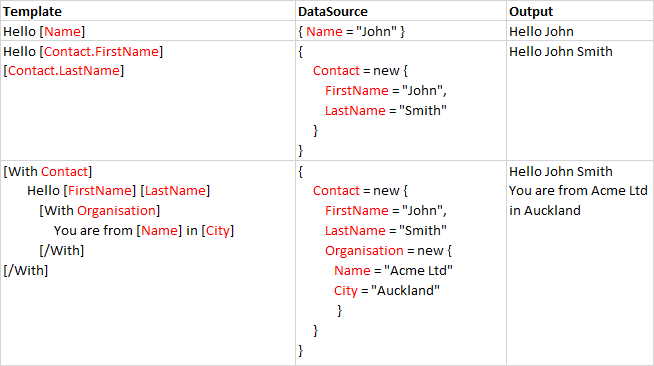
在C#中,我们可以使用System.Text.StringBuilder来创建并修改字符串模板。以下是一个简单的示例,展示了如何处理传入的模板和数据源,并输出相应的格式化输出:
using System;
using System.Collections.Generic;
using System.Diagnostics;
using System.Linq;

class TemplateEngine {
    public static void Main() {
        Console.WriteLine(Apply("Hello {0}", "World"));
        Console.WriteLine(Apply("{0} {1}", "Alice", 42));
        Console.WriteLine(Apply("[Contact.FirstName]", "Alice"));
        Console.WriteLine(Apply("[Contact.LastName]", "Bob"));
        Console.WriteLine(Apply("[With Contact]", new Contact()));
        Console.WriteLine(Apply("[Name] [LastName]", new Name("Alice", "Bob")));
        Console.WriteLine(Apply("[FirstName] [LastName]", new Person("Alice", "Bob")));
        Console.WriteLine(Apply("[Name] in [City]", new Company("Acme Ltd", "Auckland")));
        Console.WriteLine(Apply("[Name] in [City] in [Country]", new Location("Acme Ltd", "Auckland", "New Zealand")));
    }

    private static string Apply(string format, params object[] args) {
        StringBuilder sb = new StringBuilder();
        foreach (var arg in args) {
            sb.Append(format).Replace("{}", arg.ToString());
        }
        return sb.ToString();
    }

    class Contact {
        public string FirstName { get; set; }
        public string LastName { get; set; }
    }

    class Name {
        public string FirstName { get; set; }
        public string LastName { get; set; }
    }

    class Person : Name {
        public string Address { get; set; }
    }

    class Location : Name {
        public string Country { get; set; }
        public string City { get; set; }
    }

    class Company : Name {
        public string Country { get; set; }
        public string City { get; set; }
    }
}
这个示例中的Apply方法接受一个格式字符串和可选参数数组,然后将这些参数插入到原始字符串中。这适用于大多数类型的模板,包括但不限于姓名、地址、公司名称等。
请注意,这个示例没有处理错误情况或异常,例如当输入的数据类型不匹配时。在实际应用中,你可能还需要添加更多的错误检查和处理逻辑。