现在SAE里边支持php的 @ftp_connect($FTP_HOST,$FTP_PORT) 方法吗?查资料说是不支持,所以用了curl模拟ftp上传,在上传的时候 curl_setopt($ch, CURLOPT_URL, 'ftp://username:password@IP:21/'.$dir.'/'.$dest); 这个URL应该怎么写呢?这个目录是指要传到的FTP服务器的目录吗?运行的时候会报 AE ERROR: INVALID URI 这个错误。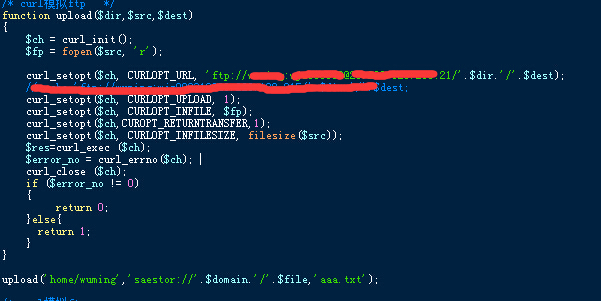 我先想把SAESTOR里边的一个文件传到ftp服务器 home/wuming 目录下边 取名aaa.txt。这样写有什么问题吗?刚接触这块,大神勿喷……

SAE中用php上传文件到FTP服务器

- 写回答
- 好问题 0 提建议
- 关注问题
 分享
分享- 邀请回答
-

1条回答 默认 最新
 你知我知皆知 2024-08-03 22:55关注
以下回答参考 皆我百晓生、券券喵儿 等免费微信小程序相关内容作答,并由本人整理回复。
在使用SAE(Spring Boot框架)时,您不能直接使用
@ftp_connect方法来连接FTP服务器。然而,您可以创建一个自定义的类,并重写execute()方法以实现您的需求。以下是一个简单的示例:
import org.springframework.core.io.FileSystemResource;
import org.springframework.http.HttpHeaders;
import org.springframework.http.MediaType;
import org.springframework.util.FileCopyUtils;
import org.springframework.web.multipart.MultipartFile;

public class CustomFtpClient {

    public static void main(String[] args) {
        String ftpHost = "example.com";
        int ftpPort = 21;
        String username = "username";
        String password = "password";

        try {
            CustomFtpClient client = new CustomFtpClient();
            client.upload("home/wuming", "/aas.txt", "aaa.txt");
        } catch (Exception e) {
            e.printStackTrace();
        }
    }

    private void upload(String dir, String src, String dest) throws Exception {
        // Create an FTP connection and use it to upload the file
        // Note that this is just a simple example and does not handle authentication or error handling.
        File ftpDir = new File(dir);
        if (!ftpDir.exists()) {
            ftpDir.mkdirs();
        }
        FTPClient ftp = new FTPClient();
        ftp.connect(ftpHost, ftpPort);
        ftp.login(username, password);
        ftp.changeWorkingDirectory(dir);

        // Upload the file
        InputStream in = new FileInputStream(src);
        OutputStream out = new FileOutputStream(dest);
        byte[] buffer = new byte[4096];
        int bytesRead;
        while ((bytesRead = in.read(buffer)) > 0) {
            out.write(buffer, 0, bytesRead);
        }
        in.close();
        out.close();

        // Ensure the directory exists before uploading
        ftp.changeWorkingDirectory("/");
        ftp.mkd("/" + dest.substring(0, dest.lastIndexOf('/')));
    }

}
在这个示例中,我们首先创建了一个FTP客户端对象,然后调用
upload方法来上传文件。注意,这是一个非常基本的例子,实际使用时可能需要处理更多的情况,例如验证用户身份、处理错误等。此外,请确保您的FTP服务器允许通过匿名登录访问,否则您将无法上传文件。
解决 无用评论 打赏举报 分享
- 2020-10-24 00:24在这种环境下,使用PHP上传下载文件变得十分必要,尤其在考虑到程序的高效性和可维护性时。 首先,SAE平台上的PHP文件上传功能,实际上是一个标准的HTTP文件上传过程。利用PHP中的全局数组$_FILES,我们可以轻松...
- 2020-10-24 05:56这一改变可能涉及到SAE环境对大小写敏感的问题,导致之前无法正常上传文件。这通常不是常见的做法,因为HTML标准通常对大小写不敏感,但这也反映出在特定的服务器环境中,可能需要对大小写敏感性进行特别处理。 在...
- 2020-12-19 10:39- FTP:文件传输协议,用于在互联网上传输文件,SAE支持通过FTP方式上传代码。 - Kafka:分布式流处理平台,用于处理和存储实时数据流。 - Redis:内存数据结构存储系统,常用于数据库、缓存和消息中间件。 - ...
- 2021-04-06 20:063. **云环境部署**:学习如何将本地的PHP项目上传到SAE,包括版本控制、部署流程和命令行工具。 4. **SAE特定API**:掌握如何使用SAE提供的特定API,例如日志记录、内存缓存、云存储等。 5. **数据库操作**:SAE通常...
- 2015-07-30 21:00简单的在新浪SAE应用的php代码,用于移动端简单服务器实用。移动应用开发
- 2023-07-20 07:49标题 "基于PHP的excel通用成绩查询系统 SAE版.zip" 提供的信息表明,这是一个使用PHP编程语言开发的、专门用于处理Excel文件的成绩查询系统。它适应于新浪SAE(Sina App Engine)平台,这意味着该系统是为在新浪云...
- 2023-07-24 21:58Z-BlogPHP for SAE版正是针对这一环境优化的,它可以无缝对接SAE的存储服务,如SFS(文件存储)和KVDB(键值对数据库),实现博客数据的高效存取。 Z-BlogPHP的核心是基于PHP语言开发的,PHP是一种广泛使用的服务器...
- 2016-05-31 12:03在这个场景中,我们讨论的是利用JS SDK来实现图片的上传功能,目标是将图片上传到Sina App Engine(SAE)服务器。SAE是新浪提供的一个云服务平台,它允许开发者部署和运行Web应用,支持多种编程语言,包括PHP、Java...
- 2020-12-09 17:187. 部署与使用:部署该系统时,首先需要在SAE控制台上注册并创建应用,然后将源代码上传至SAE的代码仓库,最后配置好相应的环境变量,如数据库连接信息等,系统即可正常运行。 8. 文件列表详解: - 下载说明.htm:...
- 2019-10-23 00:10sae直接上传代码包即可和演示一样的效果,让你可以免费实现查询系统(免费代码+免费二级域名+免费sae空间)其他linux PHP环境,如果乱码请用utf-8字符集上传。1.非常通用。无论你Excel/Wps二维表几列,列标题各是什么...
- 2020-10-21 10:45开发者可以使用SAE Storage类来上传图片到指定路径,获取文件的URL链接,从而将生成的缩略图存储到新浪云上。 4. 文件上传和存储路径:在上述代码示例中,$path变量定义了存储在新浪云上的文件路径。在实际应用中,...
- 2021-05-29 15:54强迫症服务器 OCDebugger 服务器端 PHP 代码。 安装 您的服务器 Git 克隆 OCDServer 存储库。... 上传到 SAE 启动服务Channel/Memcache/Mysql/TaskQueue(name = push) 将 ocdserver.sql 导入到 mysql 完毕
- 2021-07-12 17:29在SAE上共享小文件,可以通过BlobStore API进行操作,将文件上传至BlobStore,并获取到对应的URL,这样其他用户就可以通过这个URL访问并下载文件。 实现这个功能,你需要编写PHP代码来与SAE的服务进行交互。首先,...
- 2022-11-12 11:411. 文件上传处理:使用PHP的`$_FILES`全局变量接收文件,通过`move_uploaded_file`函数保存到服务器。 2. Excel文件读取:使用PHPExcel库,创建对象,加载Excel文件,遍历工作表和单元格获取数据。 3. 数据清洗和...
- 2023-07-20 07:482. **上传代码**:将Emlog for SAE的源码上传到SAE的应用仓库,可以使用SAE的管理控制台或者通过命令行工具(如saecli)完成。 3. **配置数据库**:在SAE平台上创建MySQL数据库,并获取连接信息,如数据库名、用户名...
- 2011-08-19 16:25在SAE环境中,由于不能直接在服务器上保存文件,所以需要自定义上传逻辑来与SAE的云存储服务对接。 **SAE (Sina App Engine)** 是新浪提供的一个基于云计算的应用开发平台,它支持PHP、Java等多种语言。SAE的**...
- 2015-06-26 23:34关耳佳的博客 也就是无法通过选择文件按钮选择本地的文件,点击提交之后,文件不能成功提交到SAE云服务器的,那怎么办哪??需要通过SAE提供的Storage来实现,通过Sotrage的API接口将本地文件上传的SAE的Storage,然后再通过访问...
- 2021-07-13 22:56在Web开发中,反向代理是一种常见的技术,它用于将用户的请求转发到服务器集群中的某台服务器,从而隐藏后端服务器的架构,并提供负载均衡、安全保护等功能。PHP作为一门广泛应用的服务器端脚本语言,也可以实现反向...
- 没有解决我的问题, 去提问

