The connection to adb is down, and a severe error has occured.
HelloWorld] You must restart adb and Eclipse.
HelloWorld] Please ensure that adb is correctly located at 'E:\软件\开发\adt-bundle-windows-x86-20131030\sdk\platform-tools\adb.exe' and can be executed.
一直报错、
试了好多方法没用、
1 开始运行cmd
2 adb kill-server 杀死adb进程
3 adb start-server 开启adb进程
4 查看adb端口
C:\Documents and Settings\Administrator>adb nodaemon server
cannot bind 'tcp:5037'
5 查找adb的端口被谁占有
netstat -ano | findstr "5037"
6 杀死该进程
tasklist|find "5037"
7 重启adb
adb start-server
8 以上动作多做几遍如果还不行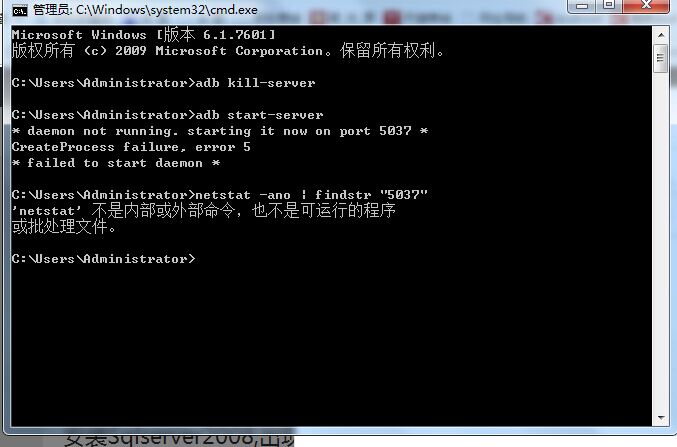

Android开发下You must restart adb and Eclipse

- 写回答
- 好问题 0 提建议
- 关注问题
 分享
分享- 邀请回答
-

7条回答 默认 最新
 frank_20080215 2015-07-06 03:17关注
netstat -ano | findstr "5037" -- windows的某些功能没有安装。通过管理工具进行安装
解决 无用评论 打赏举报 分享
- 2018-06-19 15:09qq_38922435的博客 今天一不小心遇到个问题,问题截图如下我试了N种google来的方法,都失效,现在把我的解决...2,如有真机连接,拔掉真机,重复1的步骤,3,关掉eclipse,然后在命令行运行如下命令 adb kill-server adb start-serv...
- 2016-08-20 12:32weixin_30666753的博客 遇到了几次这个问题:Theconnectiontoadbisdown,andasevereerrorhasoccured. ...YoumustrestartadbandEclipse.Pleaseensurethatadbiscorrectlylocatedat'E:\setups\android\android-2.1_r01-windows\too...
- 2020-01-21 17:43英国老鼠_的博客 1.打开命令行,输入 ...3.重启eclipse 若第二步出现错误提示: adb server is out of date. killing... ADB server didn't ACK * failed to start daemon * 解决方法: 1.命令行输入ne...
- 2015-02-12 11:48[奋斗不止]的博客 The connection to adb is down, and a severe error has occured.You must restart adb and Eclipse.Please ensure that adb is correctly located at ‘D:\RunJian..\adb.exe’ and can be executed.真机测试时...
- 2013-11-27 11:22tony.gu的博客 【报错信息】: The connection to adb is down, and a severe error has ... You must restart adb and Eclipse. Please ensure that adb is correctly located at 'D:/android-sdk-windows/tools/adb.exe' an
- 2016-07-30 09:02qq_1729193966的博客 You must restart adb and Eclipse. [2016-07-27 20:28:45 - briup] Please ensure that adb is correctly located at 'D:\android_java_devlope\adt-bundle-windows-x86_64-20131030\sdk\platform-tools\adb.exe'
- 2015-10-11 13:06吴思成的博客 问题截图 ...1,关闭eclipse并在进程中杀掉adb.exe,然后重启。 2,如有真机连接,拔掉真机,重复1的步骤, 3,关掉eclipse,然后在命令行运行如下命令 adb kill-server adb start-server
- 2014-10-30 23:43猫哥的博客 [2014-10-30 22:24:44 - ChinaRailwayAndroid] ------------------------------ ...[2014-10-30 22:24:44 - ChinaRailwayAndroid] Android Launch! [2014-10-30 22:24:44 - ChinaRailwayAndroid] The connection to a
- 2015-04-03 13:58小白study的博客 问题: [2013-05-06 11:14:07 -HelloWorld] ------------------------------ [2013-05-06 11:14:07 -HelloWorld] Android Launch!...[2013-05-06 11:14:07 - HelloWorld]The connection to adb is down, and a s
- 2012-01-03 12:39甜tianquan的博客 最近运行eclipse,控制台时不时老出现这样的错误: The connection to adb is down, and a severe ... You must restart adb and Eclipse. Please ensure that adb is correctly located at 'D:/android-s
- 2015-11-21 09:26景上的博客 在调试Android项目时,出现如下信息: The connection to adb is down, and a severe error... You must restart adb and Eclipse. Please ensure that adb is correctly located at 打开进程管理器,会有*adb.
- 2014-12-23 14:29weixin_34150830的博客 1,关闭eclipse并在进程中杀掉adb.exe,然后重启。 2,如有真机连接,拔掉真机,重复1的步骤, 3,关掉eclipse,然后在命令行运行如下命令 adb kill-server adb start-server 然后重启eclipse ...
- 2013-07-08 15:53linruoyunhen的博客 今天突然遇到这样的问题,图忘截了,就引用下网上的图。...1,关闭eclipse并在进程中杀掉adb.exe,然后重启。 2,如有真机连接,拔掉真机,重复1的步骤, 3,关掉eclipse,然后在命令行运行如下命令 a
- 没有解决我的问题, 去提问
