Getting started with Filebeat modules
Following the how-to docs from the Elastic docs, I've created the very first Filebeat module for testing purposes.
Since it needs "Go" to be installed, I've installed it as follow (using 1.11.5 because is the version for beats v7.1.1):
sh
GO_VERSION="1.11.5"
curl -so go.tar.gz "https://dl.google.com/go/go$GO_VERSION.linux-amd64.tar.gz"
tar -xzf go.tar.gz
mv go /usr/local/
rm -f go.tar.gz
Setup Go environment:
sh
export GOROOT=/usr/local/go
export GOPATH=/home/vagrant/filebeat-wazuh-module
export PATH=$GOPATH/bin:$GOROOT/bin:$PATH
go version
// go version go1.11.5 linux/amd64
Prepare Filebeat:
sh
go get github.com/elastic/beats
cd src/github.com/elastic/beats/filebeat/
git checkout v7.1.1
go get
make
Create an empty module:
sh
make create-module MODULE=wazuh
// New module was generated, now you can start creating filesets by create-fileset command.
Verify the generated empty module:
tree module/wazuh/
module/wazuh/
├── _meta
│   ├── config.yml
│   ├── docs.asciidoc
│   └── fields.yml
└── module.yml
Now, create the fileset for the module:
make create-fileset MODULE=wazuh FILESET=wazuh-fileset
New fileset was generated, please check that module.yml file have proper fileset dashboard settings. After setting up Grok pattern in pipeline.json, please generate fields.yml
Verify the generated fileset for the Wazuh module:
├── _meta
│   ├── config.yml
│   ├── docs.asciidoc
│   └── fields.yml
├── module.yml
└── wazuh-fileset
    ├── config
    │   └── wazuh-fileset.yml
    ├── ingest
    │   └── pipeline.json
    ├── manifest.yml
    ├── _meta
    └── test
After doing a tiny modification in the manifest.yml, I've tried to build the module, then I've noticed virtualenv is also needed.
yum install python-virtualenv -y
Now, and following their docs:
make update
mage update
Generated fields.yml for filebeat to /home/vagrant/filebeat-wazuh-module/src/github.com/elastic/beats/filebeat/fields.yml
No fields files for module apache2
Generated fields.yml for filebeat to /home/vagrant/filebeat-wazuh-module/src/github.com/elastic/beats/filebeat/fields.yml
>> Building filebeat.yml for linux/amd64
>> Building filebeat.reference.yml for linux/amd64
>> Building filebeat.docker.yml for linux/amd64
Generated fields.yml for filebeat to /home/vagrant/filebeat-wazuh-module/src/github.com/elastic/beats/filebeat/build/fields/fields.all.yml
Load the fake module into Filebeat:
- First step is to stop Filebeat and to modify its current configuration.
sh
systemctl stop filebeat
vi /etc/filebeat/filebeat.yml
Here is the testing config I've used:
yaml
filebeat.modules:
- module: wazuh

output.elasticsearch.hosts: ['http://172.16.1.4:9200']
output.elasticsearch.indices:
  - index: 'testing-module'
Copy our module to Filebeat:
sh
cp modules.d/wazuh.yml.disabled /etc/filebeat/modules.d/
cp module/wazuh/ /usr/share/filebeat/module/ -R
stat -c "%a %n" /usr/share/filebeat/module/zeek # Not needed, just looking for the right perms (755)
chmod 755 /usr/share/filebeat/module/wazuh -R
Run Filebeat in debug mode:
/usr/share/filebeat/bin/filebeat -e -c /etc/filebeat/filebeat.yml -path.home /usr/share/filebeat -path.config /etc/filebeat -path.data /var/lib/filebeat -path.logs /var/log/filebeat -d '*'
Add an alert to the alerts.json:
cat myalert.json >> /var/ossec/logs/alerts/alerts.json
And here is the Filebeat output (reduced because the debug messages are too long):
[root filebeat]# cat /tmp/output.txt | grep wazuh
    "pipeline": "filebeat-7.1.0-wazuh-wazuh-fileset-pipeline"
    "type": "wazuh"
  "message": "{\"timestamp\":\"2019-06-11T08:29:26.125+0000\",\"rule\":{\"level\":3,\"description\":\"Service startup type was changed\",\"id\":\"61104\",\"info\":\"This does not appear to be logged on Windows 2000\",\"firedtimes\":2,\"mail\":false,\"groups\":[\"windows\",\" windows_systempolicy_changed\"],\"pci_dss\":[\"10.6\"],\"gdpr\":[\"IV_35.7.d\"]},\"agent\":{\"id\":\"010\",\"name\":\"windows-ag\",\"ip\":\"10.0.2.15\"},\"manager\":{\"name\":\"master\"},\"id\":\"1560241766.129973\",\"cluster\":{\"name\":\"wazuh\",\"node\":\"node01\"},\"decoder\":{\"name\":\"windows_eventchannel\"},\"data\":{\"foo\":\"bar\"},\"location\":\"EventChannel\"}",
    "module": "wazuh",
    "dataset": "wazuh.wazuh-fileset"
    "name": "wazuh-fileset"
2019-06-24T15:36:27.186Z    DEBUG   [elasticsearch] elasticsearch/client.go:752 GET http://172.16.1.4:9200/_ingest/pipeline/filebeat-7.1.0-wazuh-wazuh-fileset-pipeline  <nil>
2019-06-24T15:36:27.187Z    DEBUG   [modules]   fileset/pipelines.go:120    Pipeline filebeat-7.1.0-wazuh-wazuh-fileset-pipeline already loaded
</nil>
As we can see our pipeline is doing the basic job, the event is not wazuh-comptaible yet of course, but it's a first step that I think is useful.
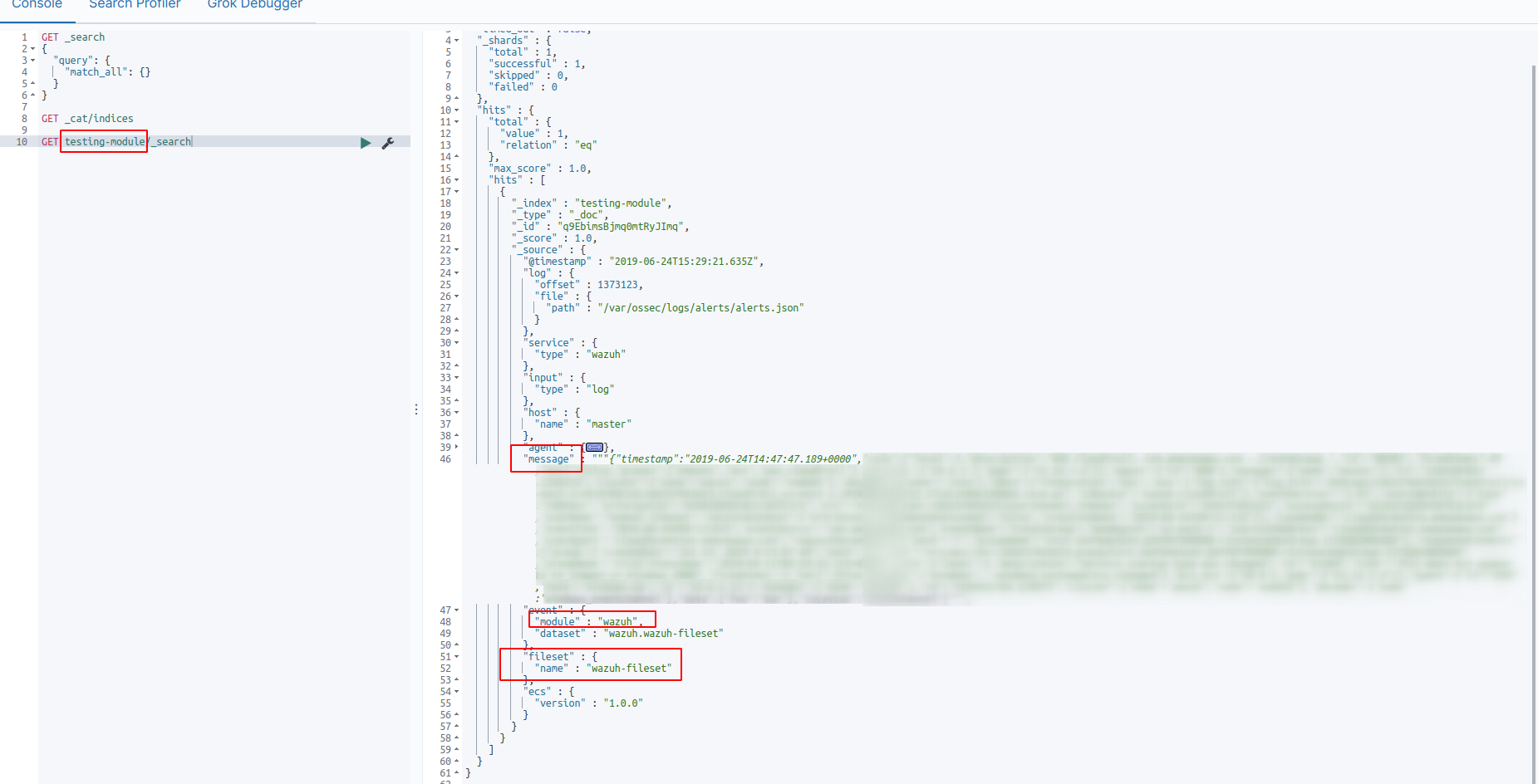
It's in Elasticsearch, and we can see it was indexed in the right index (testing-module):