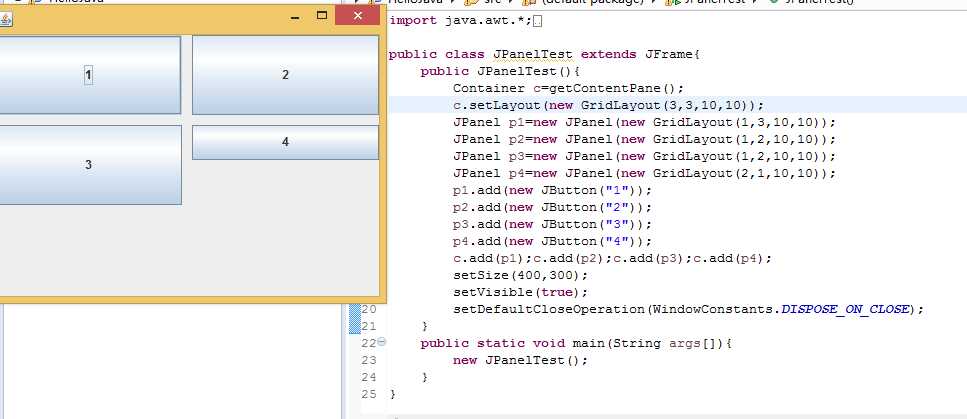
运行这个Java程序的时候容器网格设置为3行3列,为什么运行的时候只有两列,而且第四个面板大小与其他三个不同?

关于Java的Swing程序问题

- 写回答
- 好问题 0 提建议
- 关注问题
 分享
分享- 邀请回答
-

3条回答 默认 最新

 关注
关注第一个问题,你的结果之所以不是3行3列, GridLayout(3,3)布局时,设定的列数只有在行数为0时才起作用;当行数不为0时,列数是由行数和添加的布局组件总数决定的。比如,你的程序里面,行数为3,布局组件总数为4,那么列数将被确定为2,所以,你会看到运行之后的布局。
第二个问题,你的p4有两行,所以就是这样的效果了。
修正代码如下(布局行数为0,p4为1行),可以看到你需要的效果:import java.awt.*; import javax.swing.*; public class JPanelTest extends JFrame{ public JPanelTest() throws HeadlessException { Container c = getContentPane(); c.setLayout(new GridLayout(0,3,10,10)); JPanel p1 = new JPanel(new GridLayout(1,1,10,10)); JPanel p2 = new JPanel(new GridLayout(1,2,10,10)); JPanel p3 = new JPanel(new GridLayout(1,2,10,10)); JPanel p4 = new JPanel(new GridLayout(1,1,10,10)); p1.add(new JButton("1")); p2.add(new JButton("2")); p3.add(new JButton("3")); p4.add(new JButton("4")); c.add(p1); c.add(p2); c.add(p3); c.add(p4); setSize(400,500); setVisible(true); setDefaultCloseOperation(WindowConstants.DISPOSE_ON_CLOSE); } public static void main(String[] args) { new JPanelTest(); } }本回答被题主选为最佳回答 , 对您是否有帮助呢?解决 无用评论 打赏举报 分享
- 2022-06-22 16:23内容概要:打包好的可以运行的Java Swing程序 使用前提;安装了eclipse和在eclipse里面下载swing插件 适用人群:想学习Java Swing技术的人以及需要进行整蛊好友的人 最后,作者想说的是,1.9块钱的资源,你买不了吃亏,买...
- 2022-01-06 09:33使用Java Swing 编写的小程序,可导入Excel ,导出中奖名单,并根据导入的Excel 动画滚动显示参选人员,抽奖和设置页面分开。
- 2023-06-10 21:21基于JavaSwing开发日记本程序 java
- 2022-04-17 16:54CS模式聊天程序代码,实现语言为Java,前端UI界面用Java Swing框架实现,服务端与客户端通信采用Java NIO,自定义按分隔符\n读取消息的消息读取格式解决TCP粘包拆包问题。
- 2015-04-16 14:30精通Java Swing程序设计,里面有各个类的详细说明.推荐!-proficient in Java Swing program design, there are all kind of details. Recommended!
- 2019-07-10 18:02java swing 随机数抽签程序,基于java swing编写,主要是学习swing的众多操作,一些基本组件的使用,但本抽签程序实际上效果挺不错,项目源码中已编译生成有exe可执行文件,不过运行需要你的电脑中安装有Java 环境 ...
- 2018-11-14 13:39java 利用swing+socket实现多人聊天程序,分客户端,服务端,运行效果参考博客 https://blog.csdn.net/wcc27857285/article/details/84038401
- 2021-11-26 14:21Zafir1688的博客 三、java swing程序打包成可安装exe程序方法 本方法打包的工程不包含DLL,所以相对简单一些。 1)Eclipse打包可执行jar方法 eclipse工程右键--Build Fat Jar,如下图所示: 在Fat jar配置界面进行如下图配置,配置...
- 2016-08-06 17:41首先,关于Java Swing,它提供了各种组件,如JFrame(窗口)、JButton(按钮)、JLabel(标签)、JTextField(文本框)和JTable(表格)等,这些组件可以组合起来创建复杂的用户交互界面。在员工管理系统中,可能...
- 2023-06-22 10:12com.tetris里的Tetris类是程序的主入口,运行该程序即...基于Java+Swing俄罗斯方块 基于Java+Swing俄罗斯方块 基于Java+Swing俄罗斯方块 基于Java+Swing俄罗斯方块 基于Java+Swing俄罗斯方块 基于Java+Swing俄罗斯方块
- 没有解决我的问题, 去提问

