


1条回答 默认 最新
 你知我知皆知 2024-08-04 17:23关注
以下回答参考 皆我百晓生、券券喵儿 等免费微信小程序相关内容作答,并由本人整理回复。
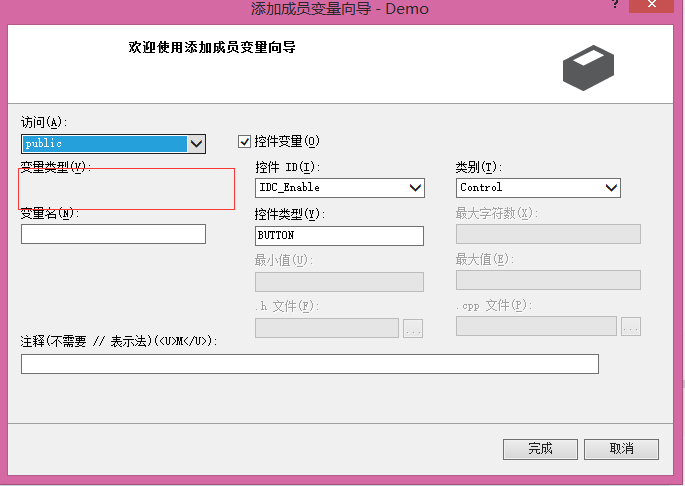
在Visual Studio 2013中,当您尝试访问一个MFC控件的变量时,如果这个变量没有被声明或初始化为适当的值,则可能会导致控制台应用程序崩溃。这通常发生在试图访问未定义或不可见的对象时。
对于您的情况,可能的原因有:
- 控件变量尚未初始化:确保在类中正确地初始化了
IDC_Enable控件变量。 - 变量类型的不匹配:确保变量类型与控件类型一致,并且变量名和控件名称相同。
- 变量未设置:确保已经为控件变量设置了正确的数据。
例如,如果您在类中定义了一个名为
EnableButton的成员变量,但没有为其分配任何初始值,那么在调用按钮状态方法时就会出现错误。以下是一个简单的示例,演示如何为一个MFC按钮创建一个控件变量并将其赋值:
#include <windows.h>
#include <mfcui.h>

class MyForm : public CFormBase
{
    DECLARE_DYNAMIC(MyForm)

protected:
    // Declare a member variable for the button.
    CButton *pButton;

public:
    MyForm();
    ~MyForm();

private:
    void OnButtonClick(UINT /*uMsg*/, WPARAM /*wParam*/, LPARAM lParam, BOOL& /*bHandled*/);

    // This function is called when the button state changes.
    void ButtonStateChanged(CButton* pButton);
};

MyForm::MyForm()
{
    // Initialize the member variable.
    pButton = new CButton;
}

MyForm::~MyForm()
{
    delete pButton;
}

void MyForm::OnButtonClick(UINT /*uMsg*/, WPARAM /*wParam*/, LPARAM /*lParam*/, BOOL& bHandled)
{
    if (pButton->GetState() == CBRS_DEFAULT)
    {
        // Change the state of the button to pressed.
        pButton->SetState(CBRS_PRESSED);
        bHandled = TRUE;
    }
}

void MyForm::ButtonStateChanged(CButton* pButton)
{
    // Do something with the button's state change here.
}
在这个例子中,我们首先创建了一个
CButton对象,然后通过AddRef()方法给它增加引用计数,以便我们可以对其进行管理和释放。然后,我们在OnButtonClick函数中检查按钮的状态,如果是默认状态,我们就将它的状态更改为按下状态。最后,在ButtonStateChanged函数中,我们处理按钮状态的变化。解决 无用评论 打赏举报 分享
分享- 控件变量尚未初始化:确保在类中正确地初始化了
- 2016-12-02 11:46草上爬的博客 在MFC程序或者VB/C#等窗体程序中,每个控件都有一个句柄,而且用句柄工具移过去会自动识别,但是在Qt程序中默认Qt是一个窗体一个句柄,如果要让每个控件都拥有独立的句柄,在main函数中要做如下设置。 int main(int...
- 2019-10-04 23:27aaa407217484的博客 MFC提供了几个CView派生的视窗类, 封装了通用控件的功能,但仍然使用工作框文档显示窗口体系结构:CEditView封装了编辑控件,CTreeView保持了树列表控件,CListView封装了列表显示窗口控件,CRichEditView可以处理...
- 2011-06-04 19:27chenp105的博客 MFC提供了几个CView派生的视窗类, 封装了通用控件的功能,但仍然使用工作框文档显示窗口体系结构:CEditView封装了编辑控件,CTreeView保持了树列表控件,CListView封装了列表显示窗口控件,CRichEditView可以处理...
- 2010-09-22 13:12wxxujian的博客 MFC提供了几个CView派生的视窗类, 封装了通用控件的功能,但仍然使用工作框文档显示窗口体系结构:CEditView封装了编辑控件,CTreeView保持了树列表控件,CListView封装了列表显示窗口控件,CRichEditView可以处理...
- 2010-07-24 21:03light546的博客 MFC提供了几个CView派生的视窗类, 封装了通用控件的功能,但仍然使用工作框文档显示窗口体系结构:CEditView封装了编辑控件,CTreeView保持了树列表控件,CListView封装了列表显示窗口控件,CRichEditView可以处理...
- 2014-10-29 09:23tangzhilinhk的博客 MFC提供了几个CView派生的视窗类, 封装了通用控件的功能,但仍然使用工作框文档显示窗口体系结构:CEditView封装了编辑控件,CTreeView保持了树列表控件,CListView封装了列表显示窗口控件,CRichEditView可以处理...
- 2009-04-14 18:50eattonton的博客 T 如何用程序控制电源管理设置 Q 我们知道在电源选项 属性 里面可以设置 关闭监视器 1...5分钟之后 请问各位大虾,应该怎么办?是不是要调用API?如果是,应该调用什么函数?另外补充说明:如果是调出控制面板让用户自
- 2008-10-03 11:07skyremember的博客 ,每次创建线程它都指向一个新的线程对象,而它是全局变量,这样只到程序退出前它所指向的线程对象都不会释放,而我想在一个线程结束后就能释放该线程对 象,不想让 pThread 在原先的线程对象还没释放时就又指向一个...
- 2008-03-11 11:07hejishan的博客 如何得到用 ATL 作的控件的窗口句柄,试了几个都无效,怎么回事? Q 这ATL编成还真费劲,我用vs7做了个ATL控件,同时要导入一个别的绘图用的dll,但是该dll中的库函数全都需要窗口句柄,我试了控件类中的m_hWnd,m_...
- 2005-09-13 22:06蒋晟的博客 如何得到用 ATL 作的控件的窗口句柄,试了几个都无效,怎么回事? Q 这ATL编成还真费劲,我用vs7做了个ATL控件,同时要导入一个别的绘图用的dll,但是该dll中的库函数全都需要窗口句柄,我试了控件类中的m_hWnd,m_...
- 没有解决我的问题, 去提问
