项目中自定义了泛型,在含有泛型的类中,代码补全功能要么没有,要么很弱。
在同一个项目中的其他没有使用泛型的类中,代码补全功能可以正常使用。看到其他一些博客说的把 window--->首选项---->java--->edit--->...--->advanced
里面全部打钩了但是还是不行。
以下是代码图片: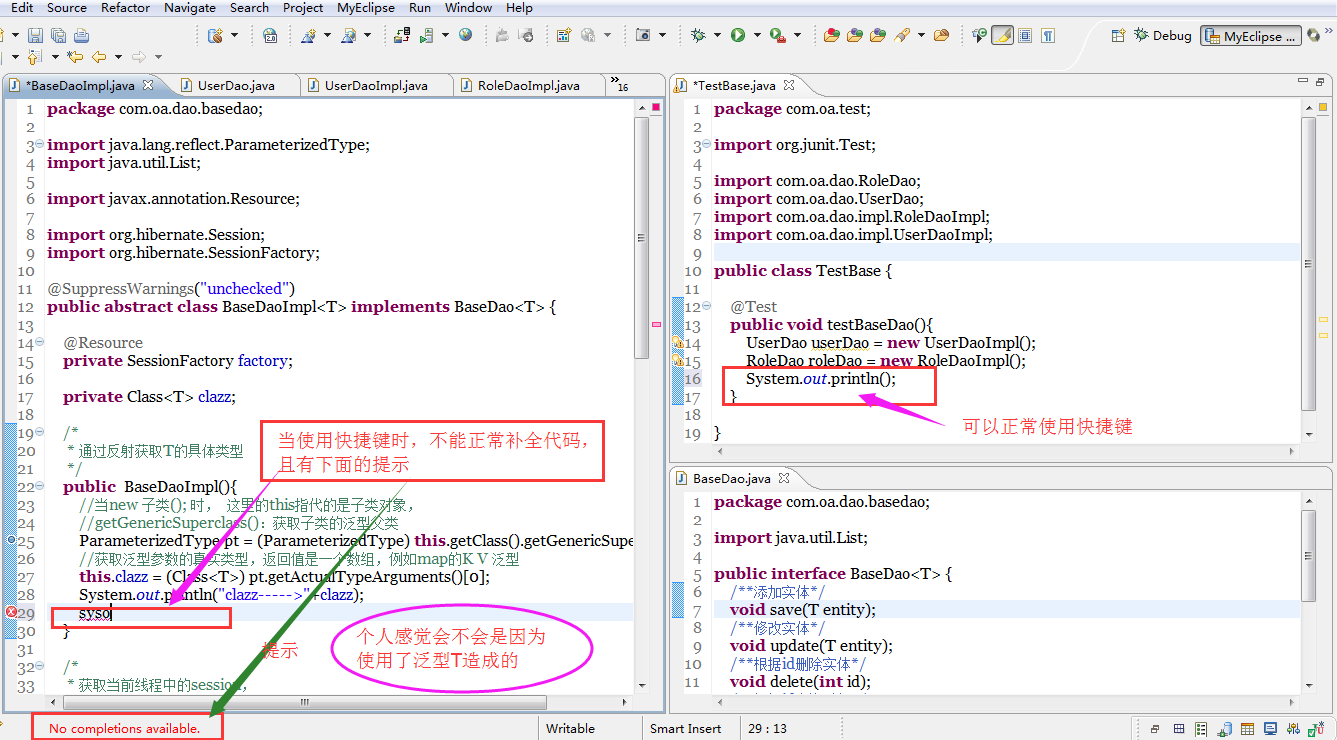

myeclise 使用快捷键时 下面提示 no completions available ,

- 写回答
- 好问题 0 提建议
- 关注问题
 分享
分享- 邀请回答
-

2条回答 默认 最新
 devmiao 2015-12-20 16:57关注
1、菜单window->Preferences->Java->Editor->Content Assist->Enable auto activation 选项要打上勾
2、windows-->preference-->workbench-->keys 下设置Content Assist 的快捷键
3、window->Preferences->Java->Editor->Content Assist->Advanced 上面的选项卡Select the proposal kinds contained in the 'default' content assist list: 中把 Other Java Proposals 选项打上勾就可以了
4、Window->Preference->General->Start up and Shutdown,把“Prompt for workspace on startup”选中,退出Eclipse,再重新进入新建一个Workspace,然后将原来Workspace下的所有工程文件import进来,在import的时候,记得选中”Copy projects into workspace”,然后就OK了。解决 无用评论 打赏举报 分享
- 2015-08-06 21:24hello wjy的博客 通常进行以下操作就行了: 1、菜单window->Preferences->Java->Editor->Content Assist->Enable auto ... 2、windows-->preference-->workbench-->keys 下设置Content Assist 的快捷键 (注:这里可以自定义
- linjing1003的博客 通常进行以下操作就行了: 1、菜单window->Preferences->Java->Editor->Content Assist-&...Enable auto activation 选项要打上勾 ...(注:这里可以自定义各种快捷键,...
- 2013-07-04 14:42AidaZhong的博客 新建一个Workspace,然后将原来Workspace下的所有工程文件import进来,在import的时候,记得选中”Copy projects into workspace”,然后就OK了。 至于怎么新建一个Workspace呢……Window->Preference->General->...
- 2019-03-04 21:37责任至上的博客 MyEclipse6.6的代码提示功能不好使了,Alt+/ 不提示,有些点不出方法例如:List list =new ArrayList(); list点不出东西,不报错,只能手打, 于是就上网去查,在百度中查到了如下方法: 1、菜单window->...
- svsechen198789的博客 今天特抑郁,早上开机后发现eclipse的代码提示功能不好使了,Alt+/ 这么也不给提示,打对象.也点不出方法来。 于是就上网去查,在百度中查到了如下方法: 1、菜单window->Preferences->...
- 2014-03-07 17:06weixin_30415801的博客 2、windows-->preference-->workbench-->keys 下设置Content Assist 的快捷键 (注:这里可以自定义各种快捷键,如删除一行,删除一列,向前删,像后删~~~~) 3、window->Preferences->Java->Editor->Content...
- 没有解决我的问题, 去提问
