
这是listview的子布局。代码如下
 <?xml version="1.0" encoding="utf-8"?>
<LinearLayout xmlns:android="http://schemas.android.com/apk/res/android"
    android:layout_width="match_parent"
    android:layout_height="match_parent"
    android:orientation="horizontal" >

    <CheckBox
        android:id="@+id/check_systemapp"
        android:layout_width="wrap_content"
        android:layout_height="wrap_content" />
    <ImageView
        android:id="@+id/icon_systemapp"
        android:layout_width="40dp"
        android:layout_height="40dp"/>
    <LinearLayout
        android:layout_width="0dp"
        android:layout_height="wrap_content"
        android:orientation="vertical"
        android:layout_weight="1"
        >
        <TextView
            android:id="@+id/appname_systemapp"
            android:layout_width="wrap_content"
            android:layout_height="wrap_content"/>
        <TextView
            android:id="@+id/packagename_systemapp"
            android:layout_width="wrap_content"
            android:layout_height="wrap_content" />
    </LinearLayout>
    <TextView
            android:id="@+id/versionname_systemapp"
            android:layout_width="wrap_content"
            android:layout_height="wrap_content" />
</LinearLayout>
所得到的效果是这样的
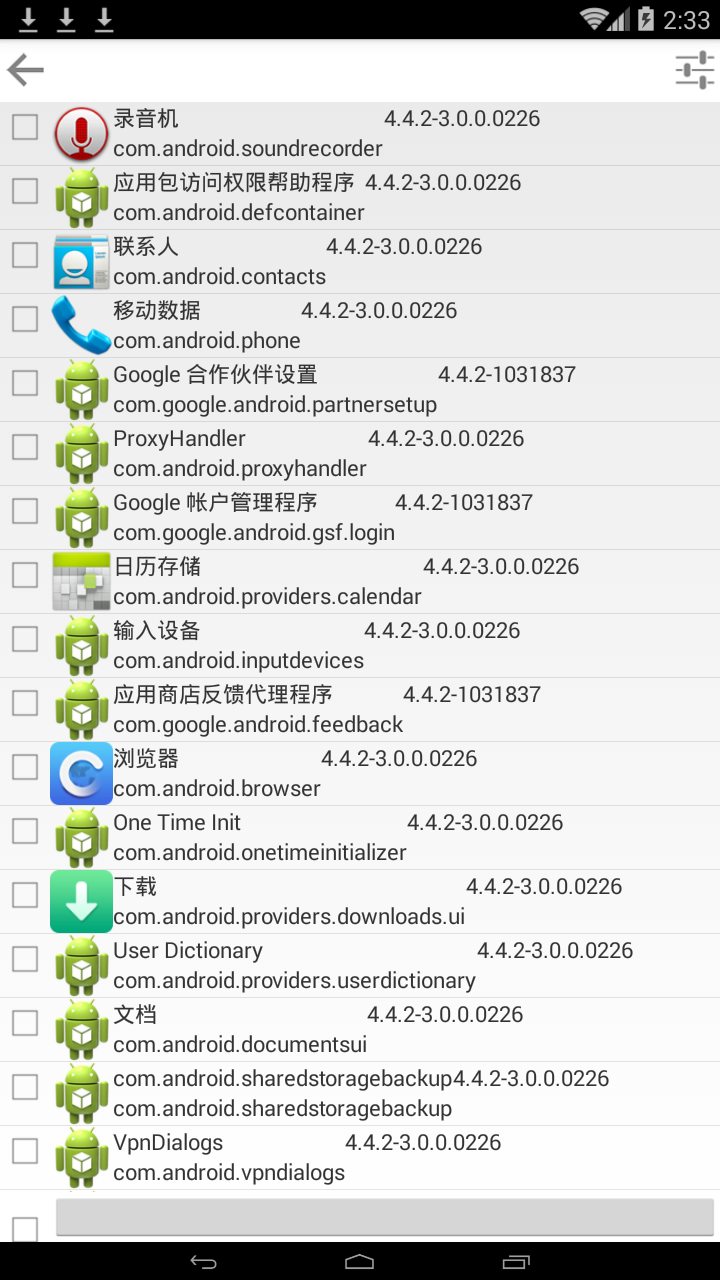
也就是说,我所设置的weight=1并未生效。
同样的我还尝试了添加match_parent以及layout_gravity,都没有效果


