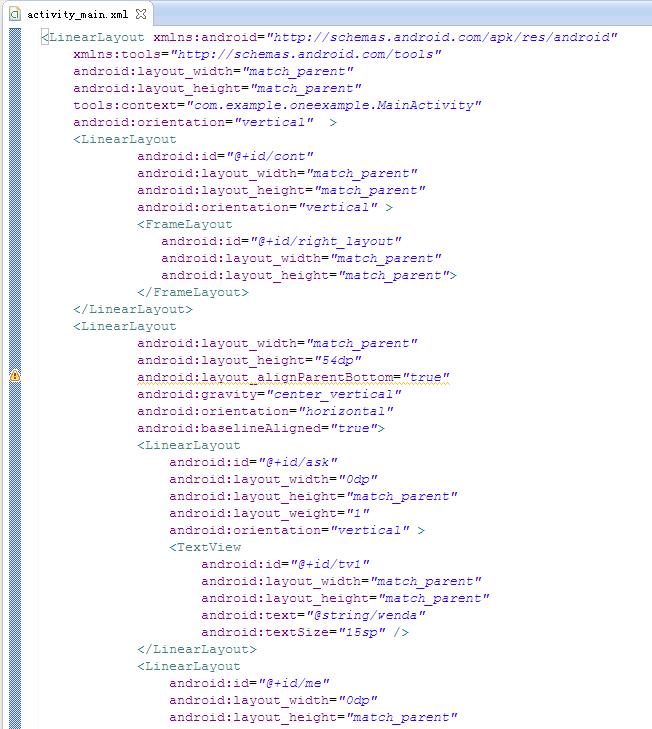
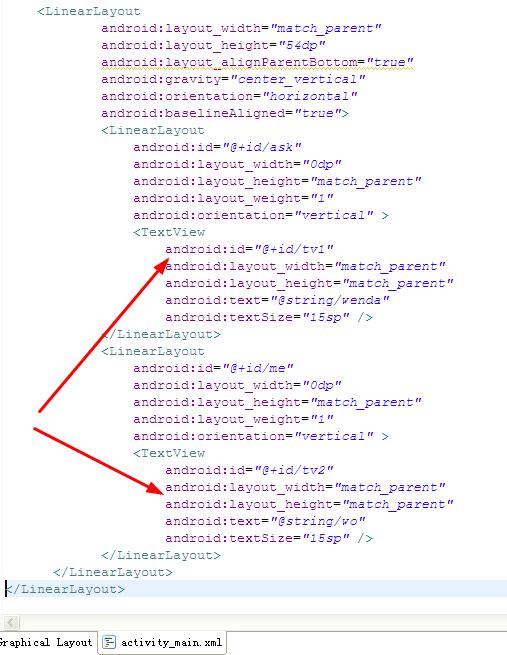
设置了两个TextView,怎么都没显示出来,界面上一片空白
MainActivity.java
 package com.example.oneexample;

import android.os.Bundle;
import android.support.v4.app.Fragment;
import android.support.v4.app.FragmentActivity;
import android.support.v4.app.FragmentManager;
import android.support.v4.app.FragmentTransaction;
import android.view.Menu;
import android.view.MenuItem;
import android.view.View;
import android.view.View.OnClickListener;
import android.widget.LinearLayout;

public class MainActivity extends FragmentActivity implements OnClickListener {
    private LinearLayout ask,me;
    private Fragment current;

    @Override
    protected void onCreate(Bundle savedInstanceState) {
        super.onCreate(savedInstanceState);
        setContentView(R.layout.activity_main);
        ask=(LinearLayout)findViewById(R.id.ask);
        me=(LinearLayout)findViewById(R.id.me);
        ask.setOnClickListener(this);
        me.setOnClickListener(this);
    }

    @Override
    public void onClick(View v) {
        switch (v.getId()) {
        case R.id.ask:
            LeftFragment fragment=new LeftFragment();
            FragmentManager fragmentManager=getSupportFragmentManager();
            FragmentTransaction transaction=fragmentManager.beginTransaction();
            if (current==fragment)
                break;
            if(!fragment.isAdded())
            {
                transaction.hide(current);
                transaction.add(R.id.cont, fragment);
                transaction.commit();
            }
            else
            {
                transaction.hide(current);
                transaction.show(fragment);
                transaction.commit();
            }
            current=fragment;
            break;
        case R.id.me:
            RightFragment fragments=new RightFragment();
            FragmentManager fragmentManagers=getSupportFragmentManager();
            FragmentTransaction transactions=fragmentManagers.beginTransaction();
            if (current==fragments)
                break;
            if(!fragments.isAdded())
            {
                transactions.hide(current);
                transactions.add(R.id.cont, fragments);
                transactions.commit();
            }
            else
            {
                transactions.hide(current);
                transactions.show(fragments);
                transactions.commit();
            }
            current=fragments;
            break;
        default:break;
        }
    }

    @Override
    public boolean onCreateOptionsMenu(Menu menu) {
        // Inflate the menu; this adds items to the action bar if it is present.
        getMenuInflater().inflate(R.menu.main, menu);
        return true;
    }

    @Override
    public boolean onOptionsItemSelected(MenuItem item) {
        // Handle action bar item clicks here. The action bar will
        // automatically handle clicks on the Home/Up button, so long
        // as you specify a parent activity in AndroidManifest.xml.
        int id = item.getItemId();
        if (id == R.id.action_settings) {
            return true;
        }
        return super.onOptionsItemSelected(item);
    }
}