根据官方文档 https://developer.apple.com/documentation/watchkit/nowplayingview(Don’t add any other elements to the view.)开发者无法添加新的控件在该页面上,但是我新建的 NowPlayingView 页面下方一片空白,没有任何按钮。
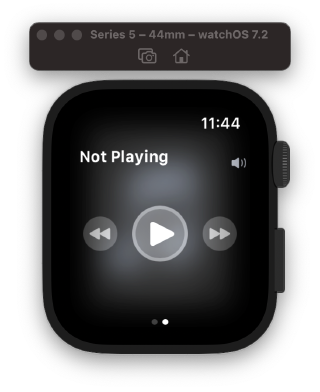
但是 Apple Music 和 播客 的 NowPlayingView 下方都有三个不同的功能按钮。
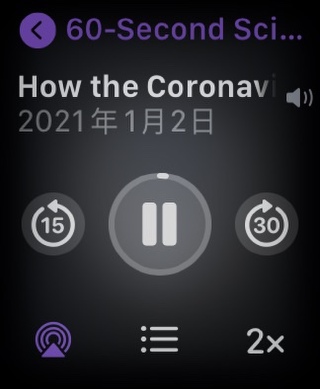
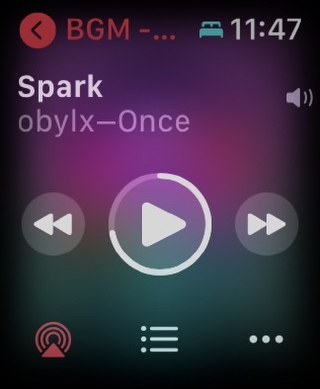
所以我想请教,如何添加按钮,自定义该页面。

根据官方文档 https://developer.apple.com/documentation/watchkit/nowplayingview(Don’t add any other elements to the view.)开发者无法添加新的控件在该页面上,但是我新建的 NowPlayingView 页面下方一片空白,没有任何按钮。
但是 Apple Music 和 播客 的 NowPlayingView 下方都有三个不同的功能按钮。
所以我想请教,如何添加按钮,自定义该页面。
 分享
分享
以下回答参考 皆我百晓生、券券喵儿 等免费微信小程序相关内容作答,并由本人整理回复。
要创建一个自定义的NowPlayingView页面,您需要遵循以下步骤:
创建一个新的SwiftUI文件,例如CustomNowPlaying.swiftui。
在文件中导入必要的库和框架:
import SwiftUI
CustomNowPlaying的新类,并继承自WKNowPlayingView。这将允许我们重写一些已知的行为并添加自己的功能:class CustomNowPlaying: WKNowPlayingView {
override func body() -> some View {
// 添加您的控件和其他元素
}
}
例如,如果您想要添加一个播放列表控制按钮,请修改body()方法以包含所需的控件。以下是示例代码:
struct CustomNowPlaying: WKNowPlayingView {
    let music = MusicLibrary()

    var body: some View {
        VStack {
            ForEach(music.songs, id: \.self) { song in
                HStack {
                    Text(song.title)
                        .font(.title)
                        .padding(8)

                    Button(action: {
                        if let url = Bundle.main.url(forResource: song.title, withExtension: "mp3") {
                            UIApplication.shared.open(url as URL, options: [:], completionHandler: nil)
                        }
                    }, label: {
                        Image(systemName: "play.circle")
                            .resizable()
                            .frame(width: 24, height: 24)
                    })
                }
            }
        }
    }
}
注意:此代码示例仅用于说明目的,实际使用时可能需要进行调整以适应您的需求。
分享
