小白刚入手Mac进行Java开发,在使用mybatis-generator自动生成代码的时候一直报没有关闭标签(实际上已经关闭,在win上没有任何问题):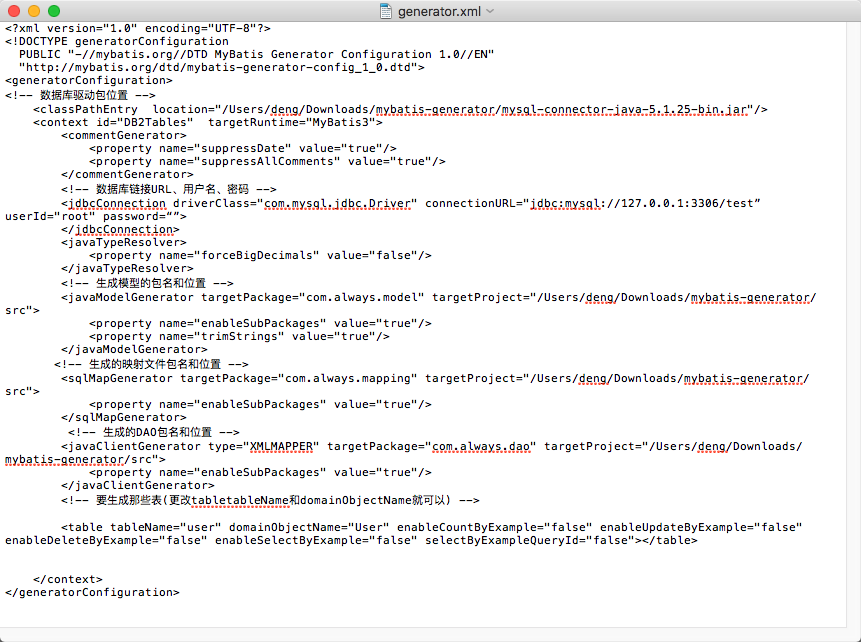
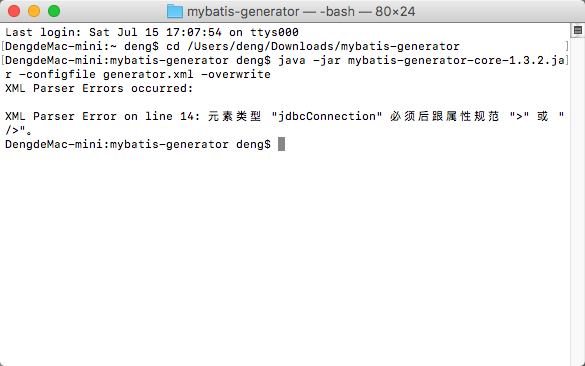
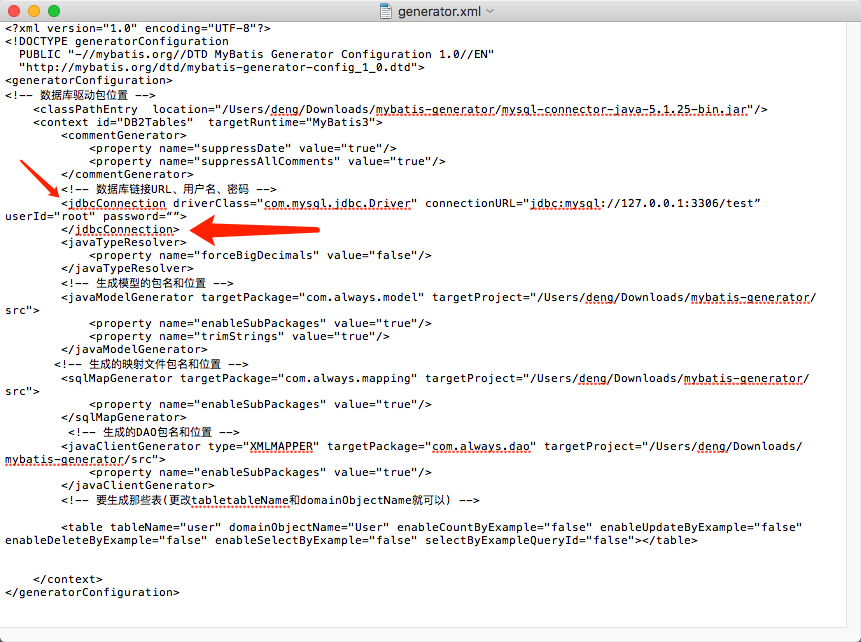
烦请高手指点迷津

Mac中用mybatis-generator生成代码一直报错

- 写回答
- 好问题 0 提建议
- 关注问题
 分享
分享- 邀请回答
-

1条回答 默认 最新
 你知我知皆知 2024-08-06 08:42关注
以下回答参考 皆我百晓生、券券喵儿 等免费微信小程序相关内容作答,并由本人整理回复。
在使用MyBatis Generator时遇到的问题可能是因为生成的配置文件中的
<jdbcConnection>标签缺少必要的属性。在上述示例中,缺失了driverClass属性。为了修复此错误,请确保将<jdbcConnection>标签添加到generatorConfiguration部分,并设置driverClass属性以匹配您的MySQL连接库。以下是修改后的
generator.xml文件:<?xml version="1.0" encoding="UTF-8"?> <!DOCTYPE generatorConfiguration PUBLIC "-//mybatis.org//DTD MyBatis Generator Configuration 1.0//EN" "http://mybatis.org/dtd/mybatis-generator-config_1_0.dtd"> <generatorConfiguration> <!-- 数据库驱动包位置 --> <context id="DB2Tables" targetRuntime="MyBatis3"> <classpathEntry location="/Users/deng/Downloads/mybatis-generator/mysql-connector-iava-5.1.25-bin.iar"/> <commentGenerator suppressDate="true" suppressAllComments="true"/> <!-- 数据库链接URL、用户名、密码 --> <idbcConnection driverClass="com.mysgl.jdbc.priver." connectionURL="idbcamysal://127.0.0.1:3306/test" userId="root" password=""> <property name="driverClass">com.mysql.cj.jdbc.Driver</property> <property name="connectionURL">jdbc:mysql://127.0.0.1:3306/test</property> <property name="username">root</property> <property name="password">your_password_here</property> </idbcConnection> <javaTypeResolver forceBigDecimals="false"/> <!-- 生成模型的包名和位置 --> <javaModelGenerator targetPackage="com.always.model" targetProject="/Users/deng/mybatis-generator/src"> <property name="enableSubPackages" value="true"/> <property name="trimStrings" value="true"/> </javaModelGenerator> <!-- 生成的映射文件包名和位置 --> <sqlMapGenerator targetPackage="com.always.mapping" targetProject="/Users/deng/Downloads/mybatis-generator/src"> <property name="enableSubPackages" value="true"/> </sqlMapGenerator> <!-- 生成的DAO包名和位置 --> <javaClientGenerator type="XMLMAPPER" targetPackage="com.always.dao" targetproject="/Users/deng/Downloads/mybatis-generator/src"> <property name="enableSubPackages" value="true"/> </javaClientGenerator> <!-- 要生成哪些表(更改tableTableName和domainObjectName就可以) --> <table tableName="user" domainObjectName="User" enableCountByExample="false" enableUpdateByExample="false" enableDeleteByExample="false" enableSelectByExample="false" selectByExampleQueryId="false"/> </context> </generatorConfiguration>请注意替换
com.mysql.cj.jdbc.Driver为您实际使用的MySQL JDBC 驱动库的名称。如果您正在使用JDBC 4.x版本,请确保使用com.mysql.jdbc.Driver。此外,您还需要替换your_password_here为您的MySQL数据库的实际用户密码。解决 无用评论 打赏举报 分享
- 2021-01-26 02:02滏阳河边捉蚯蚓的博客 说明本项目最初想要解决数据库表名、字段名的命名法与 java 的类、属性命名法不一致带来的一系列问题。当然,本项目的 MBG 扩展类还做了一些其他事情,比如方便分表时做表名替换,更详细的,请参考: MBG 扩展类 ...
- 2021-03-17 18:18weixin_39613540的博客 Java的MyBatis框架中MyBatis Generator代码生成器的用法关于Mybatis GeneratorMyBatis Generator (MBG) 是一个Mybatis的代码生成器 MyBatis 和 iBATIS. 他可以生成Mybatis各个版本的代码,和iBATIS 2.2.0版本以后的...
- 2020-03-09 07:36chushiyunen的博客 mybatis-plus使用笔记、wrappers用法、idGenerator(id生成器等)
- 2023-07-21 16:23多加点冰也没关系的博客 内置代码生成器:采用代码或者 Maven 插件可快速生成 Mapper 、 Model 、 Service 、Controller 层代码,支持模板引擎,更有超多自定义配置等您来使用 内置分页插件:基于 MyBatis 物理分页,开发者无需关心具体操作...
- 2017-05-25 07:36uncleAndyChen的博客 本文对应的示例代码,已托管到码云:mybatis-generator需求场景 首先,我项目的 Java 代码规范是变量命名应用驼峰式命名法(Camel-Case)。数据库表名及字段名,则用下划线命名法(即用下划线分隔不同单词)。 我...
- 2022-04-15 03:08Lovely-Zhang-1026的博客 一、MyBatis-Plus简介 1、简介 MyBatis-Plus(简称 MP)是一个 MyBatis的增强工具,在 MyBatis 的基础上只做增强不做改变,为 简化开发、提高效率而生。 愿景 我们的愿景是成为 MyBatis 最好的搭档,就像魂斗罗中...
- 2022-07-07 03:45一一哥Sun的博客 你知道多少Java里的常用注解?看看壹哥做的这个总结吧。@Configuration 标识当前类是配置类 @ComponentScan 包扫描注解 扫描注解 @Bean 标识该方法的返回值交给Spring容器管理 @Scope 控制多例和单例 @Lazy 懒...
- 2022-09-02 14:38Java程序V的博客 IntelliJ在业界被公认为最好的java开发工具,尤其在智能代码助手、代码自动提示、重构、JavaEE支持、各类版本工具(git、svn等)、JUnit、CVS整合、代码分析、 创新的GUI设计等方面的功能可以说是超常的。它的旗舰版本...
- 2023-02-20 08:00CodingFire的博客 保存后在此输入命令并回车: 这个问题博主就遇到了,不知道自己版本的可以这么做: open /Library/Java/JavaVirtualMachines 接着就会弹出Java jdk所在目录,一级一级点进去,就知道完整路径了,注意,只写/Library...
- 2022-03-26 22:56乔鲁诺乔巴纳的博客 Java基础 1.常见概念与常识 1.JDK、JRE、JVM的关系 JVM: JVM是运行Java字节码的虚拟机 JDK: JAVA开发工具包,它能够创建和编译程序,JDK包含JRE JRE: JAVA运行时环境,它是运行已编译Java程序的所需的所有内容...
- 没有解决我的问题, 去提问
