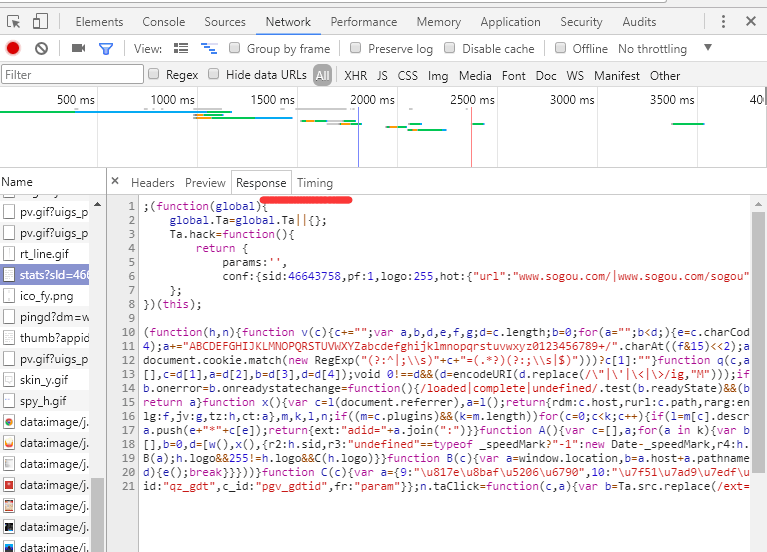

写谷歌浏览器插件的时候怎么获取到newwork中的请求的response信息

- 写回答
- 好问题 0 提建议
- 关注问题
 分享
分享- 邀请回答
-

1条回答 默认 最新
 斯洛文尼亚旅游 2017-08-18 05:13关注
自己用ajax获取内容就行了,配置好manifest允许跨域请求的页面,结合webRequet得到请求的url地址,判断是你要获取内容的再发送ajax
需要翻墙
https://developer.chrome.com/extensions/webRequest#event-onCompleted{ "name": "My extension", ... "permissions": [ "webRequest", "*://*.google.com/" ], ... }onBeforeRequest Fired when a request is about to occur. addListener chrome.webRequest.onBeforeRequest.addListener(function callback) Parameters function callback The callback parameter should be a function that looks like this: function(object details) {...}; object details string requestId The ID of the request. Request IDs are unique within a browser session. As a result, they could be used to relate different events of the same request. string url string method Standard HTTP method. integer frameId The value 0 indicates that the request happens in the main frame; a positive value indicates the ID of a subframe in which the request happens. If the document of a (sub-)frame is loaded (type is main_frame or sub_frame), frameId indicates the ID of this frame, not the ID of the outer frame. Frame IDs are unique within a tab. integer parentFrameId ID of frame that wraps the frame which sent the request. Set to -1 if no parent frame exists. object (optional) requestBody Since Chrome 23. Contains the HTTP request body data. Only provided if extraInfoSpec contains 'requestBody'. string (optional) error Errors when obtaining request body data. object (optional) formData If the request method is POST and the body is a sequence of key-value pairs encoded in UTF8, encoded as either multipart/form-data, or application/x-www-form-urlencoded, this dictionary is present and for each key contains the list of all values for that key. If the data is of another media type, or if it is malformed, the dictionary is not present. An example value of this dictionary is {'key': ['value1', 'value2']}. array of UploadData (optional) raw If the request method is PUT or POST, and the body is not already parsed in formData, then the unparsed request body elements are contained in this array. integer tabId The ID of the tab in which the request takes place. Set to -1 if the request isn't related to a tab. ResourceType type How the requested resource will be used. double timeStamp The time when this signal is triggered, in milliseconds since the epoch.解决 无用评论 打赏举报 分享
- 2019-04-16 18:01weixin_30410999的博客 开发浏览器插件的时候不想去post别人的数据,好像有种方法可以监控到页面运行ajax返回的数据,就是下图这里的数据,还请大家看看 转载于:https://www.cnblogs.com/parent/p/10718806.html...
- 2019-11-14 15:53王怕怕升职记的博客 平时在浏览器查看接口的时候,有时候会在postman重新请求一下,看看结果是否正确。... 实际上,谷歌浏览器自带一个复制功能,可以很简单的复制到postman。 一、找到你需要的接口。鼠标右键...
- 2019-07-11 21:30不止的大盗的博客 开发中对前端进行调试时,有时看不到请求的url信息。 以谷歌浏览器为例,我们检查下是否选择了 过滤 所有请求。(下边两个加红位置)
- 2022-10-26 15:49前后左右端开发的博客 5、newWork 重新发起XHR请求 平时工作在和后端联调中,我们使用最多的就是netWork来查看数据查看请求的状态等,如果我们想要重新发起一个请求,往往都是刷新页面或者重新点击按钮,如果页面加载很慢比较容易影响我们...
- 2020-08-28 14:50前端攻城狮路飞的博客 开发中不小心遇到一个小问题,问了几个人都不清楚,自己后来查了资料解决了,很简单,看下面 开始是这样的console和请求各一半: 后来变成这样了,调试很不方便: 解决办法,直接点击右上角,如下图,打开即可: ...
- 2021-03-30 13:20在IT行业中,"newwork"这个标题可能是指一个新的网络项目或者技术栈的探索。结合描述中的"新工作",我们可以推测这可能是一个关于开发者入职新公司或者开始新项目时所涉及的技术内容,尤其是与前端开发相关的。标签...
- 2021-11-28 23:57程序猿无所畏惧的博客 有时候我们在上网的时候,不希望打开的网页运行javascript,今天就和大家分享一下在谷歌浏览器下如何关闭js; 方法/步骤 首先打开chrome浏览器,我们点击右边红框里的图标,如图所示; 或者 谷歌浏览器如何禁用...
- 2025-04-07 16:38阿眠的博客 1、在vite.config.ts中的server配置。
- 2019-06-01 04:44网络分析基于地理信息系统中的道路、河流、铁路等网络数据,通过计算节点间的距离、权重和限制条件,为用户提供决策支持。在网络分析中,我们通常涉及以下核心概念: 1. **网络数据集**:这是网络分析的基础,包含...
- 2020-04-17 09:32纯洁的小新的博客 谷歌浏览器按F12进入调试面板 勾选左上角User large request rows多选框,就能在size列查看压缩前后大小
- 2022-06-10 12:23【标题】"newwork.zip" 是一个压缩文件,通常用于存储和传输多个文件或文件夹。在IT领域,压缩文件是常见的数据管理方式,它通过特定的算法将原始文件缩小体积,以便更高效地存储和分享。zip格式是其中最流行的一种...
- 2024-03-07 15:46Mr_wilson_liu的博客 Google如何快速抓接口导入到postman调试
- 2020-11-14 07:25weixin_39918588的博客 前言在爬虫开发过程中,经常会遇到验证码的情况,这是反爬过程中相当有门槛的措施,破解成本非常高,需要深度学习、JS 逆向等相关的经验,而且成功率还不一定很高。即使破解成功,如果目标网站换了验证码生成的方法...
- 2022-03-11 16:11weixin_39430584的博客 即开启一个端口并作为一个标准代理存在,当HTTP客户端(浏览器等)设置了这个代理,则可以抓取所有的请求细节并获取返回内容。这个工具类似于fiddler和charles 安装: 直接到项目的github上下载打好的压缩包即可:...
- 2024-07-26 14:11程序员小景的博客 这显然不是我们想要的,所以我们根据情况会对vendor进行拆分,比如拆分到CDN,或者直接拆分到页面中 因此,我们在做性能优化过程中,必须根据最终能给用户体验带来的提升权衡后做出适合当前项目的选择 指标和目标 ...
- 2020-12-24 04:50屠龙少女玖的博客 看下面如果你只是搞前端界面,那就到此结束不用往下看了,剩下的是给苦逼后台干的事!!4:这时,我们就需要把ueditor中的php那个文件夹挪到apache服务器的根目录下此时我的php文件夹的目录是ap...
- 2021-02-26 09:05热爱Java的程序猿的博客 比如,在谷歌浏览器中访问:http://jsonview.com/example.json 所以,我们需要安装一下格式化json的插件,让它好看起来 下载JsonView扩展程序压缩包 下载地址:...
- 2025-08-11 15:23一个扣子的博客 本文介绍了海螺AI视频生成插件的完整使用流程:1.需先在国际版海螺AI官网注册账号,建议使用Chrome浏览器并连接外网;2.通过浏览器调试模式获取海螺token;3.将token绑定到自动化AI挂机平台作为中转;4.配置Coze插件...
- 没有解决我的问题, 去提问

