
现在我已经实现了通过控制台输入来弹出一个窗体,如图所示。但是我想在控制台不关闭的情况下,继续输入并继续弹出窗体,应该如何实现呢?请大神赐教!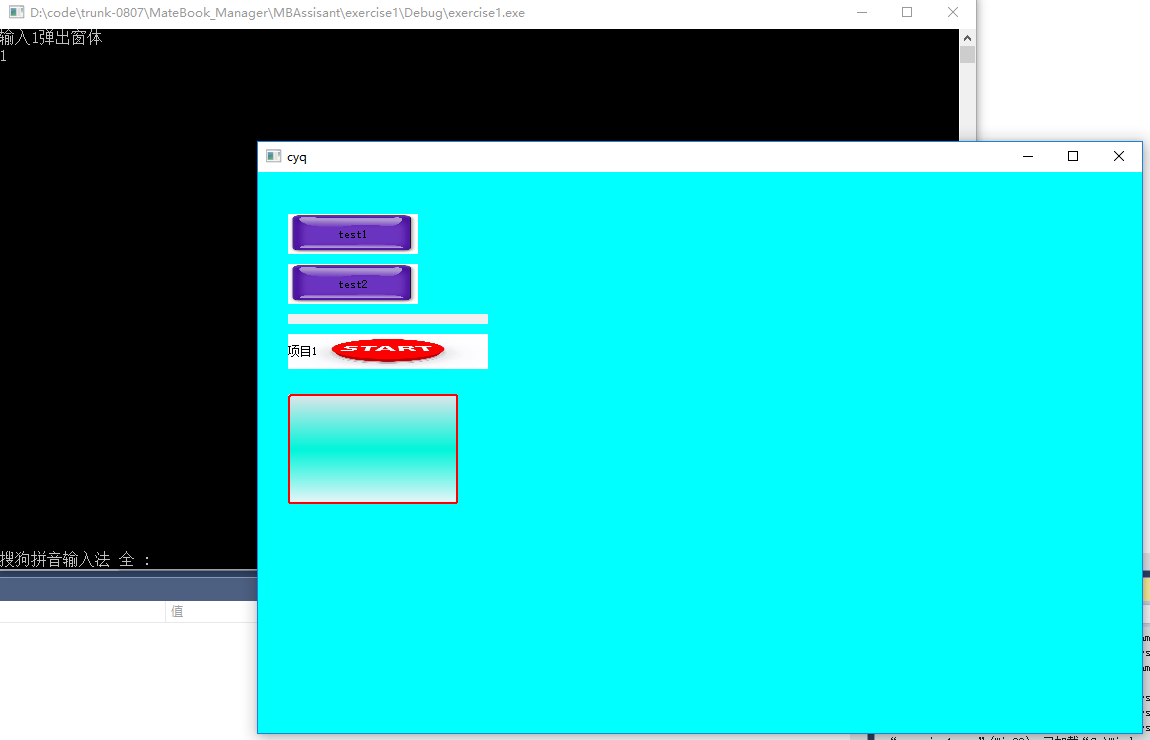
代码:
#include
#include
#include "windows.h"
#pragma once
#include "Duilib/UIlib.h"
using namespace DuiLib;
using namespace std;
#ifdef _DEBUG
ifdef _UNICODE
pragma comment(lib, "bin\DuiLib_ud.lib")
else
pragma comment(lib, "bin\DuiLib_d.lib")
endif
#else
ifdef _UNICODE
pragma comment(lib, "bin\DuiLib_u.lib")
else
pragma comment(lib, "bin\DuiLib.lib")
endif
#endif
//DWORD WINAPI funproc(LPVOID lpparentet);
//int WINAPI _tWinMain(HINSTANCE hInstance, HINSTANCE hPrevInstance, LPTSTR lpCmdLine, int nCmdShow);
//void WINAPI t1(HINSTANCE hInstance, HINSTANCE hPrevInstance, LPTSTR lpCmdLine, int nCmdShow);
/*DWORD WINAPI funproc(LPVOID lpparentet)
{
Sleep(1000);
cout << "子线程线程!" << endl;
return 0;
}*/
class CDuiFrameWnd : public CWindowWnd, public INotifyUI
{
public:
virtual LPCTSTR GetWindowClassName() const { return _T("DUIMainFrame"); }
virtual void Notify(TNotifyUI& msg)
{
if (msg.sType == _T("click"))
{
if (msg.pSender->GetName() == _T("button1"))
{
::MessageBox(NULL, _T("我是按钮test1"), _T("点击了test1"), NULL);
}
if (msg.pSender->GetName() == _T("button2"))
{
::MessageBox(NULL, _T("我是按钮test2"), _T("点击了test2"), NULL);
}
}
}

virtual LRESULT HandleMessage(UINT uMsg, WPARAM wParam, LPARAM lParam)
{
    LRESULT lRes = 0;

    if (uMsg == WM_CREATE)
    {
        m_PaintManager.Init(m_hWnd);

        CDialogBuilder builder;
        CControlUI* pRoot = builder.Create(_T("XMLFILE.xml"), (UINT)0, NULL, &m_PaintManager);   // duilib.xml需要放到exe目录下
        ASSERT(pRoot && "Failed to parse XML");

        m_PaintManager.AttachDialog(pRoot);
        m_PaintManager.AddNotifier(this);   // 添加控件等消息响应,这样消息就会传达到duilib的消息循环,我们可以在Notify函数里做消息处理
        return lRes;
    }

    if (m_PaintManager.MessageHandler(uMsg, wParam, lParam, lRes))
    {
        return lRes;
    }

    return __super::HandleMessage(uMsg, wParam, lParam);
}
protected:
CPaintManagerUI m_PaintManager;
};
int main()
{
int i;
CDuiFrameWnd duiFrame;
//HINSTANCE hInstance = (HINSTANCE)GetModuleHandle(NULL);
cout << "输入1弹出窗体" << endl;
cin >> i;
while (i == 1) {
std::thread t1(& {
HINSTANCE hInstance = (HINSTANCE)GetModuleHandle(NULL);
CPaintManagerUI::SetInstance(hInstance);
CPaintManagerUI::SetResourcePath(CPaintManagerUI::GetInstancePath());
duiFrame.Create(NULL, _T("cyq"), UI_WNDSTYLE_FRAME, WS_EX_WINDOWEDGE);
duiFrame.CenterWindow();
duiFrame.ShowModal();
});
t1.detach();
cin >> i;
}
cout << "wrong number!";
system("pause");
return 0;
}


