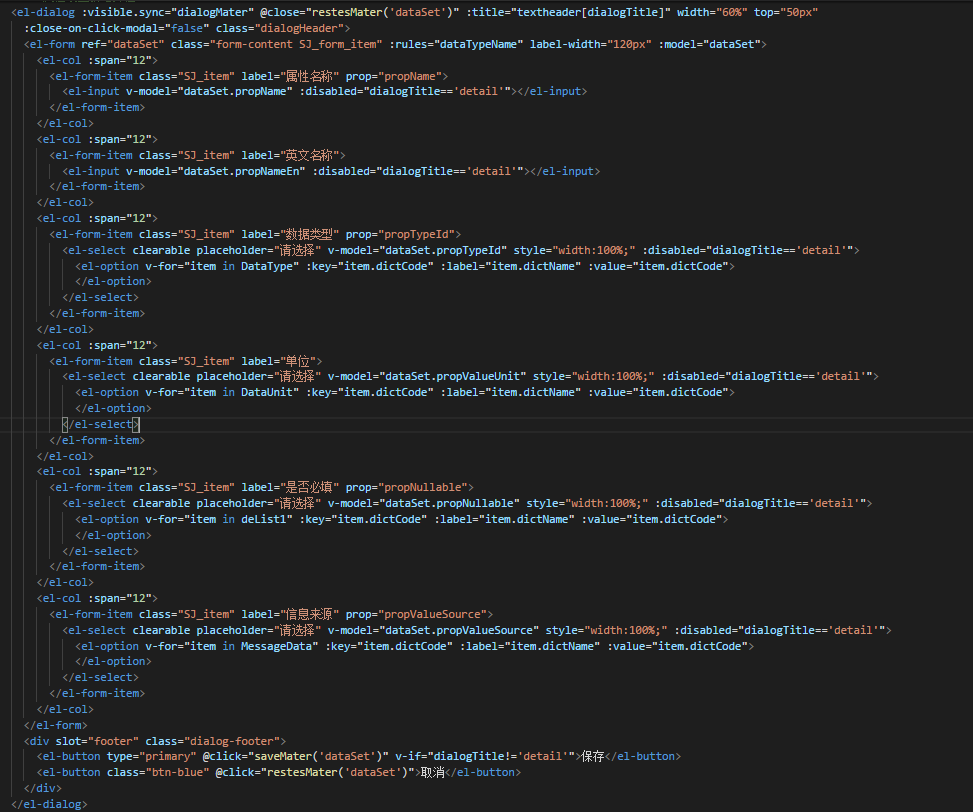
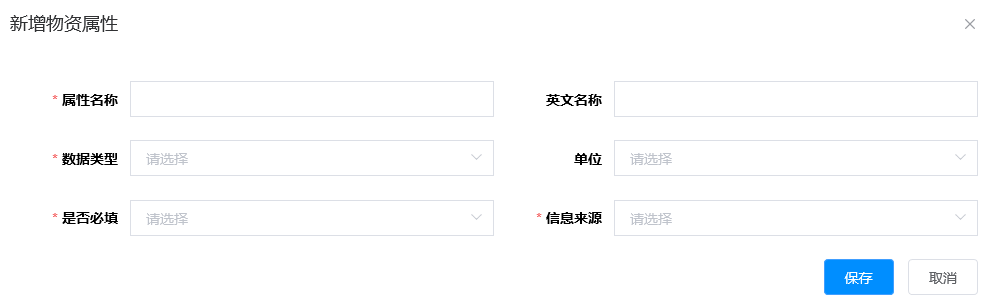


element-ui 兼容ie11 选择后会出现空白

- 写回答
- 好问题 0 提建议
- 关注问题
 分享
分享- 邀请回答
-

1条回答 默认 最新
 你知我知皆知 2024-08-07 10:47关注
以下回答参考 皆我百晓生、券券喵儿 等免费微信小程序相关内容作答,并由本人整理回复。
要解决这个问题,首先确保在 HTML 文件中正确地引入 Element UI 的样式。然后,在 Vue.js 或 React 中使用以下代码来兼容 Internet Explorer 11(IE11)并显示对话框:
<!-- 引入 Element UI 样式 -->
<link rel="stylesheet" href="https://unpkg.com/element-ui/dist/index.css">

<script>
import { Dialog } from 'element-ui';

export default {
  data() {
    return {
      dialogMater: false,
      textheader: [
        {
          title: '新增物资属性',
          detail: '新增物资属性'
        }
      ],
      dataset: {
        propName: '',
        propNameEn: '',
        propTypeId: '',
        propValueUnit: '',
        propNullable: '',
        propValueSource: ''
      },
      DataType: [],
      DataUnit: [],
      delistl: []
    };
  },
  methods: {
    saveMater: function (name) {
      // 在这里处理保存操作
      this.$message({
        message: '已保存',
        type: 'success'
      });
    },
    restesMater: function (name) {
      // 在这里处理取消操作
      this.$message({
        message: '已取消',
        type: 'warning'
      });
    }
  },
  mounted() {
    this.getDataType();
    this.getDataUnit();
    this.getDeliList();
  },
  created() {},
  updated() {},
  destroyed() {},
  computed: {}
};
</script>

<style scoped>
/* 自定义样式 */
</style>
这段代码展示了如何在 Vue.js 或 React 中实现兼容 IE11 的 Element UI 对话框,并提供了基本的表单输入字段和按钮。你需要根据你的项目需求调整这些元素。
注意:这只是一个基础示例,实际应用中可能还需要添加更多的验证规则、错误提示等细节。此外,为了支持 IE11,你可能需要使用 polyfills 来处理一些浏览器特性。
解决 无用评论 打赏举报 分享
- 2023-10-10 06:54_Never_More_的博客 最开始直接拷贝了官网的案例.简单做了修改,想着应该没...坑爹的elementui 最后说说用的是vue-cli 5 创建的vue2项目,为了兼容IE11浏览器,我差点想放弃了,谁能想到一个第一次搞前端,还要兼容过时这么久的IE,哎,苦啊.....
- 2024-11-23 14:58weixin_45849565的博客 vue2项目兼容IE11浏览器
- 2021-06-03 11:59前端More的博客 【Vue】Vue全家桶(四)模块化+Webpack+Element-UI
- 2024-10-17 16:41getaxiosluo的博客 VueIE8 及以下版本,因为 Vue 使用了 IE8 无法模拟的 ECMAScript 5 特性。但对于 IE9+,Vue 底层是支持。由于开发过程中,我们经常会使用一些...IE11 打开 Vue 工程(Vue CLI)构建而来出现空白页,控制台告警、报错。
- 2019-09-19 11:28Janeisme3L的博客 总结ie中遇到的一些问题 希望各位大神多多指教。前端小白 有问题可以联系我的 qq :1458109211 element 版本 2.10.1 1.在dialog 中的问题(在dialog 中修改样式不要加scoped,否则样式可能不生效 至少我遇到的都是) ...
- 2019-03-08 10:41十一/shell的博客 vue + vue-resource + element-ui + vue-router + node.js + sass 1. el-table filter tag 使用filter-method处理数据过滤,当该标签下没有数据时标签切换不起作用 解决: 1.用el-table的filter-change方法处理过滤...
- 2019-10-14 23:45李小白杂货铺的博客 Vue 不支持 IE8 及以下版本,因为 Vue 使用了 IE8 无法模拟的 ECMAScript 5 特性。但它支持所有 兼容 ECMAScript 5 的浏览器 。 索引 官网: https://vuejs.org 中文官网: https://cn.vuejs.org API: ...
- 2022-04-22 17:04进击的yuan人的博客 导致在IE以及360兼容模式下界面为空白 思路 控制台报的是SCRIPT1003: 缺少 ':' app.js (4519,1) ,这种错误主要看报错这行的开头与末尾,可以看到问题主要出现在哪个文件,如下图,大概可以看出入口配置文件(entry...
- 2020-12-20 21:21weixin_39910523的博客 Vue 不支持 IE8 及以下版本,因为 Vue 使用了 IE8 无法模拟的 ECMAScript 5 特性。但对于 IE9+,Vue 底层是支持。...现象IE11 打开 Vue 工程(Vue CLI)构建而来出现空白页,控制台告警、报错。如...
- 2021-02-27 15:39张一弘的博客 Vue 不支持 IE8 及以下版本,因为 Vue 使用了 IE8 无法模拟的 ECMAScript 5 特性。但对于 IE9+,Vue 底层是支持。...现象IE11 打开 Vue 工程(Vue CLI)构建而来出现空白页,控制台告警、报错。如...
- 没有解决我的问题, 去提问
