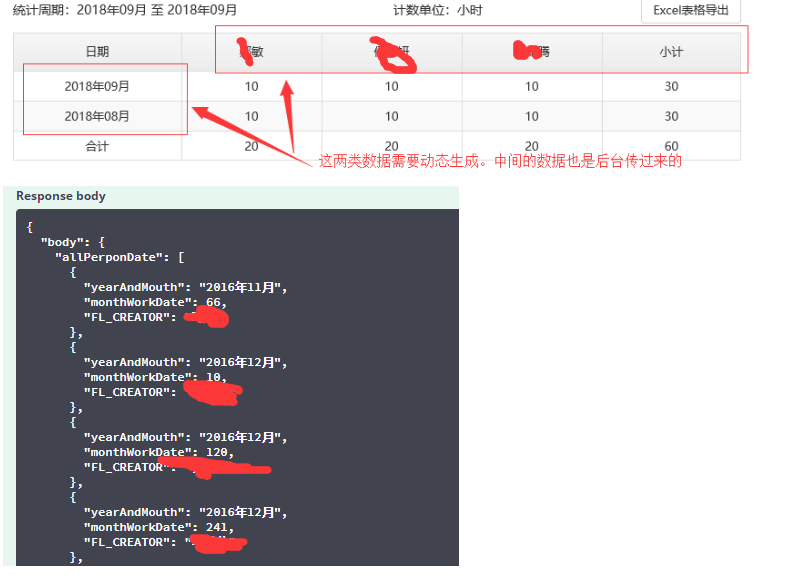
后台就传回 工作时间,姓名,月份。姓名和月份数据不能再表格里面重复,个人工作量可以重复。有大佬可以解答一下吗?

如何用Angular JS 1.3.23 做一个表格??

- 写回答
- 好问题 0 提建议
- 关注问题
 分享
分享- 邀请回答
-

1条回答 默认 最新
 你知我知皆知 2024-08-07 11:30关注
以下回答参考 皆我百晓生、券券喵儿 等免费微信小程序相关内容作答,并由本人整理回复。
要使用AngularJS创建一个表格,你需要首先安装必要的依赖项,并且熟悉AngularJS的基本语法和HTML模板。以下是如何在AngularJS中实现这个需求的步骤:
步骤 1: 安装必要的依赖
确保你已经安装了Node.js、npm(Node Package Manager)以及Angular CLI。如果没有,请从https://www.npmjs.com/get-angular-cli 下载并运行。
步骤 2: 创建项目
使用Angular CLI创建一个新的项目:
ng new my-app
cd my-app
步骤 3: 编写表单
在
src/app目录下创建一个名为table.component.html的文件,用于定义你的表单:<!-- table.component.html --> <div class="row"> <div class="col-6">Month Work Date</div> <div class="col-6">Total Hours</div> </div> <table> <tr *ngFor="let data of allPersonDates"> <td>{{data.yearAndMouth}}</td> <td>{{data.monthWorkDate}}</td> </tr> </table>步骤 4: 编写服务
在
src/app/services/all-person-dates.service.ts中添加逻辑来处理数据:import { Injectable } from '@angular/core'; @Injectable({ providedIn: 'root' }) export class AllPersonDatesService { private personData = [ { yearAndMouth: '2016年11月', monthWorkDate: 66 }, { yearAndMouth: '2016年12月', monthWorkDate: 10 }, // ...其他数据... ]; constructor() {} getAllPersonDates(): any[] { return this.personData; } }步骤 5: 在组件中使用服务
在
table.component.ts或任何其他需要显示数据的地方,注入AllPersonDatesService并调用getAllPersonDates方法获取数据:// table.component.ts import { Component, OnInit } from '@angular/core'; import { AllPersonDatesService } from './services/all-person-dates.service'; @Component({ selector: 'app-table', templateUrl: './table.component.html', styleUrls: ['./table.component.css'] }) export class TableComponent implements OnInit { allPersonDates$: any[]; constructor(private service: AllPersonDatesService) {} ngOnInit() { this.allPersonDates$ = this.service.getAllPersonDates(); } // 更多业务逻辑 }步骤 6: 使用模板编译器
将上述代码整合到
index.html中,以便它能够正确地渲染和响应用户输入:<!-- index.html --> <!DOCTYPE html> <html lang="en"> <head> <meta charset="UTF-8"> <title>My Angular App</title> </head> <body> <app-table></app-table> </body> </html>现在,你应该能够在页面上看到根据提供的数据动态生成的表格。你可以通过修改
ngOnInit()函数中的this.allPersonDates$变量来更新数据源。请注意,以上示例仅用于说明目的,实际应用可能需要更复杂的错误处理、数据验证以及其他功能。
解决 无用评论 打赏举报 分享