平台vs2012
开发语言 vb.net
查询数据绑定 gridview,数据量大,如何分页显示。知道的朋友,请告知下,谢。
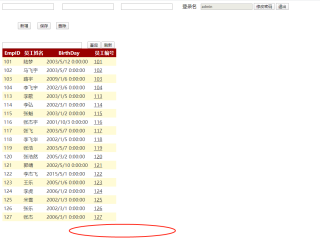

平台vs2012
开发语言 vb.net
查询数据绑定 gridview,数据量大,如何分页显示。知道的朋友,请告知下,谢。
 分享
分享
以下回答参考 皆我百晓生、券券喵儿 等免费微信小程序相关内容作答,并由本人整理回复。
要使用VB.NET在ASP.NET中实现GridView的数据分页功能,您可以使用以下步骤:
首先,确保您已经安装了ASP.NET MVC框架和Visual Studio。然后,在Visual Studio中创建一个新的项目类型为MVC Web应用(例如:MyMvcApp)。
Controllers 文件夹并新建一个名为 EmployeesController.cs 的文件。using System.Web.Mvc;
using System.Linq;
public class EmployeesController : Controller
{
public ActionResult Index()
{
var employees = EmployeeRepository.GetEmployees();
return View(employees);
}
}
Views 目录中,新建一个名为 Index.cshtml 的文件。@model List<Employee> 以适应实际数据模型:@model List<Employee>
<h2>员工列表</h2>
<table>
<thead>
<tr>
<th>员工姓名</th>
<th>生日</th>
<th>员工编号</th>
</tr>
</thead>
<tbody>
@foreach (var employee in Model)
{
<tr>
<td>@employee.Name</td>
<td>@employee.Birthday</td>
<td>@employee.EmployeeNumber</td>
</tr>
}
</tbody>
</table>
ConfigureServices 方法中,添加以下配置来启用GridView的分页功能:public void ConfigureServices(IServiceCollection services)
{
services.AddMvc().SetCompatibilityVersion(CompatibilityVersion.Version_2_2);
}
Configure 方法中的 ViewComponents 属性:public void Configure(IApplicationBuilder app, IHostingEnvironment env)
{
// ...
app.UseMvc(routes =>
{
routes.MapRoute(
name: "Default",
template: "{controller=Home}/{action=Index}/{id?}");
routes.MapRoute(
name: "SearchRoute",
template: "{controller=Home}/{action=Search}/{query?}");
routes.MapRoute(
name: "EmployeeDetailsRoute",
template: "{controller=Employees}/{action=Details}/{id?}");
routes.MapRoute(
name: "EditRoute",
template: "{controller=Employees}/{action=Edit}/{id?}");
routes.MapRoute(
name: "DeleteRoute",
template: "{controller=Employees}/{action=Delete}/{id?}");
routes.MapRoute(
name: "NewRoute",
template: "{controller=Employees}/{action=New}");
routes.MapRoute(
name: "IndexRoute",
template: "{controller=Employees}/{action=Index}");
routes.MapRoute(
name: "SearchIndexRoute",
template: "{controller=Employees}/{action=Search}");
routes.MapRoute(
name: "SearchPageRoute",
template: "{controller=Employees}/{action=Search}/{page:int}");
});
}
Index.cshtml 视图以设置分页参数:@{ ViewBag.PaginationUrl = Url.Action("Index", "Employees"); }
现在可以运行您的应用。通过访问 http://localhost:port/ 并在浏览器中查看员工列表页面。根据需要调整分页URL参数,如 page 参数,以获取所需信息。
这个示例展示了如何使用VB.NET和ASP.NET MVC在GridView上实现数据分页。你可以进一步扩展功能,比如处理搜索、排序和其他高级操作,以及更复杂的用户界面设计。
分享


