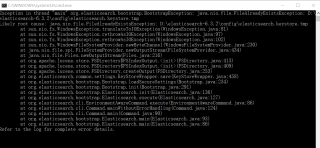

win10下因root权限elasticsearch.bat闪退!!大神们请赐教!!!

- 写回答
- 好问题 0 提建议
- 关注问题
 分享
分享- 邀请回答
-

1条回答 默认 最新

 关注
关注让阿豪来帮你解答,本回答参考chatgpt3.5编写提供,如果还有疑问可以评论或留言
问题:如何使用Python爬虫爬取网页内容并进行简单的数据处理? 回答:- 导入必要的库 首先需要导入Python的requests库和BeautifulSoup库,requests库用来发送HTTP请求,BeautifulSoup库用来解析HTML文档。
import requests from bs4 import BeautifulSoup- 发送HTTP请求获取网页内容 使用requests库发送HTTP请求,获取网页的源代码。
url = 'https://www.example.com' response = requests.get(url) html_content = response.text- 解析HTML文档 使用BeautifulSoup库解析获取的HTML文档,提取需要的数据。
soup = BeautifulSoup(html_content, 'html.parser') titles = soup.find_all('h2') for title in titles: print(title.text)- 数据处理 根据需求对提取的数据进行简单的处理,如去除空格、去除换行符等操作。
cleaned_titles = [title.strip() for title in titles]
for title in cleaned_titles:
    print(title)
案例: 假设我们要爬取CSDN博客首页的所有博文标题,并输出到控制台上。
import requests
from bs4 import BeautifulSoup
url = 'https://www.csdn.net/'
response = requests.get(url)
html_content = response.text
soup = BeautifulSoup(html_content, 'html.parser')
titles = soup.find_all('h2', class_='title')
for title in titles:
    print(title.text)
通过以上步骤,可以使用Python爬虫爬取网页内容并进行简单的数据处理。
解决 无用评论 打赏举报 分享