如何利用QT绘图库QCustomPlot来自定义绘制路线图?
目前我知道的是这个库用来绘制一些曲线图,折线图等等,都是从左往右进行绘制,现在我想问能不能用这个库来绘制一条自定义的线路图,比如下图所示的红色路线
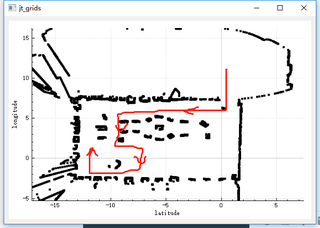
至于为什么要用这个绘图库,因为这个库可以提供坐标系,可以随意放大缩小,拖拽等等的功能

如何利用QT绘图库QCustomPlot来自定义绘制路线图?
目前我知道的是这个库用来绘制一些曲线图,折线图等等,都是从左往右进行绘制,现在我想问能不能用这个库来绘制一条自定义的线路图,比如下图所示的红色路线
至于为什么要用这个绘图库,因为这个库可以提供坐标系,可以随意放大缩小,拖拽等等的功能
 分享
分享
 关注
关注让阿豪来帮你解答,本回答参考chatgpt3.5编写提供,如果还有疑问可以评论或留言要利用QT绘图库QCustomPlot来自定义绘制路线图,可以通过以下步骤实现:
QCustomPlot *customPlot = new QCustomPlot();
customPlot->setInteractions(QCP::iRangeDrag | QCP::iRangeZoom);
customPlot->addLayer("customLayer");
QCPItemLine *customLine = new QCPItemLine(customPlot);
customPlot->layer("customLayer")->setVisible(true);
customLine->start->setCoords(1, 3);
customLine->end->setCoords(4, 6);
customPlot->replot();
customLine->setHead(QCPLineEnding::esSpikeArrow);
customLine->setPen(QPen(Qt::red));
customLine->setLayer("customLayer"); // 设置图元所在的层
customPlot->replot();
customPlot->xAxis->setRange(0, 10);
customPlot->yAxis->setRange(0, 10);
customPlot->xAxis->grid()->setVisible(true);
customPlot->yAxis->grid()->setVisible(true);
customPlot->axisRect()->setupFullAxesBox();
通过以上步骤,就可以利用QT绘图库QCustomPlot来绘制自定义的路线图。其核心是通过QCPItemLine对象来绘制自定义的线条,并结合QCustomPlot提供的坐标系、放大缩小、拖拽等功能,可以实现对路线图的自定义绘制和展示。
分享


