
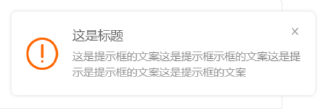
将message和description的文字改成橘色
import { Button, notification, Space } from 'antd';

const openNotificationWithIcon = type => {
  notification[type]({
    message: 'Notification Title',
    description:
      'This is the content of the notification. This is the content of the notification. This is the content of the notification.',
  });
};

ReactDOM.render(
  <Space>
    <Button onClick={() => openNotificationWithIcon('success')}>Success</Button>
    <Button onClick={() => openNotificationWithIcon('info')}>Info</Button>
    <Button onClick={() => openNotificationWithIcon('warning')}>Warning</Button>
    <Button onClick={() => openNotificationWithIcon('error')}>Error</Button>
  </Space>,
  mountNode,
);


