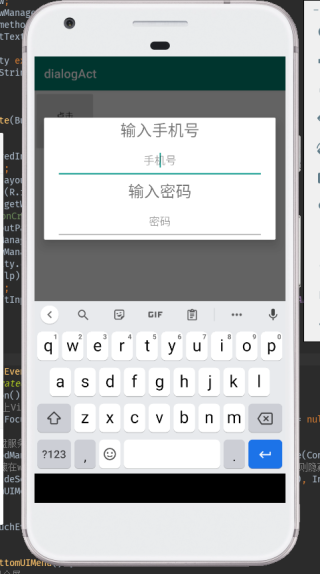
package com.example.dialogact;

import androidx.appcompat.app.AppCompatActivity;

import android.content.Context;
import android.graphics.Color;
import android.os.Build;
import android.os.Bundle;
import android.util.Log;
import android.view.Gravity;
import android.view.MotionEvent;
import android.view.View;
import android.view.Window;
import android.view.WindowManager;
import android.view.inputmethod.InputMethodManager;
import android.widget.EditText;

public class DialogActivity extends AppCompatActivity {
    private static final String TAG = "tag_dia";
    EditText edt ;

    @Override
    protected void onCreate(Bundle savedInstanceState) {


        super.onCreate(savedInstanceState);
        hideBottomUIMenu();
        setContentView(R.layout.activity_dialog);
        edt = findViewById(R.id.tel);
        Window win = this.getWindow();
        Log.d(TAG, "onCreate: " + ScreenUtil.getNevirgation(this));
        WindowManager.LayoutParams lp = win.getAttributes();
        lp.width = WindowManager.LayoutParams.MATCH_PARENT;
        lp.height = WindowManager.LayoutParams.WRAP_CONTENT;
        lp.gravity = Gravity.CENTER;//设置对话框置底部显示
        win.setAttributes(lp);
        edt.requestFocus();
        getWindow().setSoftInputMode(WindowManager.LayoutParams.SOFT_INPUT_STATE_ALWAYS_VISIBLE);


    }

    @Override
    public boolean onTouchEvent(MotionEvent event) {
        // TODO Auto-generated method stub
        if (event.getAction() == MotionEvent.ACTION_DOWN) {
            //获取Activity上View 的焦点不等于空,获取焦点的标志不等于空
            if (getCurrentFocus() != null && getCurrentFocus().getWindowToken() != null) {

                //获取软键盘服务
                InputMethodManager manager = (InputMethodManager) getSystemService(Context.INPUT_METHOD_SERVICE);
                //管理器隐藏在windows上的软键盘(标记的VIEW,如果输入法在窗口上已经显示,则隐藏,反之则显示)
                manager.hideSoftInputFromWindow(getCurrentFocus().getWindowToken(), InputMethodManager.HIDE_NOT_ALWAYS);
                hideBottomUIMenu();
            }
        }
        return super.onTouchEvent(event);
    }

    protected void hideBottomUIMenu() {
        //隐藏虚拟按键,并且全屏
        if (Build.VERSION.SDK_INT > 11 && Build.VERSION.SDK_INT < 19) { // lower api
            View v = this.getWindow().getDecorView();
            v.setSystemUiVisibility(View.GONE);
        } else if (Build.VERSION.SDK_INT >= 19) {
            //for new api versions.
            View decorView = getWindow().getDecorView();
            int uiOptions = View.SYSTEM_UI_FLAG_HIDE_NAVIGATION
                    | View.SYSTEM_UI_FLAG_IMMERSIVE_STICKY | View.SYSTEM_UI_FLAG_FULLSCREEN;
            decorView.setSystemUiVisibility(uiOptions);

        }
    }
}