网页布局页面要求:页面标题为“主页”,页面分为页面头部信息(coral)、LOGO(brown),页面导航(peachpuff),页面主要内容(yellow),页面版权信息(aquamarine)和广告(cornflowerblue),请根据上图完成页面布局
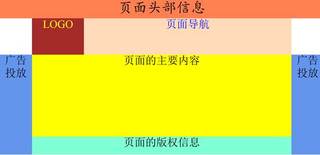

网页布局页面要求:页面标题为“主页”,页面分为页面头部信息(coral)、LOGO(brown),页面导航(peachpuff),页面主要内容(yellow),页面版权信息(aquamarine)和广告(cornflowerblue),请根据上图完成页面布局
 分享
分享
这个用div+flex就行看看软大神的博客讲的挺清除的http://www.ruanyifeng.com/blog/2015/07/flex-grammar.html.我写了个模板你改一下类名啥的或者div+float布局
<!DOCTYPE html>
<html lang="en">
<head>
    <meta charset="UTF-8">
    <meta http-equiv="X-UA-Compatible" content="IE=edge">
    <meta name="viewport" content="width=device-width, initial-scale=1.0">
    <title>Document</title>
    <style>
        *{
            margin: 0;
            padding: 0;
        }
        .box{
            width: 100%;
            height: 100vh;
            /* background: red; */
        }
        .head{
            width: 100%;
            height: 10%;
            background: red;
        }
        .navBox{
          width: 80%;
          height: 20%;
          margin: 0 auto;
          display: flex;
        }
        .navBox>.logo{
            width: 20%;
            height: 100%;
            background: goldenrod;
        }
        .navBox>.nav{
            width: 80%;
            height: 100%;
            background: gold;
        }
        .bodyBox{
            width: 100%;
            height: 70%;
            /* background: gray; */
            display: flex;
        }
        .bodyBox>.left,.right{
            width: 10%;
            height: 100%;
            background: blue;
        }
        .bodyBox>.center{
            width: 80%;
            height: 100%;
            background: greenyellow;
        }
        .bodyBox>.center>.banquan{
             width: 100%;
             height: 10%;
             background: red;
        }
        .bodyBox>.center>.a{
            width: 100%;
             height: 90%;
             background: grey;
        }
    </style>
</head>
<body>
    <div class="box">
        <div class="head"></div>
        <div class="navBox">
          <div class="logo"></div>
          <div class="nav"></div>
        </div>
        <div class="bodyBox">
            <div class="left"></div>
            <div class="center">
            <div class="a"></div>
                <div class="banquan">

                </div>
            </div>
            <div class="right"></div>

        </div>
    </div>
</body>
</html>
分享


