娜娜桑000 2021-06-11 15:52 采纳率: 0%
浏览 31

Sublime Text3 安装Xdebug插件后,Xdebug面板没有信息输出,如何解决

Sublime Text3 安装Xdebug 插件后
配置项如下:
1、php.ini
zend_extension="D:\phpstudy_pro\Extensions\php\php7.3.4nts\ext\php_xdebug-3.0.4-7.3-vc15-nts-x86_64.dll"
xdebug.idekey="sublime.xdebug"

xdebug.profiler_enable = on
xdebug.profiler_enable_trigger = on
xdebug.profiler_output_name = cachegrind.out.%t.%p
xdebug.profiler_output_dir="D:\xdebug"

xdebug.auto_trace = 1
;是否允许Xdebug跟踪函数调用,跟踪信息以文件形式存储,默认值为0
xdebug.trace_output_dir="D:\xdebug"
xdebug.trace_output_name=trace.xdebug

xdebug.show_local_vars=0

xdebug.remote_enable = on
;开启远程调试,必须为on不然抓不到
xdebug.remote_handler = dbgp
;使用的协议
xdebug.remote_host = 127.0.0.1
xdebug.remote_port = 65500
;远程ide服务器监听端口
xdebug.remote_log = "D:\xdebug\xdebug.log"
;创建调试日志

2、Xdebug.sublime-settings
{
    "url":"http://www.phptest.cn/testxdebug.php",
    "port":65500,
    "super_globals": true,
    "close_on_stop": true
}

3、test.sublime-project

{
    "folders":
    [
        
        {
            "path": "D:\\php-testself",
        }
    ],
    "settings":
    {
        "xdebug":
        {
            "path_mapping":
            {
                // "/home/wwwroot/my/testdebug": "F:/work/www/my/testdebug" //远程Linux与本地window项目的对应存放关系
            },
            "super_globals": true,
            "close_on_stop": true,
            "url": "http://www.phptest.cn/testxdebug.php",
            "port": 65500,  //xedebug端口
        },
    },
}


chrome浏览器安装了Xdebug插件,配置信息如下
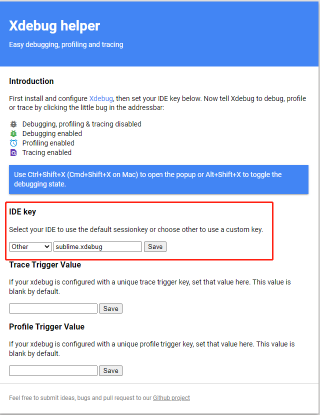
然后开始调试

sublime ->工具->xdebug->start debugging(Lunch browser) 如下图,Xdebug 面板没有任何信息输出
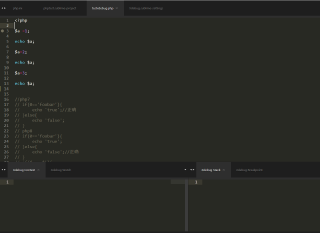
 

  • 写回答

2条回答 默认 最新

  • 小P聊技术 2021-06-12 10:53
    关注

    1、开启php的xdebug的扩展,编辑php.ini:

    zend_extension = "D:\xampphp\xamphp\php\ext\php_xdebug.dll"  #你的xdebug扩展路径
    xdebug.remote_enable = on
    xdebug.remote_handler = "dbgp"  
    xdebug.remote_host = "127.0.0.1"   #主机地址
    xdebug.remote_port = 10000   #默认填写9000,如果端口冲突,请填写9000之外的端口,比如10000


    2、安装sublime的xdebug client插件
    ①packge control包管理依赖安装(不会装的可以看下我之前的文章http://blog.csdn.net/misakaqunianxiatian/article/details/51171718
    ②ctrl+shift+p,输入install packge,回车,再输入xdebug client,回车。xdebug插件安装完成。


    3、安装chrome插件:Xdebug helper(不会装的话请百度)。点击chrome浏览器右上角的,甲壳虫配置IDE key为Other:sublime.debug。配置在localhost或者指定域名下显示xdebug插件(chrome右上角的甲壳虫)


    4、在sublime中选择Tools-----xdebug-----settting User------(如果端口冲突)
    {
    "port":10000
    }


    5、选择project-----save project as-----保存为一个文件。
    保存后,打开文件看到:(如果和下面的不一样也不要紧,因为folder是xdebug断点调试时自动生成的。第一次配置xdebug是没有folder的)


    {
    	"folders":
    	[
    		{
    			"path": "D:\\project"
    		}
    	],
    	"settings":
    	{
    		"xdebug":
    		{
    			"close_on_stop": true,
    			"path_mapping":
    			{
    			},
    			"port": 10000,
    			"super_globals": true,
    			"url": ""
    		}
    	}
    }

    你要做的是要修改的是port(如果端口冲突)


    6、重启sublime,重启nginx或Apache,重启chrome浏览器。


    7、

    打开localhost下的(因为刚才在chrome插件里配置过localhost)的任何一个php文件,并把右上角的甲壳虫点绿开启调试。

    右键xdebug-----add/remove breakpoint。(添加断点)

    选择tools-----xdebug------start debugging

    在chrome输入这个php地址,断点调试开始。

    你可以看到sublime在断点处停了下来,还可以显示出当前的所有变量,常量等。


    右键xdebug-----add/remove breakpoint。(添加断点)

    选择tools-----xdebug------start debugging

    在chrome输入这个php地址,断点调试开始。你可以看到sublime在断点处停了下来,还可以显示出当前的所有变量,常量等。


    常用快捷键tip:

    Shift+f8: 打开调试面板

    f8:打开调试面板快速连接

    Ctrl+f8: 切换断点

    Ctrl+Shift+f5: 运行到下一个断点

    Ctrl+Shift+f6: 单步

    Ctrl+Shift+f7: 步入

    Ctrl+Shift+f8: 步出 


    感觉sublime的xdebug确实不如intellij或者phpstorm好用,因为有些大的数组只能显示出一点数据,其余部分用省略号表示了,断点调试效果不好,看不到全部数组内容。

    另外只有在碰到比较棘手的问题时才会用到断点调试,比如要跟踪运行过程中框架的哪个地方出了问题,或者业务逻辑很复

    杂,需要查看很多变量的时候,断点调试会很不错。

    评论

报告相同问题?