

weixin_51958168 下午好🌅🌅🌅
本答案参考ChatGPT-3.5
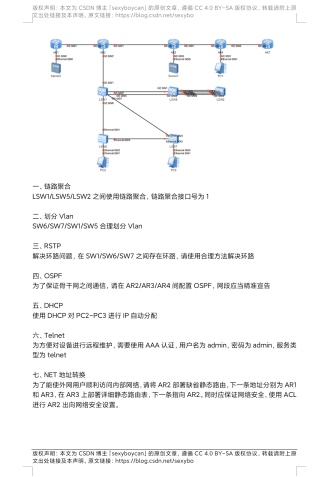
HarmonyOS 链接聚合、VLAN划分、RSTP、OSPF、DHCP、Telnet配置以及NET地址转换的每一步具体代码如下:
在华为交换机上,使用以下命令配置链路聚合:
interface GigabitEthernet 1/0/1
lacp mode active
exit

interface GigabitEthernet 1/0/5
lacp mode active
exit

interface GigabitEthernet 1/0/2
lacp mode active
exit
这里假设GigabitEthernet 1/0/1, 1/0/5, 1/0/2是聚合接口。
创建VLAN和端口绑定:
vlan database
vlan 10 name VLAN10
exit
vlan 20 name VLAN20
exit

interface GigabitEthernet 1/0/1
port link-type access
port default vlan 10
exit

interface GigabitEthernet 1/0/5
port link-type access
port default vlan 20
exit

interface GigabitEthernet 1/0/2
... (类似配置,根据实际端口和VLAN)
启用RSTP并指定根桥:
spanning-tree mode rapid-pvst
stp root-id priority 32768
在有环路的链路上配置端口配置为边缘端口:
interface GigabitEthernet 1/0/1
spanning-tree portfast edge
exit
重复此步骤于其他相关端口。
启用OSPF并宣告网段:
router ospf 1
network 192.168.1.0/24 area 0
network 192.168.2.0/24 area 0
...
替换为你的实际网络段。
在AR路由器上启用DHCP服务器:
ip dhcp pool MyPool
network 192.168.3.0 mask 255.255.255.0
default-router 192.168.3.1
dns-server 8.8.8.8
lease-time 24 hours
分配给PC2-PC3的IP范围可以在这里定义。
配置AAA和Telnet服务:
aaa new-model
local-user admin password cipher admin
service-type telnet
在交换机上允许 Telnet 访问:
telnet server enable
配置静态路由和ACL:
ip route-static 0.0.0.0 0.0.0.0 192.168.1.1
acl number 2000
rule 5 permit ip source 192.168.3.0 0.0.0.255 destination 192.168.1.0 0.0.0.255
interface Ethernet0/0/1
nat outbound 2000
确保防火墙规则正确,保护内部网络安全。
注意:以上命令仅供参考,实际操作时请根据具体的华为设备型号和命令格式进行调整。
 分享
分享


