下完什么也没动就显示这个,是program地址的问题吗还是什么原因,求帮助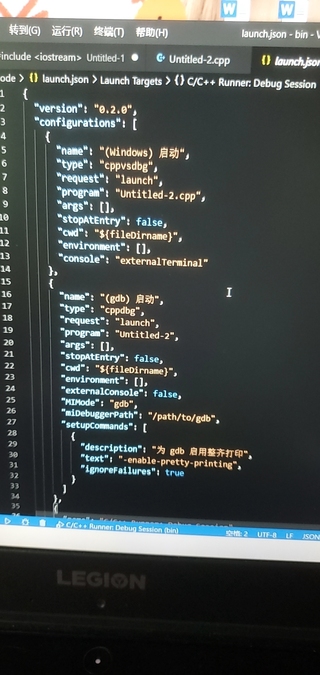
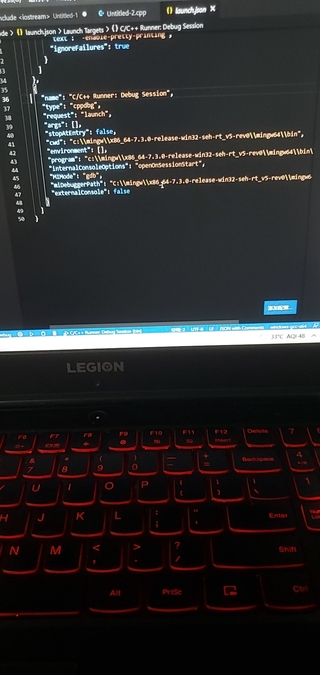

下完什么也没动就显示这个,是program地址的问题吗还是什么原因,求帮助
 分享
分享
vscode编译运行c++需要配置launch.json和task.json文件。
launch.json:
{
  "name": "G++ Debug",//调试界面中显示的名字
  "type": "cppdbg",
  "preLaunchTask": "g++debug",//这个很重要,在运行前进行编译的命令,对应task配置
  "request": "launch",
  "program": "${fileDirname}/${fileBasenameNoExtension}.exe",
  "args": [],
  "stopAtEntry": false,
  "cwd": "${fileDirname}",
  "environment": [],
  "externalConsole": true,//使用独立的终端窗口
  "MIMode": "gdb",
  "miDebuggerPath": "gdb.exe",
  "setupCommands": [
    {
      "description": "为 gdb 启用整齐打印",
      "text": "-enable-pretty-printing",
      "ignoreFailures": true
    }
  ]
}


task.json:
{
    "label": "g++debug", //launch.json中要调用的名字。
    "type": "shell",
    "command": "g++.exe", //G++.exe路径需要配置到PATH里
    "args": [
        "${file}",
        "-g", //debug参数
        "-fexec-charset=gbk",
        "-o",
        "${fileDirname}/${fileBasenameNoExtension}.exe",
    ]
}
 创建了问题
7月14日
创建了问题
7月14日

