我使用的是镭神智能的W系列激光雷达,采用XCOM采集到的16进制数据如何转换为极坐标下的数据呢?我想最终使用python脚本绘制在二维平面中,恳请指教。
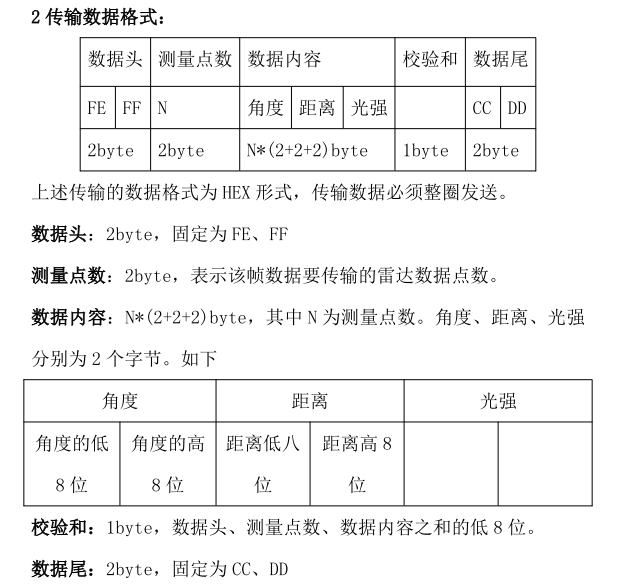
上图是雷达的通讯格式。
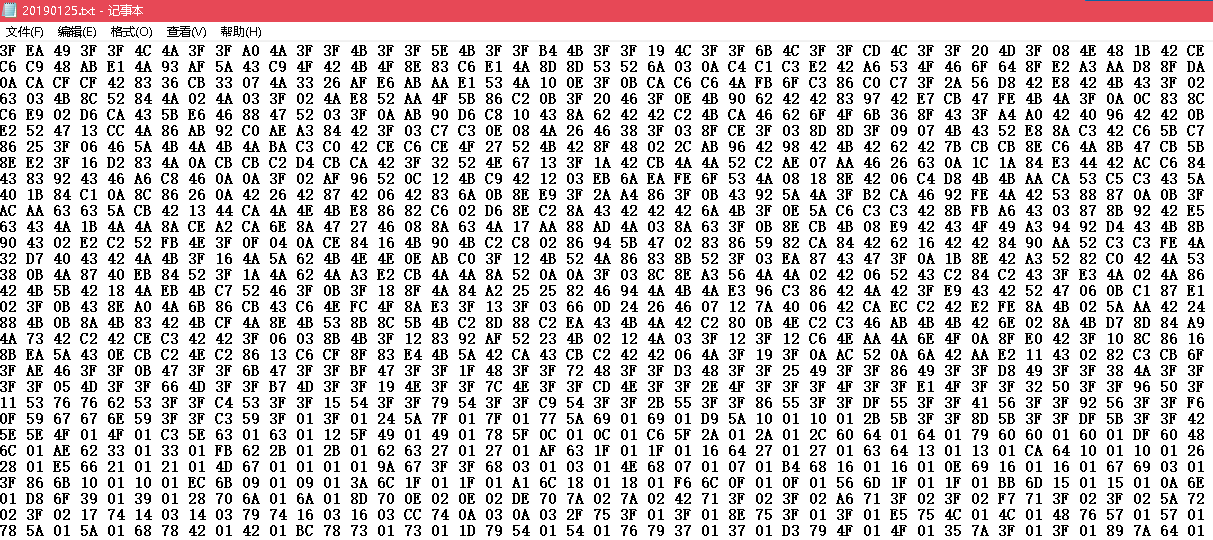
下图是我用串口调试助手采集得到的数据。

我使用的是镭神智能的W系列激光雷达,采用XCOM采集到的16进制数据如何转换为极坐标下的数据呢?我想最终使用python脚本绘制在二维平面中,恳请指教。
上图是雷达的通讯格式。
下图是我用串口调试助手采集得到的数据。
 分享
分享
以下回答参考 皆我百晓生、券券喵儿 等免费微信小程序相关内容作答,并由本人整理回复。
要将XCOM串口调试助手采集到的十六进制激光雷达数据转换为极坐标,请遵循以下步骤:
首先,你需要从你的XCOM串口调试助手获取数据,并将其转换为Python可读的形式。然后,你可以使用Python的math库来计算角度和距离。以下是将数据转换为极坐标的基本步骤:
下面是使用Python实现这些步骤的一个示例代码:
import binascii

def parse_laser_data(data):
    # 数据头部
    header = data[:2]

    # 测量点数
    num_points = int.from_bytes(data[2:4], byteorder='big')

    # 数据内容
    content = data[4:]

    # 构造一个字典用于存储数据
    laser_data = {
        'header': header,
        'num_points': num_points,
        'content': content,
    }

    return laser_data

def calculate_angle_and_distance(laser_data):
    # 转换为浮点数
    angle_high_byte = int.from_bytes(laser_data['content'][2*3:], byteorder='big') / 256
    angle_low_byte = int.from_bytes(laser_data['content'][2*3:], byteorder='big') % 256

    distance_high_byte = int.from_bytes(laser_data['content'][4*3:], byteorder='big') / 256
    distance_low_byte = int.from_bytes(laser_data['content'][4*3:], byteorder='big') % 256

    # 计算角度
    angle = (angle_high_byte - angle_low_byte) * 180 / 256

    # 计算距离
    distance = (distance_high_byte - distance_low_byte) * 2

    return {'angle': angle, 'distance': distance}

# 示例数据
data = b'\x01\x02\x03\x04\x05\x06\x07\x08\x09\x0a\x0b\x0c\x0d\x0e\x0f\x10\x11\x12\x13\x14\x15\x16\x17\x18\x19\x1a\x1b\x1c\x1d\x1e\x1f'
laser_data = parse_laser_data(data)
angle_and_distance = calculate_angle_and_distance(laser_data)

print("Angle:", angle_and_distance['angle'])
print("Distance:", angle_and_distance['distance'])
这个例子中的parse_laser_data()函数会解析并返回激光数据的头部和内容。calculate_angle_and_distance()函数则会根据这些数据计算出角度和距离。
注意:这段代码需要你安装binascii库,如果还没有安装,可以通过pip进行安装:
pip install binascii


