请问下怎么样可以设置DataFrame表头的背景颜色和字体颜色,然后导出来这些格式也是保留的,感谢~
比如这样的表格,我想把表头设置为蓝色,表头的字体颜色设置为白色


请问下怎么样可以设置DataFrame表头的背景颜色和字体颜色,然后导出来这些格式也是保留的,感谢~
比如这样的表格,我想把表头设置为蓝色,表头的字体颜色设置为白色
 分享
分享
众所周知,改变样式的目的是使最终用户的可读性更强。我们可以更改数据的颜色和格式,以便更有效地传达想法。通常,对于在DataFrame上更直观的可视化,我们使用DataFrame.style属性,该属性返回样式器对象,该对象具有许多用于格式化和可视化数据框的有用方法。
import pandas as pd
import numpy as np

# Seeding random data from numpy
np.random.seed(24)

# Making the DatFrame
df = pd.DataFrame({'A': np.linspace(1, 10, 10)})
df = pd.concat([df, pd.DataFrame(np.random.randn(10, 4),
                                 columns=list('BCDE'))], axis=1)

# DataFrame without any styling
print("Original DataFrame:\n")
print(df)
print("\nModified Stlying DataFrame:")
df.style.set_properties(**{'background-color': 'black',
                           'color': 'green'})
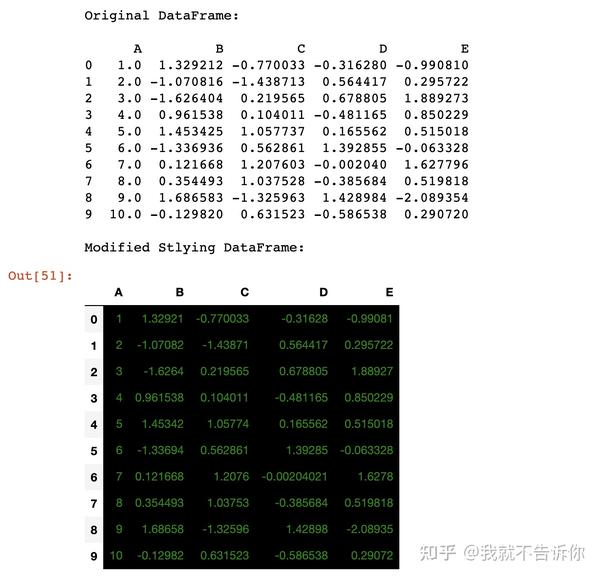
df.style.set_properties
df.iloc[0, 3] = np.nan
df.iloc[2, 3] = np.nan
df.iloc[4, 2] = np.nan
df.iloc[7, 4] = np.nan

# Highlight the NaN values in DataFrame
print("\nModified Stlying DataFrame:")
df.style.highlight_null(null_color='red')
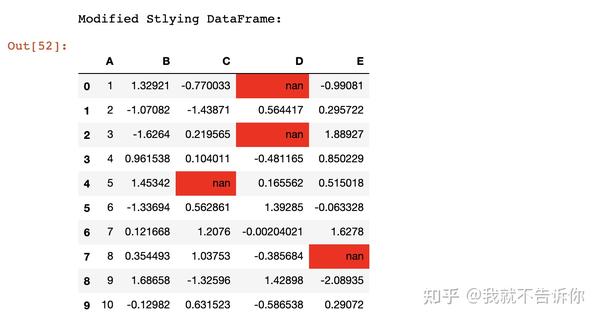
print("\nModified Stlying DataFrame:")
df.style.highlight_min(axis=0)
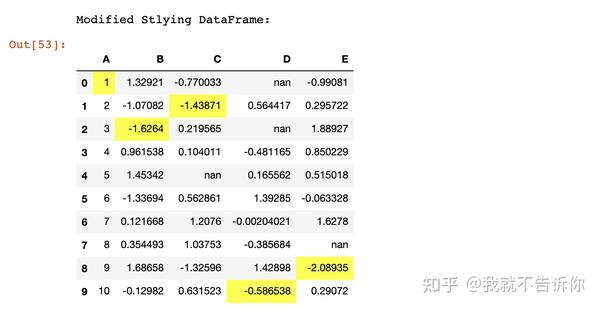
# Highlight the Max values in each column
print("\nModified Stlying DataFrame:")
df.style.highlight_max(axis=0)
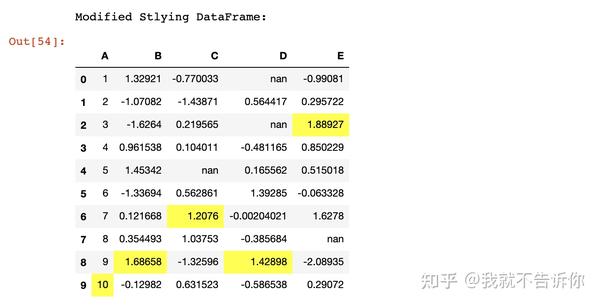
# function for set text color of positive
# values in Dataframes
def color_positive_green(val):
    """
    Takes a scalar and returns a string with
    the css property `'color: green'` for positive
    strings, black otherwise.
    """
    if val > 0:
        color = 'green'
    else:
        color = 'black'
    return 'color: %s' % color

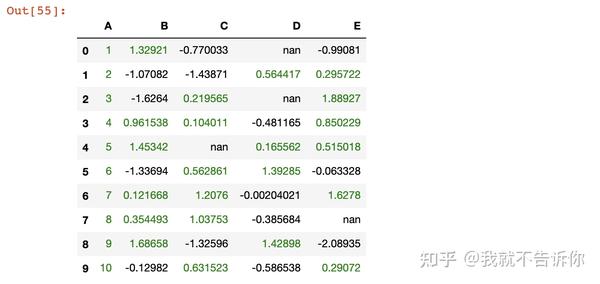
df.style.applymap(color_positive_green)
# Import seaborn library
import seaborn as sns

# Declaring the cm variable by the
# color palette from seaborn
cm = sns.light_palette("green", as_cmap=True)

# Visualizing the DataFrame with set precision
print("\nModified Stlying DataFrame:")
df.style.background_gradient(cmap=cm).set_precision(2)

# Highlight the NaN values in DataFrame
# using seaborn color palette
print("\nModified Stlying DataFrame:")
df.style.background_gradient(cmap=cm).set_precision(2).highlight_null('red')

# Highlight the NaN values in DataFrame
# using seaborn color palette as well as
# min('lighblue') and max('blue') values
# in each column
print("\nModified Stlying DataFrame:")
df.style.background_gradient(cmap=cm).set_precision(2).highlight_null('red').highlight_min(axis=0, color='lightblue').highlight_max(axis=0, color='blue')

分享 已结题
(查看结题原因) 1月7日
创建了问题
9月10日
已结题
(查看结题原因) 1月7日
创建了问题
9月10日


