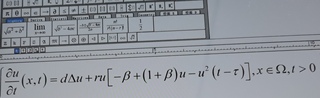

时滞+反应扩散方程的解怎么进行matlab模拟呀?怎么画三维的图

- 写回答
- 好问题 0 提建议
- 关注问题
 分享
分享- 邀请回答
-

2条回答 默认 最新
 joel_1993 2021-10-06 21:27关注
反应-扩散方程的二维模拟程序,仅供参考:
function rxn_dfsn_gs(f,k,Du,Dv,options) % RXN_DFSN_GS Generates and records Gray-Scott reaction diffusion % models using Euler's method. % % RXN_DFSN_GS() generates a Gray-Scott reaction-diffusion % model with sample coefficients. The result is saved as an MP4 named % 'rxn_dfsn_gs.mp4'. % % RXN_DFSN_GS(f,k) generates a Gray-Scott reaction-diffusion % model with standard diffusion coefficients, a rate of conversion k, % and a feed rate f. The result is saved as an MP4 named % 'rxn_dfsn_gs.mp4'. See "Inputs" for details. % % RXN_DFSN_GS(f,k,Du,Dv) generates a Gray-Scott reaction-diffusion % model with the diffusion coefficients Du and Dv, rate of conversion k, % and feed rate f. The result is saved as an MP4 named % 'rxn_dfsn_gs.mp4'. See "Inputs" for details. % % RXN_DFSN_GS(...,PARAM1,VAL1,PARAM2,VAL2,...) are additional % name-value pairs that can be used to change default function % parameters. See "Parameters" for details. % % Inputs % Du,Dv: double. Diffusion coefficients for species u and v. All % equation constants are based off of the standard set of equations % for Gray-Scott systems. Default values are 1 and 0.5, respectively. % f: Feed rate. Recommended value between 0 and 0.1. Default is 0.04 % k: Rate of conversion. Recommended value between 0 and 0.1. Default is % 0.0636 % % Parameters % 'GridSize': int. Edge length for the square grid used for the % model. Note generation time increases exponentially with grid size. % All initial states work with a grid size >= 70. (Default = 200) % 'InitState': char. Intial model state. Possible inputs listed below. % 'square'- Centered square concentration spot of species v. (Default) % 'wavefront'- Simulated wave front of species v. % 'bar'- Centered rectangular concentration spot of species v. % 'vSpots'- 10 random square concentration spots of species v. % 'uSpots'- 10 random square concentration spots of species u. % 'NumIterations': int. Total number of model iterations. Each iteration % represents a step of Euler's method. (Default = 10000) % 'FrameSpacing': int. Number of iterations between captured frames % (Default = 20) % 'dt': double. Time increment between iterations of Euler's method. % (Default = 1) % 'Colormap': char. Colormap used for visualization. Supports all % default MATLAB colormaps (Default = 'jet') % 'FileName': char. Name and file format of created video. See the % MATLAB help site for a list of supported video export formats. % (Default = 'rxn_dfsn_gs.mp4') % % % Examples % Example 1: Generate and record default model. % rxn_dfsn_gs(); % Example 2: Generate and record model with custom f and k constants. % rxn_dfsn_gs(0.022,0.051); % Example 3: Generate and record model with custom constants. % rxn_dfsn_gs(0.022,0.055,1,0.3); % Example 4: Generate and record model with custom f,k and initial state. % rxn_dfsn_gs(0.01,0.041,'InitState','wavefront'); % Example 5: Generate and record model with custom constants and % multiple custom parameters. % rxn_dfsn_gs(0.09,0.059,1,0.45,... % 'InitState','uSpots',... % 'FrameSpacing',60,... % 'NumIterations',20000); arguments f double = 0.04 k double = 0.0636 Du double = 1 Dv double = 0.5 options.GridSize int64 = 200 options.InitState char = 'square' options.NumIterations int64 = 10000 options.FrameSpacing int64 = 20 options.dt double = 1 options.Colormap char = 'jet' options.FileName char = 'rxn_dfsn_gs.mp4' end %% Initialization % Default cell values u = ones(options.GridSize); v = zeros(options.GridSize); if (strcmp(options.InitState,'square')) % Square initial state u(options.GridSize/2-5:options.GridSize/2+5,options.GridSize/2-5:options.GridSize/2+5) = 0; v(options.GridSize/2-5:options.GridSize/2+5,options.GridSize/2-5:options.GridSize/2+5) = 1; elseif (strcmp(options.InitState,'wavefront')) % Wavefront initial state u(options.GridSize/2-30:options.GridSize/2+30,options.GridSize/2-6:options.GridSize/2-4) = 0.75; u(options.GridSize/2-30:options.GridSize/2+30,options.GridSize/2-3:options.GridSize/2-1) = 0.5; u(options.GridSize/2-30:options.GridSize/2+30,options.GridSize/2:options.GridSize/2+2) = 0.25; u(options.GridSize/2-30:options.GridSize/2+30,options.GridSize/2+3:options.GridSize/2+5) = 0; v(options.GridSize/2-30:options.GridSize/2+30,options.GridSize/2+3:options.GridSize/2+5) = 1; elseif (strcmp(options.InitState,'bar')) % Bar initial state u(options.GridSize/2-10:options.GridSize/2+10,options.GridSize/2-2:options.GridSize/2+2) = 0; v(options.GridSize/2-10:options.GridSize/2+10,options.GridSize/2-2:options.GridSize/2+2) = 1; elseif (strcmp(options.InitState,'vSpots')) % Random spots of v initial state for i = 1:10 xrand = randi([5,options.GridSize-5]); yrand = randi([5,options.GridSize-5]); v(xrand-4:xrand+4,yrand-4:yrand+4) = 1; u(xrand-4:xrand+4,yrand-4:yrand+4) = 0; end elseif (strcmp(options.InitState,'uSpots')) % Random spots of u initial state u = zeros(options.GridSize); v = ones(options.GridSize); for i = 1:10 xrand = randi([5,options.GridSize-5]); yrand = randi([5,options.GridSize-5]); u(xrand-4:xrand+4,yrand-4:yrand+4) = 1; v(xrand-4:xrand+4,yrand-4:yrand+4) = 0; end end writer = VideoWriter(options.FileName); % Define VideoWriter object open(writer); figure(1) % Open figure for image plotting colormap(options.Colormap) % Set colormap %% Iterative Modeling % Model iteration loop for i = 1:options.NumIterations % Calculates instantaneous rate of change duT = Du.*(laplacian(u))-u.*v.^2+f.*(1.-u); dvT = Dv.*(laplacian(v))+u.*v.^2-(f+k).*v; % Increments values using Euler's method u = u + options.dt*duT; v = v + options.dt*dvT; % Records frame every 'FrameSpacing' iterations if (mod(i,options.FrameSpacing) == 0) image(u,'CDataMapping','scaled'); % Create image based from u conc frame = getframe(1); % Grab frame writeVideo(writer,frame); % Write frame to video end end close(writer); % Close videoWriter fprintf('Done!\n'); % Notify user when recording is complete end function arrOut = laplacian(arrIn) % Calculates laplacian for a matrix using a 3x3 convolution with edge wrapping arrOut = -1*arrIn + ... 0.2*(circshift(arrIn,1)+circshift(arrIn,-1)+circshift(arrIn,-1,2)+circshift(arrIn,1,2)) + ... 0.05*(circshift(arrIn,[1 1])+circshift(arrIn,[1 -1])+circshift(arrIn,[-1 1])+circshift(arrIn,[-1 -1])); end评论 打赏解决 1无用举报 分享
- 对这一过程进行建模的最新尝试包括对细胞的三维描述,包括细胞质(即大块)和膜(即表面)[2,3],对于这种类型的大块表面模型,有两个描述可能导致图案形成的机制类型。 这些就是所谓的经典图灵不稳定性(图1A)和...
- 2022-07-10 16:44Pride goes before a fall的博客 求一份时滞反应扩散方程(纽曼边界条件的)的代码
- 2021-07-10 13:30本文的研究重点在于应用特征值理论、规范型理论和中心流形定理来分析具有时滞的Host-Parasitoid模型的稳定性和分支特性,并利用Matlab工具对理论分析进行验证。 首先,本文给出了Host-Parasitoid模型的基本形式,这...
- 2020-07-18 05:30MATLAB的`pdepe`函数是专门用于一维偏微分方程的,而更高维度的问题则需要自定义算法。 3. **有限元方法步骤**: - **离散化**:将连续区域划分为有限个子域(有限元),通常选择三角形或四边形。 - **插值函数**...
- 2022-11-14 19:00studyer_爱啃鸡爪的小米的博客 分析:该方程应该在某个t0时间之后成立,初始值必须是定义在t0之前的一个关于t的单值向量函数phi(t)。我假设t0=0吧,phi(t)=[1;
- 2021-07-12 16:17结冰架构的博客 时滞微分方程包含的项的值依赖于先前时间的解。时滞可以固定不变、与时间相关或与状态相关,而求解器函数(dde23、ddesd 或 ddensd)的选择取决于方程中的时滞类型。通常,时滞将导数的当前值与某个先前时间的解的值...
- 2021-07-14 19:05结冰架构的博客 方程组为: P˙a(t)=−1caRPa(t)+1caRPv(t)+1caVstr(Paτ(t))H(t)\dot{P}_a(t) = -\dfrac{1}{c_aR}P_a(t) + \dfrac{1}{c_aR}P_v(t) + \dfrac{1}{c_a}V_{str}(P_{a}^τ(t))H(t)P˙a(t)=−caR1Pa(t)+caR1...
- 2025-05-27 09:40Matlab算法改进和仿真定制工程师的博客 本文旨在深入探讨MATLAB中ode15s函数在求解刚性DAEs方面的卓越性能,并以一个典型的化学反应工程问题——均质反应性四元混合物的残渣曲线图(Residue Curve Maps, RCMs)构建为例,详细阐述其应用。
- 2021-04-23 12:38袁圆园建建的博客 ddesd求解带有常规时滞的时滞微分方程 (DDE)语法sol = ddesd(ddefun,delays,history,tspan)sol = ddesd(ddefun,delays,history,tspan,options)参数ddefun用于对微分方程 y′(t) = f(t,y(t),y(d(1),...,y(d(k))) 的...
- 2021-07-16 19:19结冰架构的博客 dde23:求解带有固定时滞的时滞微分方程 (DDE)。 语法 sol = dde23(ddefun,lags,history,tspan) sol = dde23(ddefun,lags,history,tspan,options) 参数 参数 说明 ddefun 用于对微分方程 y′(t)=f(t,y(t),y...
- 2022-04-06 10:57「已注销」的博客 matlab绘制三维混沌系统程序(以三阶微分方程系统为例),可以出庞加莱截面图、二维相图、三维相图、分岔图,需要的同学可以(不代做)。 _:8550662869649774皮皮and瓜瓜
- 2022-10-19 22:06studyer_爱啃鸡爪的小米的博客 分岔会出现在连续系统(以常微分方程、时滞微分方程或偏微分方程来描述)或是离散系统中(以映射来描述)。分岔理论或分歧理论(bifurcation theory)是数学中研究一群曲线在本质或是拓扑结构.上的改变。bifurcation-词最...
- 2021-04-20 04:28睿心冥想的博客 clcclear all%画系统的庞加莱图主程序;T=2*pi;%周期;tspan=0:T/100:200*T;%求解区间;y0=[0.005,0.005,0.005,0.005,0.005,0.005,0.005,0.005,0.005,0.005];%初始值;options=odeset('RelTol',10^-3,'AbsTol',10^-3...
- 2022-11-11 21:07在MATLAB中,可以通过解微分方程并绘制二维相图或三维轨迹来直观地理解这些参数变化对系统动态的影响。通过调整参数值,我们可以观察到不同参数组合下食饵和捕食者种群数量随时间的变化趋势,从而深入理解生态系统中...
- 2023-02-15 18:25源代码大师的博客 Matlab完整教程专栏完整目录
- 2021-05-30 15:05Simulink 是 MATLAB 的一个扩展工具,用于创建、模拟和分析多域动态系统。在控制系统设计中,相图是一种可视化工具,它可以帮助我们理解系统的稳定性和动态行为。本篇文章将深入探讨如何使用 Simulink 制作相图,并...
- 2022-10-19 22:19studyer_爱啃鸡爪的小米的博客 分岔会出现在连续系统(以常微分方程、时滞微分方程或偏微分方程来描述)或是离散系统中(以映射来描述)。分岔理论或分歧理论(bifurcation theory)是数学中研究一群曲线在本质或是拓扑结构.上的改变。bifurcation-词最...
- 没有解决我的问题, 去提问


问题事件
 创建了问题
10月6日
创建了问题
10月6日