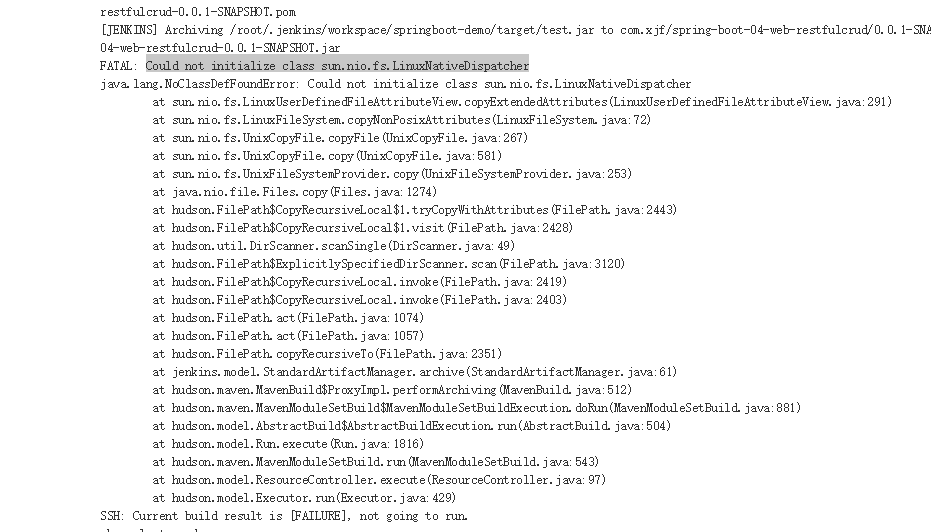
请问这是为什么啊?

Jenkins部署springboot,打包好了之后报Could not initialize class sun.nio.fs.LinuxNativeDispatcher

- 写回答
- 好问题 0 提建议
- 关注问题
 分享
分享- 邀请回答
-

1条回答 默认 最新
 你知我知皆知 2024-08-08 10:27关注
以下回答参考 皆我百晓生、券券喵儿 等免费微信小程序相关内容作答,并由本人整理回复。
这个问题是由于Spring Boot项目在构建过程中遇到的问题。Sun Native FileSystem Provider是Java的文件系统API的一部分,在Jenkins中,我们可以通过以下步骤解决这个问题:
-
首先,我们需要确保已经安装了Apache Ant和Apache Maven。
-
在项目的pom.xml文件中添加以下依赖:
<dependency> <groupId>org.apache.maven.plugins</groupId> <artifactId>maven-ant-plugin</artifactId> <version>3.0.0-M3</version> </dependency> <dependency> <groupId>com.github.johnrengelman</groupId> <artifactId>ant-maven-plugin</artifactId> <version>3.2.0</version> </dependency>- 在项目的build.gradle文件中添加以下依赖:
dependencies { implementation 'org.apache.maven.plugins:maven-ant-plugin:3.0.0-M3' implementation 'com.github.johnrengelman:ant-maven-plugin:3.2.0' }- 然后,在
src/main/resources/META-INF/maven/org.example/example/pom.properties文件中添加以下配置:
sun.io.native.NativeCompiler=org.apache.maven.plugins:maven-ant-plugin:3.0.0-M3 sun.io.native.NativeCompiler=org.apache.maven.plugins:maven-ant-plugin:3.0.0-M3- 最后,在你的Spring Boot项目中创建一个名为
build.gradle.kts的文件,并添加以下内容:
plugins {
    kotlin("jvm") version "1.3.71"
}

group = "com.example"
version = "0.0.1-SNAPSHOT"

repositories {
    mavenCentral()
}

dependencies {
    implementation(kotlin("stdlib-jdk8"))
}

tasks.withType<KotlinCompile> {
    kotlinOptions.jvmTarget = "1.8"
}
现在,你应该可以在Spring Boot项目中使用
maven-ant-plugin来编译和打包你的项目。如果你仍然遇到问题,请检查你的环境变量是否正确设置,或者查看Apache Ant或Apache Maven的文档以获取更多帮助。解决 无用评论 打赏举报 分享-
- 菜菜菜菜菜鸡的博客 重启jenkins之后就好了.... 有知道具体原因的可以分享下
- 2021-11-23 17:15
 Jenkins打包报错:FATAL: Could not initialize class jenkins.plugins.maveninfo.extractor.MavenInfoExtractoryanyuan1024的博客 错误信息 FATAL: Could not initialize class jenkins.plugins.maveninfo.extractor.MavenInfoExtractor 原因 Maven info Plugin插件版本不匹配 解决方案 升级Maven info Plugin 0.3.0版本
 - 2021-10-23 21:13神慕蔡蔡的博客 先说说CI/CD2.jenkins介绍3.jenkins包下载4.jenkins部署5.jenkins手动部署java项目6.jenkins自动部署java项目7.jenkins脚本语法扩展 jenkins 1.先说说CI/CD 生产环境下,提前需要备份,再操作 集成:个人研发的...
- 2013-05-29 17:57rzhzhz的博客 这里就是一个好的起点: 分布式计算的谬论 . Chapter 1. 入门 Table of Contents 1.1. 介绍 1.2. 快速开始 1.2.1. 下载解压最新版本 1.2.2. 启动 HBase 1.2.3. ...
- 2015-03-09 14:44道仁的博客 这里就是一个好的起点: 分布式计算的谬论 . Chapter 1. 入门 Table of Contents 1.1. 介绍 1.2. 快速开始 1.2.1. 下载解压最新版本 1.2.2. 启动 HBase 1.2.3. ...
- 2018-06-13 19:19jl415247240的博客 这里就是一个好的起点: 分布式计算的谬论 . Chapter 1. 入门 Table of Contents 1.1. 介绍 1.2. 快速开始 1.2.1. 下载解压最新版本 1.2.2. 启动 HBase 1.2.3. Shell 练习 1.2.4. 停止 HBase 1.2.5. 下一步该做...
- 2016-11-17 16:46lbyyy的博客 这里就是一个好的起点: 分布式计算的谬论 . Chapter 1. 入门 Table of Contents 1.1. 介绍 1.2. 快速开始 1.2.1. 下载解压最新版本 1.2.2. 启动 HBase 1.2.3. ...
- 2017-07-29 09:38克终的博客 Apache HBase™ 参考指南 ...要配置部署,编辑conf/hbase-env.sh文件中的环境变量——该配置文件主要启动脚本用于获取已启动的集群——然后增加配置到XML文件,如同覆盖HBase缺省配置,告诉HBase用什么文件...
- 2014-07-31 10:17cheng911215的博客 要配置部署,编辑conf/hbase-env.sh文件中的环境变量——该配置文件主要启动脚本用于获取已启动的集群——然后增加配置到XML文件,如同覆盖HBase缺省配置,告诉HBase用什么文件系统, 全部ZooKeeper位置 [ ...
- 2014-06-25 15:12zhuralll111的博客 MemStore是Sorted Memory Buffer,用户写入的数据首先会放入MemStore,当MemStore满了以后会Flush成一个StoreFile(底层实现是HFile),当StoreFile文件数量增长到一定阈值,会触发Compact合并操作,将多个Store...
- 没有解决我的问题, 去提问