<!DOCTYPE html>
<html lang="en">
<head>
    <meta charset="UTF-8">
    <meta http-equiv="X-UA-Compatible" content="IE=edge">
    <meta name="viewport" content="width=device-width, initial-scale=1.0">
    <title>Document</title>
</head>
<body>
    <p>1</p>
    <p>2</p>
    <p>3</p>
    <script>
        const [p1,p2,p3] = document.querySelectorAll('p');

        const m1 = new Map()
        const m2 = new Map()
        const m3 = new Map()
        m1.set('color','red').set('backgroundColor','yellow').set('fontSize','40px');
        m2.set('color','green').set('backgroundColor','pink').set('fontSize','40px');
        m3.set('color','blue').set('backgroundColor','orange').set('fontSize','40px');

        const m = new Map()
        m.set(p1,m1).set(p2,m2).set(p3,m3)

        m.forEach((value,elem)=>{
            elem.style = value;
        })

    </script>
</body>
</html>

下面代码如何修改才能把样式写进标签

- 写回答
- 好问题 0 提建议
- 关注问题
 分享
分享- 邀请回答
-

3条回答 默认 最新
 CSDN专家-showbo 2021-11-11 16:00关注
题主要的代码如下
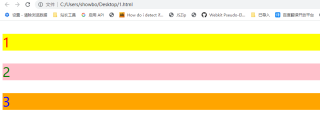
<!DOCTYPE html> <html lang="en"> <head> <meta charset="UTF-8"> <meta http-equiv="X-UA-Compatible" content="IE=edge"> <meta name="viewport" content="width=device-width, initial-scale=1.0"> <title>Document</title> </head> <body> <p>1</p> <p>2</p> <p>3</p> <script> const [p1, p2, p3] = document.querySelectorAll('p'); const m1 = new Map() const m2 = new Map() const m3 = new Map() m1.set('color', 'red').set('background-color', 'yellow').set('font-size', '40px'); m2.set('color', 'green').set('background-color', 'pink').set('font-size', '40px'); m3.set('color', 'blue').set('background-color', 'orange').set('font-size', '40px'); const m = new Map() m.set(p1, m1).set(p2, m2).set(p3, m3) m.forEach((value, elem) => { value.forEach(( value,attr) => { elem.style[attr] = value; }) }) </script> </body> </html>有帮助麻烦点下【采纳该答案】,谢谢~~
本回答被题主选为最佳回答 , 对您是否有帮助呢?评论 打赏解决 2无用举报 分享
- 2021-06-11 13:44怪叔叔来了的博客 1,from标签from标签的功能是向服务器传输数据,实现用户交互的重要标签。from标签的具体使用:input标签使用示例:姓名: 用户名: 密码: 爱好:骑车游戏电影男女第一句:action标签的意思就是表单提交到服务器的链接...
- 2023-09-01 11:30最帅的前端的博客 a标签样式
- 2022-08-07 15:29前端小芬芬的博客 前端代码规范
- 2025-02-18 16:52MM老狼爱吃肉的博客 速览要修改WordPress前端页面,可通过后台“外观”->“编辑”找到对应PHP文件进行修改,或直接在页面编辑器中插入代码块。详答。
- 2023-02-24 17:32关忆北_的博客 前端导出表格 修改样式(xlsx-style)用法
- 2024-08-12 00:15Akira37R的博客 文章涵盖了CSS的引入方式(内部、外部、行内)、选择器(标签选择器、类选择器、ID选择器、复合选择器)、CSS特性(继承性、层叠性、优先级)以及文字控制属性和背景属性等关键内容。通过具体示例和图解,帮助读者...
- 2021-07-14 16:39web前端神器的博客 前端html标签还需要手写吗?说两句与时俱进,不断更新,不断学习自动化省去的代码量学习教程课程 说两句 随着社会的发展新技术层出不穷,从最原生的js,html,css到后续的框架jquery,bootsrap。再到后来的vue,angular,...
- 2024-10-24 18:32yma16的博客 大家好,我是yma16,本文分享 前端——Selection api操作选中文本 样式、取消样式(解决标签的无限嵌套问题)Selection 对象表示用户选择的文本范围或插入符号的当前位置。它代表页面中的文本选区,可能横跨多个元素...
- 2022-04-27 13:50jack_dh的博客 Typora软件代码块样式设置
- 2023-08-11 11:09Future守护的博客 修改Element-Plus的tab标签字体样式
- 没有解决我的问题, 去提问

问题事件
 系统已结题
11月19日
系统已结题
11月19日 已采纳回答
11月11日
已采纳回答
11月11日-
创建了问题
11月11日