#图片和文字是怎么呈现这样的效果的
#图片和文字是怎么呈现这样的效果的
#图片和文字是怎么呈现这样的效果的
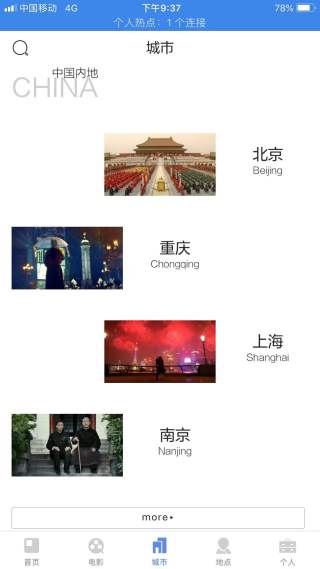

#图片和文字是怎么呈现这样的效果的
#图片和文字是怎么呈现这样的效果的
#图片和文字是怎么呈现这样的效果的
 分享
分享
用float: left或right; 左右浮动图片
你题目的解答代码如下:
<!doctype html>
<html lang="en">
<head>
    <meta charset="UTF-8" />
    <meta name="viewport" content="width=device-width, initial-scale=1.0">
    <meta http-equiv="X-UA-Compatible" content="IE=edge,chrome=1" />
    <title> 页面名称 </title>
<style type="text/css">
.box {
    width: 300px;
}
.box > div{
    margin: 20px 0px;
}
.box > div:nth-child(2n){
    float: left;
}
.box > div:nth-child(2n+1){
    float: right;
}
.box > div img{
    vertical-align: middle;
}
.box > div .text{
    display: inline-block;
    margin: 20px;
}
</style>
</head>
<body>

<div class="box">
    <div>
        <img src="1.jpg" width="150" height="80" alt="" />
        <div class="text">文本</div>
    </div>
    <div>
        <img src="1.jpg" width="150" height="80" alt="" />
        <div class="text">文本</div>
    </div>
    <div>
        <img src="1.jpg" width="150" height="80" alt="" />
        <div class="text">文本</div>
    </div>
    <div>
        <img src="1.jpg" width="150" height="80" alt="" />
        <div class="text">文本</div>
    </div>
    <div>
        <img src="1.jpg" width="150" height="80" alt="" />
        <div class="text">文本</div>
    </div>
</div>

</body>
</html>
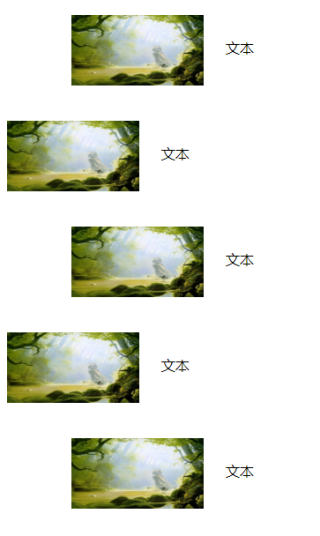
如有帮助,请点击我的回答下方的【采纳该答案】按钮帮忙采纳下,谢谢!
分享 系统已结题
1月10日
系统已结题
1月10日 已采纳回答
1月2日
修改了问题
1月2日
创建了问题
1月2日
已采纳回答
1月2日
修改了问题
1月2日
创建了问题
1月2日