请问Android 散乱的按钮如何布局
想在这些图形上添加按钮,但是absoluteLayout在不同的机器上会偏,其他布局也想不出好办法
请在链接中看图
Docs
飞书文档 - 多人实时在线编辑,促进团队深度协作与互动
https://acc15t4bm5.feishu.cn/docs/doccnulDv3UDIocFPpEDD3Z6NPe

请问Android 散乱的按钮如何布局
想在这些图形上添加按钮,但是absoluteLayout在不同的机器上会偏,其他布局也想不出好办法
请在链接中看图
Docs
飞书文档 - 多人实时在线编辑,促进团队深度协作与互动
https://acc15t4bm5.feishu.cn/docs/doccnulDv3UDIocFPpEDD3Z6NPe
 分享
分享
ConstrainLayout 可以做到百分比定位宽高位置,应该可以满足你的需求
示例代码:
<?xml version="1.0" encoding="utf-8"?>
<androidx.constraintlayout.widget.ConstraintLayout
        xmlns:android="http://schemas.android.com/apk/res/android"
        android:layout_width="match_parent"
        android:layout_height="match_parent"
        xmlns:app="http://schemas.android.com/apk/res-auto">

    <androidx.constraintlayout.widget.ConstraintLayout
            app:layout_constraintTop_toTopOf="parent"
            app:layout_constraintBottom_toBottomOf="parent"
            android:layout_width="match_parent"
            app:layout_constraintDimensionRatio="1.5"
            android:layout_height="0dp">

        <androidx.appcompat.widget.AppCompatImageView
                android:src="@mipmap/img"
                app:layout_constraintTop_toTopOf="parent"
                app:layout_constraintBottom_toBottomOf="parent"
                app:layout_constraintStart_toStartOf="parent"
                app:layout_constraintEnd_toEndOf="parent"
                android:layout_width="wrap_content"
                android:layout_height="wrap_content"/>


        <View
                app:layout_constraintStart_toStartOf="parent"
                app:layout_constraintEnd_toEndOf="parent"
                app:layout_constraintTop_toTopOf="parent"
                app:layout_constraintBottom_toBottomOf="parent"
                app:layout_constraintHorizontal_bias="0.675"
                app:layout_constraintVertical_bias="0.6"
                android:background="@color/black"
                app:layout_constraintHeight_percent="0.05"
                app:layout_constraintWidth_percent="0.04"
                android:layout_width="0dp"
                android:layout_height="0dp"/>

    </androidx.constraintlayout.widget.ConstraintLayout>

</androidx.constraintlayout.widget.ConstraintLayout>
效果:
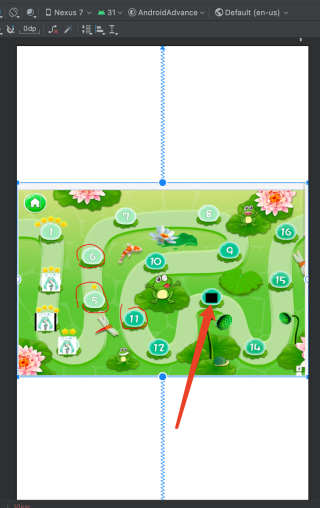
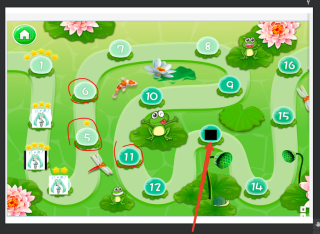
切换屏幕比例后:
分享 系统已结题
4月16日
系统已结题
4月16日 已采纳回答
4月8日
创建了问题
4月8日
已采纳回答
4月8日
创建了问题
4月8日

