Android小学弟 2019-08-15 11:00 采纳率: 0%
浏览 378

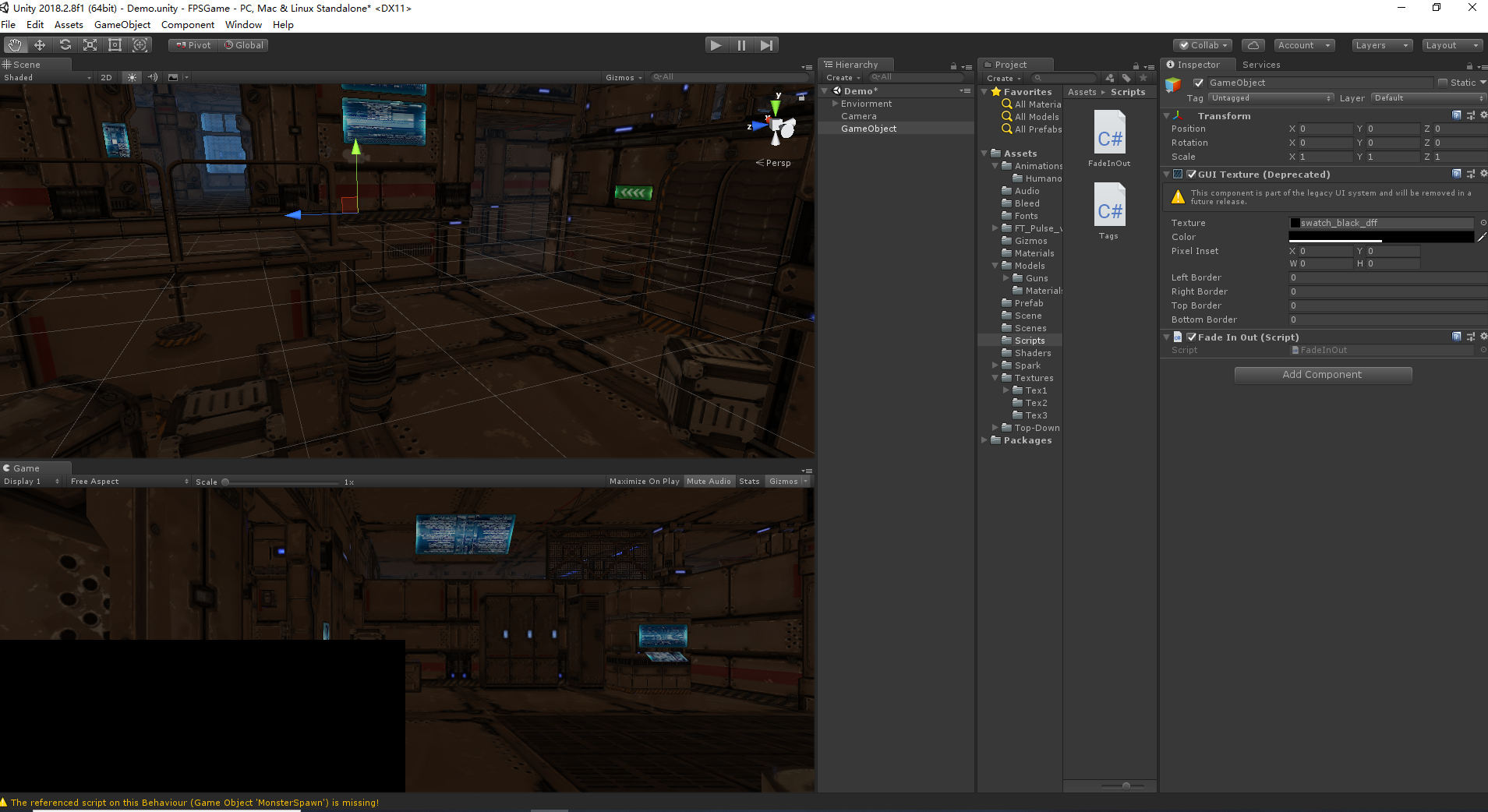
unity3D 实现场景淡入淡出 运行没有任何效果

图片说明

场景淡入淡出的代码

using System.Collections;
using System.Collections.Generic;
using UnityEngine;
using UnityEngine.SceneManagement;

public class fadeInOut : MonoBehaviour
{
    public float fadeSpeed = 1.5f;
    private bool sceneStarting = true;
    private GUITexture tex;
    void Start()
    {
        tex = this.GetComponent<GUITexture>();
        tex.pixelInset = new Rect(0, 0, Screen.width, Screen.height);
    }
    void Update()
    {
        if (sceneStarting)
        {
            StartScene();
        }
    }
    private void FadeToClear()
    {
        tex.color = Color.Lerp(tex.color, Color.clear, fadeSpeed * Time.deltaTime);
    }
    private void FadeToBlack()
    {
        tex.color = Color.Lerp(tex.color, Color.black, fadeSpeed * Time.deltaTime);
    }
    private void StartScene()
    {
        FadeToClear();
        if (tex.color.a <= 0.05f)
        {
            tex.color = Color.clear;
            tex.enabled = false;
            sceneStarting = false;
        }
    }
    public void EndScen()
    {
        tex.enabled = true;
        FadeToBlack();
        if (tex.color.a >= 0.95f)
        {
            SceneManager.LoadScene("Demo");
        }
    } 


}

  • 写回答

1条回答 默认 最新

  • 你知我知皆知 2024-08-11 06:41
    关注

    以下回答参考 皆我百晓生券券喵儿 等免费微信小程序相关内容作答,并由本人整理回复。

    要实现Unity 3D中的场景淡入和淡出效果,你需要使用FadeInOut类。这个类包含一些方法来控制场景的透明度变化。以下是如何实现这些功能的方法:

    using System.Collections;
    using System.Collections.Generic;
    using UnityEngine;
    
    // 假设你已经有一个名为FadeInOut的组件,并且它具有一个名为fadeSpeed的属性,表示淡入/淡出的速度。
    [RequireComponent(typeof(FadeInOut))]
    public class FadeTransition : MonoBehaviour
    {
        // 设置淡入速度,默认为1.5秒。
        [SerializeField] private float fadeSpeed = 1.5f;
    
        // 控制淡入状态。
        private bool fading = false;
    
        // 模拟场景开始时的状态。
        private bool sceneStarted = true;
    
        // 渲染器文本对象。
        private GUITexture _texture;
    
        // 初始化渲染器文本对象。
        private void Awake()
        {
            _texture = GetComponent<GUITexture>();
            _texture.pixelInset = new Rect(0, 0, Screen.width, Screen.height);
        }
    
        // 更新函数。
        private void Update()
        {
            // 如果场景还没有开始,则进行场景开始处理。
            if (!sceneStarted)
            {
                // 调用StartScene() 方法以开始场景。
                StartScene();
            }
        }
    
        // 开始场景。
        private void StartScene()
        {
            // 转换为淡入模式。
            fading = true;
            sceneStarted = false;
    
            // 调用FadeToClear() 和 FadeToBlack() 方法来实现淡入和淡出效果。
            FadeToClear();
            FadeToBlack();
    
            // 确保在淡入完成后执行下一个操作。
            if (_texture.color.a <= 0.05f)
            {
                _texture.color = Color.clear;
                _texture.enabled = false;
                fading = false;
                sceneStarted = true;
            }
        }
    
        // 完成场景并返回到默认设置。
        public void EndScene()
        {
            _texture.enabled = true;
            FadeToBlack();
            if (_texture.color.a >= 0.95f)
            {
                // 跳转到下一个场景或加载新场景。
                SceneManager.LoadScene("NextSceneName");
            }
        }
    
        // 淡入到黑色。
        private void FadeToBlack()
        {
            _texture.color = Color.Lerp(_texture.color, Color.black, fadeSpeed * Time.deltaTime);
        }
    
        // 淡入到白色。
        private void FadeToClear()
        {
            _texture.color = Color.Lerp(_texture.color, Color.clear, fadeSpeed * Time.deltaTime);
        }
    }
    
    // 假设你在你的场景中有一个名为FadeInOut的组件,并且它有一个名为fadeSpeed的属性。
    public class FadeInOut : MonoBehaviour
    {
        // 默认淡入速度。
        public float fadeSpeed = 1.5f;
    }
    

    注意:这段代码是根据你提供的示例创建的,所以你需要将FadeInOut组件替换为你自己的FadeInOut组件,并调整其fadeSpeed属性以匹配你的需求。

    此外,请确保在你的项目中正确引用了FadeInOut组件,否则可能无法正确运行此代码。

    评论

报告相同问题?