
数组内图片无法正常遍历
从本地获取数据,在onLoad的时候push到数组里并且循环
<view v-for="(item,index) in heroSj" :key="index">
            <view class="uni-row box">
                <view>
                    <image class="img1" :src='item.url'></image>
                </view>
                <view class="text">{{ item.name1 }}</view>
                <view class="text">{{ item.name2 }}</view>
            </view>
            <view class="uni-row box">
                <view>
                    <image class="img2" :src="item.url2" mode=""></image>
                    <!-- <barckground-img class="img2" :url='item.url2'></barckground-img> -->
                </view>
            </view>
        </view>
onLoad:function() {
            that = this;
            // 同步取缓存
            // const res = uni.getStorageSync('id');
            //     if (res){
            //             var sj = [];
            //             sj = JSON.parse(JSON.stringify(res));
            //             console.log(sj);
            //             that.heroSj.push(sj);
            //             console.log('载入');
            //         }

            // 异步取缓存
            uni.getStorage({
                    key:'id',
                    success: function (res) {
                        var sj = [];
                        sj = JSON.parse(JSON.stringify(res.data));
                        console.log(sj);
                        that.heroSj.push(sj);
                        console.log('载入');
                    }
                });
            },
如图使用image的话会报错渲染问题

换成barckground-img虽然不会再出现渲染报错,但是url2数组里面的图片无法渲染到页面上,并且没有任何报错。
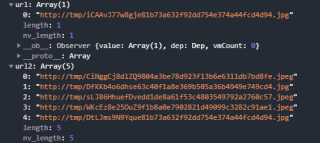
把url2和url的渲染位置互换渲染失败,报错渲染问题


