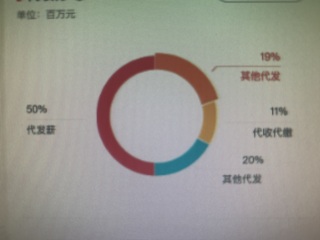
引导线上边显示百分比,下边显示文字,还有就是选中部分也不一样
这是UI图
这是效果图
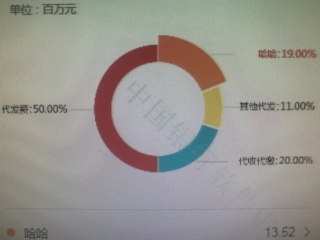
我该怎么写才能与原型图保持一致啊,麻烦指点指点,谢谢🙏

引导线上边显示百分比,下边显示文字,还有就是选中部分也不一样
这是UI图
这是效果图
我该怎么写才能与原型图保持一致啊,麻烦指点指点,谢谢🙏
 分享
分享
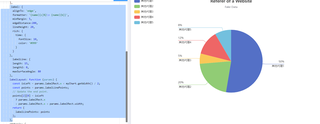
你复制这个试试,看看是不是你要的效果
option = {
title: {
text: 'Referer of a Website',
subtext: 'Fake Data',
left: 'center'
},
tooltip: {
trigger: 'item'
},
legend: {
orient: 'vertical',
left: 'left'
},
series: [
{
name: 'Access From',
type: 'pie',
radius: '50%',
data: [
{ value: 50, name: '其他代理1' },
{ value: 20, name: '其他代理2' },
{ value: 5, name: '其他代理3' },
{ value: 12, name: '其他代理4'},
{ value: 8, name: '其他代理5' }
],
label: {
alignTo: 'edge',
formatter: '{name|{c}%}\n {name|{b}}',
minMargin: 5,
edgeDistance:200,
lineHeight: 20,
rich: {
time: {
fontSize: 10,
color: '#999'
    }
  }
},
labelLine: {
length: 15,
length2: 0,
maxSurfaceAngle: 80
},
labelLayout: function (params) {
const isLeft = params.labelRect.x < myChart.getWidth() / 2;
const points = params.labelLinePoints;
// Update the end point.
points[2][0] = isLeft
? params.labelRect.x
: params.labelRect.x + params.labelRect.width;
return {
labelLinePoints: points
};
},
emphasis: {
itemStyle: {
shadowBlur: 10,
shadowOffsetX: 0,
shadowColor: 'rgba(0, 0, 0, 0.5)',
}
}
}
]
};
分享 创建了问题
7月29日
创建了问题
7月29日


