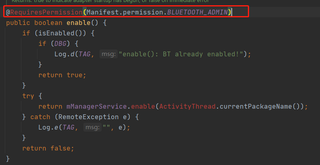
问题遇到的现象和发生背景
蓝牙devices.getName()总是报错。说是一个关于安全的问题。
bluetoothAdapter.enable()也是报错。说是一个关于安全的问题。
问题相关代码,请勿粘贴截图
private void enableBluetooth() {
    if (bluetoothAdapter.isEnabled()) {
        Toast.makeText(context,"Bluetooth already enabled",Toast.LENGTH_SHORT).show();
    }else{
        bluetoothAdapter.enable();//千年报错行!!!!!
    }
}
运行结果及报错内容
具体报错如下:
Call requires permission which may be rejected by user: code should explicitly check to see if permission is available (with checkPermission) or explicitly handle a potential SecurityException
我的解答思路和尝试过的方法
说是需要加权限。Manifest.xml中肯定是加够了的。
以下方法也不管用:
private void checkPermissions(){//检查权限
if (ContextCompat.checkSelfPermission(context, Manifest.permission.ACCESS_FINE_LOCATION)!= PackageManager.PERMISSION_GRANTED){
ActivityCompat.requestPermissions(MainActivity.this,new String[]{Manifest.permission.ACCESS_FINE_LOCATION},LOCACTION_PERMISSION_REQUEST);
}
}
自动弹出来的fix中this也报错:
if (ActivityCompat.checkSelfPermission(this, Manifest.permission.BLUETOOTH_CONNECT) != PackageManager.PERMISSION_GRANTED) {
// TODO: Consider calling
// ActivityCompat#requestPermissions
// here to request the missing permissions, and then overriding
// public void onRequestPermissionsResult(int requestCode, String[] permissions,
// int[] grantResults)
// to handle the case where the user grants the permission. See the documentation
// for ActivityCompat#requestPermissions for more details.
return;
}
我想要达到的结果
那么,如何才能不报错呢?