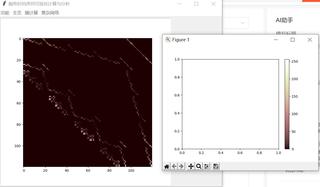
在python中用matplotlib的imshow绘制图后再加colorbar时colorbar不能和原图在一起
self.left_fram = tk.Frame(self.master, borderwidth=1, relief=tk.GROOVE)
    self.left_fram.pack(side=tk.LEFT, padx=5, pady=5)
    self.right_fram = tk.Frame(self.master, borderwidth=1)
    self.right_fram.pack(side=tk.RIGHT, anchor=N, pady=5, padx=5)
    self.figure = plt.Figure(figsize=(7, 7))
    self.scatter = FigureCanvasTkAgg(self.figure, self.left_fram)
    self.scatter.get_tk_widget().pack()
    #________________________________________________
    self.net1= self.figure.add_subplot(111)
    net_info=self.net1.imshow(self.weight_matrix,cmap='pink')
    print(f"net_info: {net_info}",end='\n')
    print(f"type: {type(net_info)}", end='\n')
    plt.colorbar(net_info)
    plt.show()
MatplotlibDeprecationWarning: Starting from Matplotlib 3.6, colorbar() will steal space from the mappable's axes, rather than from the current axes, to place the colorbar. To silence this warning, explicitly pass the 'ax' argument to colorbar().
plt.colorbar(net_info)