
问题如下:
我插入一条新的评论为array[0],点赞第一条置顶评论,发生变化的确是第二条,vuex变化的也是第二条
整个评论区是父组件comment-list,一条评论是子组件comment-item
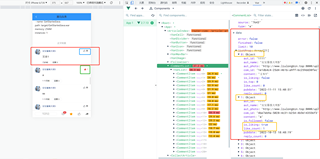
下面给出父组件评论区comment-list代码:
<template>

  <van-list
    v-model="loading"
    :finished="finished"
    finished-text="已显示全部评论"
    :error="error"
    error-text="加载失败,请点击重试"
    :immediate-check="false"
    @load="onLoad"
  >
    <comment-item
      v-for="(item, index) in list"
      :key="index"
      :comment="item"
      @reply-click="$emit('reply-click', $event)"
    />
  </van-list>
</template>

<script>
import { getComments } from '@/api/comment'
import CommentItem from './comment-item'

export default {
  name: 'CommentList',
  components: {
    CommentItem
  },
  props: {
    source: {
      type: [Number, String, Object],
      required: true
    },
    list: {
      type: Array,
      default: () => []
    },
    type: {
      type: String,
      // 自定义 Prop 数据验证
      validator (value) {
        return ['a', 'c'].includes(value)
      },
      default: 'a'
    }
  },
  data () {
    return {
      // list: [],
      loading: false,
      finished: false,
      offset: null, // 获取下一页数据的标记
      limit: 10,
      error: false,
      listProp: this.list
    }
  },
  computed: {},
  watch: {},
  created () {
    // 当你手动初始 onLoad 的话,它不会自动开始初始的 loading
    // 所以我们要手动的开启初始 loading
    this.loading = true
    this.onLoad()
  },
  mounted () {},
  methods: {
    async onLoad () {
      try {
        // 获取文章的评论和获取评论的回复是同一个接口
        // 唯一的区别是接口参数不一样
        //    type
        //      a 文章的评论
        //      c 评论的回复
        //    source
        //      文章的评论,则传递文章的 ID
        //      评论的回复,则传递评论的 ID
        // 1. 请求获取数据
        const { data } = await getComments({
          type: this.type, //  评论类型,a-对文章(article)的评论,c-对评论(comment)的回复
          source: this.source.toString(), // 源id,文章id或评论id
          offset: this.offset, // 获取评论数据的偏移量,值为评论id,表示从此id的数据向后取,不传表示从第一页开始读取数据
          limit: this.limit // 获取的评论数据个数,不传表示采用后端服务设定的默认每页数据量
        })

        // 2. 将数据添加到列表中
        const { results } = data.data
        this.listProp.push(...results)

        // 把文章评论的总数量传递到外部
        this.$emit('onload-success', data.data)

        // 3. 将 loading 设置为 false
        this.loading = false

        // 4. 判断是否还有数据
        if (results.length) {
          // 有就更新获取下一页的数据页码
          this.offset = data.data.last_id
        } else {
          // 没有就将 finished 设置结束
          this.finished = true
        }
      } catch (err) {
        this.error = true
        this.loading = false
      }
    }
  }
}
</script>

<style scoped lang="less"></style>
给出子组件单条评论的comment-item代码:
<template>
  <van-cell class="comment-item">
    <van-image
      slot="icon"
      class="avatar"
      round
      fit="cover"
      :src="comment.aut_photo"
    />
    <div slot="title" class="title-wrap">
      <div class="user-name">{{ comment.aut_name }}</div>
      <van-button
        class="like-btn"
        :class="{
          liked: comment.is_liking
        }"
        :icon="comment.is_liking ? 'good-job' : 'good-job-o'"
        :loading="commentLoading"
        @click="onCommentLike"
      >{{ comment.like_count || '赞' }}</van-button>
    </div>

    <div slot="label">
      <p class="comment-content">{{ comment.content }}</p>
      <div class="bottom-info">
        <span class="comment-pubdate">{{ comment.pubdate | relativeTime }}</span>
        <van-button
          class="reply-btn"
          round
          @click="$emit('reply-click', comment)"
        >回复 {{ comment.reply_count }}</van-button>
      </div>
    </div>
  </van-cell>
</template>

<script>
import { addCommentLike, deleteCommentLike } from '@/api/comment'

export default {
  name: 'CommentItem',
  components: {},
  props: {
    comment: {
      type: Object,
      required: true
    }
  },
  data () {
    return {
      commentLoading: false,
      com_data: this.comment
    }
  },
  computed: {},
  watch: {},
  created () {},
  mounted () {},
  methods: {
    async onCommentLike () {
      console.log(this, '<< click action')
      this.commentLoading = true
      try {
        if (this.comment.is_liking) {
          // 已赞,取消点赞
          await deleteCommentLike(this.comment.com_id)
          this.com_data.like_count--
        } else {
          // 没有点赞,添加点赞
          await addCommentLike(this.comment.com_id)
          this.com_data.like_count++
        }
        this.com_data.is_liking = !this.com_data.is_liking
      } catch (err) {
        this.$toast('操作失败,请重试')
      }
      this.commentLoading = false
    }
  }
}
</script>

<style scoped lang="less">
.comment-item {
  .avatar {
    width: 72px;
    height: 72px;
    margin-right: 25px;
  }
  .title-wrap {
    display: flex;
    justify-content: space-between;
    align-items: center;
    .user-name {
      color: #406599;
      font-size: 26px;
    }
  }
  .comment-content {
    font-size: 32px;
    color: #222222;
    word-break: break-all;
    text-align: justify;
  }
  .comment-pubdate {
    font-size: 19px;
    color: #222;
    margin-right: 25px;
  }
  .bottom-info {
    display: flex;
    align-items: center;
  }
  .reply-btn {
    // width: 135px;
    height: 48px;
    line-height: 48px;
    font-size: 21px;
    color: #222;
  }
  .like-btn {
    height: 30px;
    padding: 0;
    border: none;
    font-size: 19px;
    line-height: 30px;
    margin-right: 7px;
    .van-icon {
      font-size: 30px;
    }
    &.liked {
      color: #e5645f;
    }
  }
}
</style>


