
vue3+vite+ant-design-vue 如何动态修改主题颜色?试了好多都不起作用


2条回答 默认 最新

 关注
关注- 这篇博客: ant-design-vue+vite主题切换详细步骤(简单案例)中的 3、动态切换主题 部分也许能够解决你的问题, 你可以仔细阅读以下内容或跳转源博客中阅读:
这里我使用一个vite插件:vite-plugin-theme-preprocessor
一个vite v2.0+插件,用于实现多个 less、sass 变量文件编译出多主题的 css,使得基于less、sass以及css modules的主题样式在线动态切换变得很简单。
原帖地址:传送门
根据仓库中的说明,我们需要先安装插件:
yarn add @zougt/vite-plugin-theme-preprocessor -D

yarn add path --save
注意
path是用来解析路径的,这在我们项目中很多地方都会用得到,同样。这里也需要。然后我们需要在vite.config.ts中使用这个插件。
import { defineConfig } from 'vite'
import vue from '@vitejs/plugin-vue'

import path from 'path'

import themePreprocessorPlugin from "@zougt/vite-plugin-theme-preprocessor";

export default defineConfig({
  plugins: [
    vue(),
    themePreprocessorPlugin({
      less: {
        // 各个主题文件的位置
        multipleScopeVars: [
          {
            scopeName: "theme-default",
            path: path.resolve("src/theme/default.less"),
          },
          {
            scopeName: "theme-green",
            path: path.resolve("src/theme/green.less"),
          },
        ],
      },
    }),
  ],
  // 开启less支持
  css: {
    preprocessorOptions: {
      less: {
        modifyVars: {
          'primary-color': '#1DA57A',
          'link-color': '#1DA57A',
          'border-radius-base': '2px',
        },
        javascriptEnabled: true
      }
    }
  }
})
上面,我们定义了两个主题分别是:
theme-default与theme-green以及对应得主题文件得位置。我们切换主题就靠主题文件了。
接下来我们需要创建这两个主题文件,并分别引入ant的样式文件,注意是less格式。
@import "ant-design-vue/lib/style/themes/default.less";
// defalut.less
// 上面引入了核心样式文件,我们可以对其进行修改,覆盖原来的达到我们的目的。
// 这里不仅能修改变量还能修改样式

// 比如我修改以下

// 全局主色 黄色
@primary-color: #ffa618;

// 链接色 青色
@link-color: #18ffb2;
@import "ant-design-vue/lib/style/themes/default.less"; // green.less // 全局主色 绿色 @primary-color: #1cce42; // 链接色 粉红色 @link-color: #c76f98;注意:
ant-design-vue/lib/style/themes/default.less这个路径是没有问题的,如果报错了,请检查你有没有安装easy less这个插件,有的话,禁用掉!然后,我们就可以进行主题切换的逻辑了!
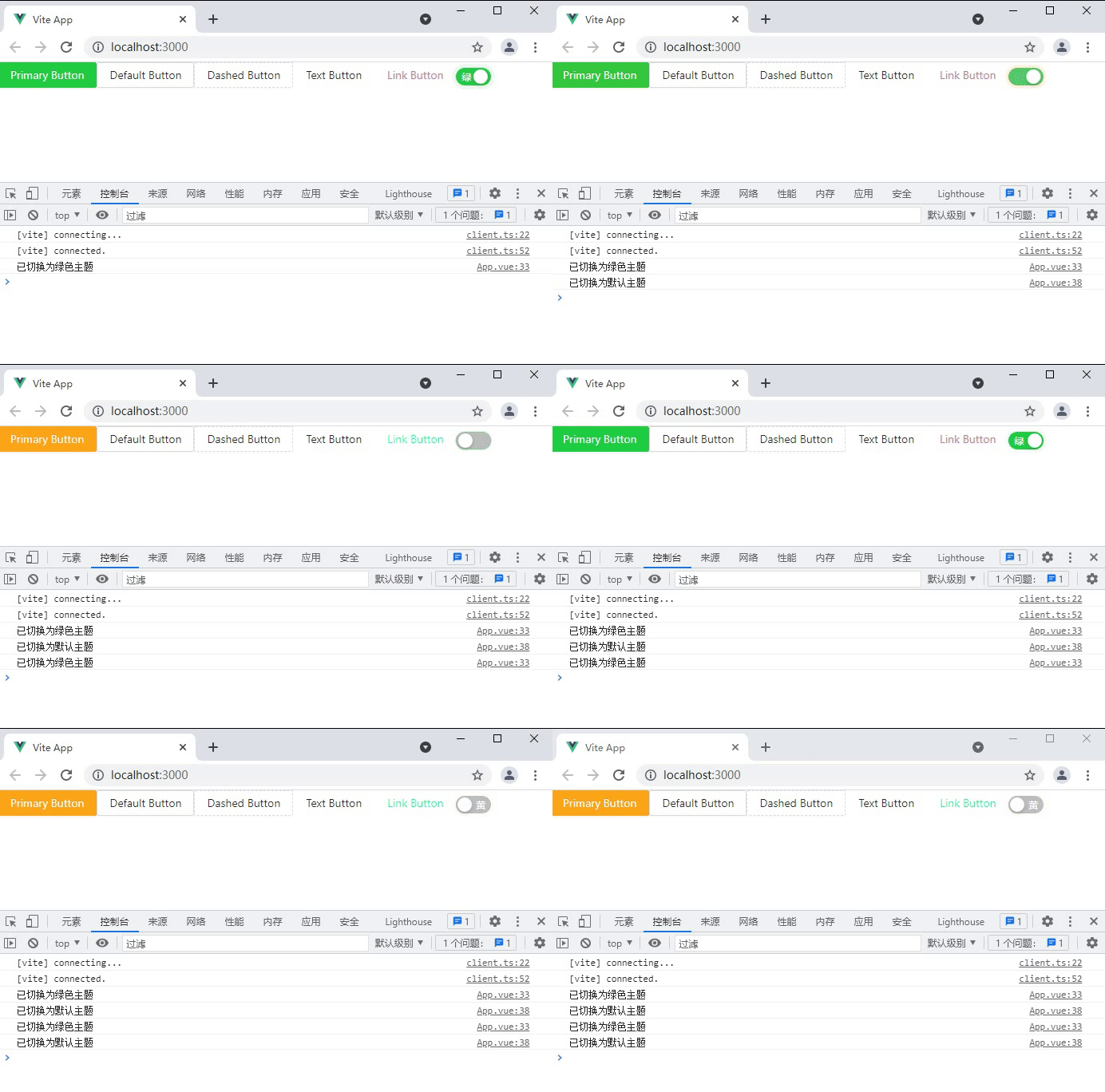
我们逻辑比较简单,我使用一个开关,打开是绿色,关闭是黄色。
在App.vue中
<template>
  <a-button type="primary">Primary Button</a-button>
  <a-button>Default Button</a-button>
  <a-button type="dashed">Dashed Button</a-button>
  <a-button type="text">Text Button</a-button>
  <a-button type="link">Link Button</a-button>

  <!-- 开关切换主题 -->
  <a-switch
    v-model:checked="checked"
    checked-children="绿"
    un-checked-children="黄"
    @change="change"
  />
</template>

<script lang="ts">
import { defineComponent, ref } from "vue";

import { toggleTheme } from "@zougt/vite-plugin-theme-preprocessor/dist/browser-utils.js";

export default defineComponent({
  setup() {
    const checked = ref<boolean>(false);

    // 切换主题回调
    const change = (value: boolean) => {
      // 如果开关打开,就切换为绿色主题,否则默认黄色主题
      if (value) {
        toggleTheme({
          scopeName: "theme-green",
        });
        console.log("已切换为绿色主题");
      } else {
        toggleTheme({
          scopeName: "theme-default",
        });
        console.log("已切换为默认主题");
      }
    };
    return {
      checked,
      change,
    };
  },
});
</script>
注意:如果你引入插件的时候报错了,但其实这并不是错,你需要关闭ts的严格检查模式。也就是在tsconfig.json中
"strict": false,
 然后注意,这时候切换主题发现是无效的。
还记得你在vite.config.ts中自定义的主题吗,将其删掉或注释掉,因为它的优先级比较高。
 css: {
  preprocessorOptions: {
    less: {
      // modifyVars: {
      //   'primary-color': '#1DA57A',
      //   'link-color': '#1DA57A',
      //   'border-radius-base': '2px',
      // },
      javascriptEnabled: true
    }
  }
}
这时候,我们片头的效果就出来了。
本回答被题主选为最佳回答 , 对您是否有帮助呢?解决 无用评论 打赏举报 分享
分享- 这篇博客: ant-design-vue+vite主题切换详细步骤(简单案例)中的 3、动态切换主题 部分也许能够解决你的问题, 你可以仔细阅读以下内容或跳转源博客中阅读:
- 2021-07-22 11:57在本文中,我们将深入探讨如何在Windows Presentation Foundation (WPF) 应用程序中实现“动态语言和主题切换”的功能。这一技术对于构建全球化、本地化的应用至关重要,它允许用户根据自己的偏好选择显示的语言和...
- 2024-10-14 16:28配色主题是易语言软件中的一个功能,允许用户根据个人喜好更改软件界面的颜色组合。这种功能不仅可以提升用户体验,还能帮助减少视觉疲劳,让长时间编程的开发者感到更加舒适。在不同主题的配色下,易语言的代码编辑...
- 2020-09-19 17:22下面,我们将详细介绍如何在PyCharm中更改界面主题颜色。 首先,打开PyCharm,进入主界面。点击顶部菜单栏中的“File”(在MacOS系统中是“PyCharm”),然后选择“Preferences”(在MacOS中是“Settings”)。这将...
- 2020-10-15 09:27Vue + Scss 动态切换主题颜色实现换肤的示例代码主要讲解了如何使用Vue框架配合Scss预处理器来实现前端主题动态切换的功能。这个过程主要通过修改HTML元素的data-theme属性值,使用Scss变量来根据不同主题应用不同的...
- 2022-04-01 21:18R语言是一种流行的编程语言,广泛应用于数据分析、科学计算和数据可视化等领域。其中,ggthemes包是R语言中一个功能强大且实用的数据可视化包,提供了多种绘图主题风格供用户选择和应用。 ggthemes包的主要功能是...
- 2023-02-08 14:44点阵动态程序代码汇编语言是计算机科学中的一个重要领域,涉及到低级编程和硬件交互的细节。汇编语言是一种符号化的机器语言,每个指令都直接对应于计算机的机器码,使得程序员可以更直观地控制硬件资源。在这个主题...
- 2023-09-21 08:06`IntelliJ IDEA` 是一款广受欢迎的集成开发环境(IDE),尤其在 Java 开发者中备受推崇,但其实它也支持多种其他编程语言,如 Python、JavaScript、Go 等。这些主题不仅适用于 IntelliJ IDEA,还能应用于其他支持...
- 2023-04-02 16:40在"LabView图形化编程语言之多控件表格"这个主题中,我们将深入探讨LabView如何利用多控件表格进行数据处理和显示。 首先,让我们了解什么是多控件表格。在LabView中,表格控件是一种用于显示和编辑数据的用户界面...
- 2022-09-24 08:58本资源“OpenGL.rar”包含的是OpenGL的源码解析和编程语言的学习资料,特别关注了图像变形这一主题,这对于游戏开发、可视化应用以及任何需要动态图形处理的领域都至关重要。 1. **OpenGL基础知识**:OpenGL是一个...
- 2022-12-01 12:08【网页编程语言学习第10章】:这个标题暗示了我们即将探讨的是关于网页编程的某个特定章节,即第10章。在网页编程的学习过程中,每一章通常涵盖不同的主题,如HTML、CSS、JavaScript、AJAX等。第10章可能涉及前端...
- 没有解决我的问题, 去提问

问题事件
 系统已结题
6月22日
系统已结题
6月22日 已采纳回答
6月14日
已采纳回答
6月14日-
创建了问题
11月21日