
问题遇到的现象和发生背景
部署 Django+Python+Nginx+uwsgi web服务器
遇到的现象和发生背景,请写出第一个错误信息
用http://www.beeshot.cn 访问时
浏览器报错 502

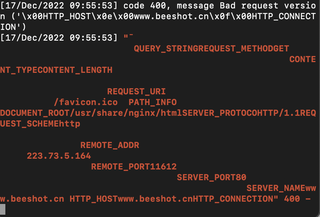
服务器端报错 400
用代码块功能插入代码,请勿粘贴截图。 不用代码块回答率下降 50%
附上 nginx和uwsgi配置
nginx.conf
Last login: Sat Dec 17 17:45:54 on ttys000
paulyip@192 ~ % ssh root@120.78.133.175
root@120.78.133.175's password:
Welcome to Ubuntu 22.04.1 LTS (GNU/Linux 5.15.0-52-generic x86_64)

 * Documentation:  https://help.ubuntu.com
 * Management:     https://landscape.canonical.com
 * Support:        https://ubuntu.com/advantage

  System information as of Sat Dec 17 05:51:20 PM CST 2022

  System load:  0.00341796875     Processes:             119
  Usage of /:   8.0% of 39.01GB   Users logged in:       1
  Memory usage: 24%               IPv4 address for eth0: 172.17.94.248
  Swap usage:   0%

 * Strictly confined Kubernetes makes edge and IoT secure. Learn how MicroK8s
   just raised the bar for easy, resilient and secure K8s cluster deployment.

   https://ubuntu.com/engage/secure-kubernetes-at-the-edge

43 updates can be applied immediately.
29 of these updates are standard security updates.
To see these additional updates run: apt list --upgradable


Welcome to Alibaba Cloud Elastic Compute Service !

Last login: Sat Dec 17 17:46:05 2022 from 223.73.5.164
root@BeeShotTest:~# cd /var/www
root@BeeShotTest:/var/www# source datavis/bin/activate
(datavis) root@BeeShotTest:/var/www# cd /
(datavis) root@BeeShotTest:/# ls
bin   dev  home  lib32  libx32      media  opt   root  sbin  srv  tmp  var
boot  etc  lib   lib64  lost+found  mnt    proc  run   snap  sys  usr  wwwroot
(datavis) root@BeeShotTest:/# cd /wwwroot/
(datavis) root@BeeShotTest:/wwwroot# cd djangoProject1/
(datavis) root@BeeShotTest:/wwwroot/djangoProject1# ls
db.sqlite3  djangoProject1  manage.py  templates
(datavis) root@BeeShotTest:/wwwroot/djangoProject1# python3 manage.py runserver 0.0.0.0:8000
Watching for file changes with StatReloader
Performing system checks...

System check identified no issues (0 silenced).

You have 18 unapplied migration(s). Your project may not work properly until you apply the migrations for app(s): admin, auth, contenttypes, sessions.
Run 'python manage.py migrate' to apply them.
December 17, 2022 - 09:53:25
Django version 4.1.4, using settings 'djangoProject1.settings'
Starting development server at http://0.0.0.0:8000/
Quit the server with CONTROL-C.
Error: That port is already in use.
(datavis) root@BeeShotTest:/wwwroot/djangoProject1# sudo systemctl start nginx
(datavis) root@BeeShotTest:/wwwroot/djangoProject1# python3 manage.py runserver 0.0.0.0:8000
Watching for file changes with StatReloader
Performing system checks...

System check identified no issues (0 silenced).

You have 18 unapplied migration(s). Your project may not work properly until you apply the migrations for app(s): admin, auth, contenttypes, sessions.
Run 'python manage.py migrate' to apply them.
December 17, 2022 - 09:53:51
Django version 4.1.4, using settings 'djangoProject1.settings'
Starting development server at http://0.0.0.0:8000/
Quit the server with CONTROL-C.
Error: That port is already in use.
(datavis) root@BeeShotTest:/wwwroot/djangoProject1# sudo systemctl start nginx
(datavis) root@BeeShotTest:/wwwroot/djangoProject1# python3 manage.py runserver 0.0.0.0:8000
Watching for file changes with StatReloader
Performing system checks...

System check identified no issues (0 silenced).

You have 18 unapplied migration(s). Your project may not work properly until you apply the migrations for app(s): admin, auth, contenttypes, sessions.
Run 'python manage.py migrate' to apply them.
December 17, 2022 - 09:54:09
Django version 4.1.4, using settings 'djangoProject1.settings'
Starting development server at http://0.0.0.0:8000/
Quit the server with CONTROL-C.
Error: That port is already in use.
(datavis) root@BeeShotTest:/wwwroot/djangoProject1# sudo fuser -k 8000/tcp
8000/tcp:             7289
(datavis) root@BeeShotTest:/wwwroot/djangoProject1# python3 manage.py runserver 0.0.0.0:8000
Watching for file changes with StatReloader
Performing system checks...

System check identified no issues (0 silenced).

You have 18 unapplied migration(s). Your project may not work properly until you apply the migrations for app(s): admin, auth, contenttypes, sessions.
Run 'python manage.py migrate' to apply them.
December 17, 2022 - 09:54:47
Django version 4.1.4, using settings 'djangoProject1.settings'
Starting development server at http://0.0.0.0:8000/
Quit the server with CONTROL-C.
[17/Dec/2022 09:54:59] code 400, message Bad request version ('\x00HTTP_HOST\x0e\x00www.beeshot.cn\x0f\x00HTTP_CONNECTION')
[17/Dec/2022 09:54:59] "ü
                         QUERY_STRINGREQUEST_METHODGET
                                                      CONTENT_TYPECONTENT_LENGTH
                                                                               RDOCUMENT_ROOT/usr/share/nginx/htmlSERVER_PROTOCOHTTP/1.1REQUEST_SCHEMEhttp
                                                                          REMOTE_ADDR
     223.73.5.164
                 REMOTE_PORT11612
                                 SERVER_PORT80
                                              SERVER_NAMEwww.beeshot.cn    HTTP_HOSTwww.beeshot.cnHTTP_CONNECTION" 400 -
[17/Dec/2022 09:55:00] code 400, message Bad request version ('\x00HTTP_HOST\x0e\x00www.beeshot.cn\x0f\x00HTTP_CONNECTION')
[17/Dec/2022 09:55:00] "¯
                         QUERY_STRINGREQUEST_METHODGET
                                                      CONTENT_TYPECONTENT_LENGTH
                                                                               REQUEST_URI
          /favicon.ico    PATH_INFO
DOCUMENT_ROOT/usr/share/nginx/htmlSERVER_PROTOCOHTTP/1.1REQUEST_SCHEMEhttp
                                                                          REMOTE_ADDR
     223.73.5.164
                 REMOTE_PORT11612
                                 SERVER_PORT80
                                              SERVER_NAMEwww.beeshot.cn    HTTP_HOSTwww.beeshot.cnHTTP_CONNECTION" 400 -
[17/Dec/2022 09:55:13] "GET / HTTP/1.1" 200 10681
[17/Dec/2022 09:55:53] code 400, message Bad request version ('\x00HTTP_HOST\x0e\x00www.beeshot.cn\x0f\x00HTTP_CONNECTION')
[17/Dec/2022 09:55:53] "Ý
                         QUERY_STRINGREQUEST_METHODGET
                                                      CONTENT_TYPECONTENT_LENGTH
                                                                               RDOCUMENT_ROOT/usr/share/nginx/htmlSERVER_PROTOCOHTTP/1.1REQUEST_SCHEMEhttp
                                                                          REMOTE_ADDR
     223.73.5.164
                 REMOTE_PORT11612
                                 SERVER_PORT80
                                              SERVER_NAMEwww.beeshot.cn    HTTP_HOSTwww.beeshot.cnHTTP_CONNECTION" 400 -
[17/Dec/2022 09:55:53] code 400, message Bad request version ('\x00HTTP_HOST\x0e\x00www.beeshot.cn\x0f\x00HTTP_CONNECTION')
[17/Dec/2022 09:55:53] "¯
                         QUERY_STRINGREQUEST_METHODGET
                                                      CONTENT_TYPECONTENT_LENGTH
                                                                               REQUEST_URI
          /favicon.ico    PATH_INFO
DOCUMENT_ROOT/usr/share/nginx/htmlSERVER_PROTOCOHTTP/1.1REQUEST_SCHEMEhttp
                                                                          REMOTE_ADDR
     223.73.5.164
                 REMOTE_PORT11612
                                 SERVER_PORT80
                                              SERVER_NAMEwww.beeshot.cn    HTTP_HOSTwww.beeshot.cnHTTP_CONNECTION" 400 -
^C(datavis) root@BeeShotTest:/wwwroot/djangoProject1# cd /etc/nginx/
(datavis) root@BeeShotTest:/etc/nginx# ls
conf.d          koi-utf            modules-enabled  sites-available  win-utf
datavis.ini     koi-win            nginx.conf       sites-enabled
fastcgi.conf    mime.types         proxy_params     snippets
fastcgi_params  modules-available  scgi_params      uwsgi_params
(datavis) root@BeeShotTest:/etc/nginx# vim nginx.conf

user www-data;
worker_processes auto;
pid /run/nginx.pid;
include /etc/nginx/modules-enabled/*.conf;

events {
        worker_connections 768;
        # multi_accept on;
}

http {
server {
                listen 80;
                server_name www.beeshot.cn;
                charset utf-8;
                set $URL  $scheme://$http_host$request_uri;
                #location /static {
                #       alias /var/www/datavis/mysite/wareHouse/static;
                #}

                location / {
                        uwsgi_pass 127.0.0.1:8000;
                        include /etc/nginx/uwsgi_params;
                }
        }


        # Basic Settings
        ##

        sendfile on;
        tcp_nopush on;
        types_hash_max_size 2048;
        # server_tokens off;

        # server_names_hash_bucket_size 64;
        # server_name_in_redirect off;

        include /etc/nginx/mime.types;
        default_type application/octet-stream;

        ##
        # SSL Settings
        ##
"nginx.conf" 97L, 1755B                                       14,28-42      Top
uwsgi.ini
[uwsgi]
chdir=/wwwroot/djangoProject1
module=mysite.wsgi:djangoProject1
master=True
pidfile=/tmp/project-master.pid
vacuum=True
max-requests=5000
daemonize=/var/log/uwsgi/yourproject.log
socket=127.0.0.1:8000
home=/var/www/datavis
py-autoreload = 1
运行结果及详细报错内容
浏览器输入 IP:8000 页面正常
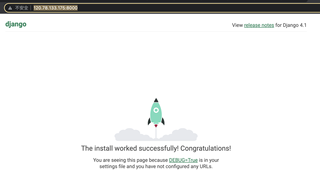
浏览器输入 IP:80

我的解答思路和尝试过的方法,不写自己思路的,回答率下降 60%
IP+80端口 显示nginx页面
故判断为配置问题
我想要达到的结果,如果你需要快速回答,请尝试 “付费悬赏”
域名访问时,能正常显示 IP:8000时的页面
支持http和https


