想要利用mathgl绘制出一个带有凸包的圆环,其中圆环的整体颜色一样,凸包的颜色与凸包上的点到圆环上面的距离有关。如下图二所示。所拥有的条件是该圆环的半径厚度,以及一个二维数组用于绘制凸包。如图1所示。
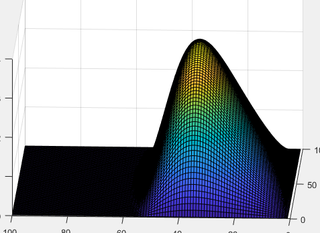
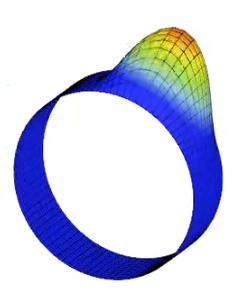

想要利用mathgl绘制出一个带有凸包的圆环,其中圆环的整体颜色一样,凸包的颜色与凸包上的点到圆环上面的距离有关。如下图二所示。所拥有的条件是该圆环的半径厚度,以及一个二维数组用于绘制凸包。如图1所示。
 分享
分享
 关注
关注方案来自 梦想橡皮擦 狂飙组基于 GPT 编写的 “程秘”
使用MathGL库中的mglGraph类实现这一功能。
using System;
using MathGL;

namespace MathGLExample
{
    class Program
    {
        static void Main(string[] args)
        {
            int radius = 10;
            int thickness = 2;
            int[,] convexHullData = new int[,] { { 1, 2 }, { 3, 4 }, { 5, 6 } };

            var graph = new mglGraph();
            graph.Ring(0, 0, radius, thickness);

            for (int i = 0; i < convexHullData.GetLength(0); i++)
            {
                int x = convexHullData[i, 0];
                int y = convexHullData[i, 1];
                double distance = Math.Sqrt(x * x + y * y);

                graph.SetColor(distance / radius, "g");
                graph.Ball(x, y, distance / 10);
            }

            graph.WritePNG("ring_with_convex_hull.png");
        }
    }
}
在这个示例中,我们使用了Ring方法绘制圆环,并使用一个二维数组绘制凸包。
关于凸包的绘制颜色,我们使用了一个简单的计算方式:将凸包上的点与圆环上的距离除以圆环的半径。
最后,我们使用了WritePNG方法将图形输出为PNG格式。
分享 创建了问题
2月7日
创建了问题
2月7日


