
使用python建模贴图出现贴图贴不上的问题
先说明BIMBase安装的路径我是在D盘下的,事情缘由是我想用BIMBase库里面的贴图,翻到BIMBase Python参数化组件库手册里面正好看到有使用python贴图的方法
示例代码如下
# 定义参数化模型
class 长方体(Component):
 # 定义各个参数及其默认值
 def __init__(self):
   Component.__init__(self)
   self['长'] = Attr(1000, obvious = True, combo = [500,1000,2000,3000,4000])
   self['宽'] = Attr(300.0, obvious = True)
   self['高'] = Attr(500, obvious = True)
   self['长方体'] = Attr(None, show = True)
   self.replace()
 @export
  # 模型造型
 def replace(self):
   # 设置变量,同时调用参数(简化书写过程)

   L = self['长']
   W = self['宽']
   H = self['高']
 # 绘制模型
   TestCube = scale(L,W,H) * Cube()
   self['长方体'] = TestCube
   self['长方体'].material('M8')

# 输出模型
if __name__ == "__main__":
  mt3 = create_material('M8', mapMode = 5, mapUnit = 0, uvScale = [1,1],
  wRotation = 0)
 mt3.mapFile = R'C:\Users\PKPM\Pictures\BIMBase 图标.png'
 FinalGeometry = 长方体()
  place(FinalGeometry)
最后呈现的效果是

我按照实例的方法照着写
代码如下
from pyp3d import *
class 椅子(Component):
    def __init__(self):
        Component.__init__(self)
        # 绘制模型参数
        self['H'] = Attr(840,obvious=True)
        self['W'] = Attr(500,obvious=True)
        self['L'] = Attr(520,obvious=True)
        self['椅子'] = Attr(None,show=True)
        self.replace()
    @export
    def replace(self):
        # 绘制模型
        H = self['H']
        W = self['W']
        L = self['L']
        r = 100
        R = 50

        背靠1 = Ellipse(Vec3(-410/2,0,380/2),Vec3(r,0,0),Vec3(0,0,r),pi/2,pi/2)
        背靠2 = Ellipse(Vec3(-410/2,0,-380/2),Vec3(r,0,0),Vec3(0,0,r),pi,pi/2)
        背靠3 = Ellipse(Vec3(410/2,0,-380/2),Vec3(r,0,0),Vec3(0,0,r),pi/2*3,pi/2)
        背靠4 = Ellipse(Vec3(410/2,0,380/2),Vec3(r,0,0),Vec3(0,0,r),0,pi/2)
        背靠 = ContourLine([背靠1,背靠2,背靠3,背靠4])
        背靠 = ExtrusionPlus([背靠],Vec3(0,10,0))

        背靠支住1 =Cone(Vec3(-250,0,-500/2),Vec3(250,0,-500/2),R)
        背靠支住2 =Cone(Vec3(-250,-10,-520/2),Vec3(250,-10,-520/2),R)
        背靠支住3 =Cone(Vec3(-300,-10,-520/2),Vec3(300,-10,-520/2),20)
        背靠支住 = trans(0,190,-190) * rotx(-0.35*pi) * (背靠支住1 - 背靠支住2)
        背靠支住 = 背靠支住-背靠支住3

        座垫1 = Ellipse(Vec3(-500/2,-100,-350),Vec3(R,0,0),Vec3(0,R,0),pi/2,pi/2)
        座垫2 = Ellipse(Vec3(-500/2,-500,-350),Vec3(R,0,0),Vec3(0,R,0),pi,pi/2)
        座垫3 = Ellipse(Vec3(500/2,-500,-350),Vec3(R,0,0),Vec3(0,R,0),pi/2*3,pi/2)
        座垫4 = Ellipse(Vec3(500/2,-100,-350),Vec3(R,0,0),Vec3(0,R,0),0,pi/2)
        座垫 = ContourLine([座垫1,座垫2,座垫3,座垫4])
        座垫 = trans(0,0,5) * ExtrusionPlus([座垫],Vec3(0,0,-10))

        左桌脚 = FilletPipe([Vec3(-550/2,-50,-700),Vec3(-500/2,-100,-370),Vec3(-500/2,-500,-370),Vec3(-550/2,-550,-700)],[0,40,40,0],20)
        右桌脚 = FilletPipe([Vec3(550/2,-50,-700),Vec3(500/2,-100,-370),Vec3(500/2,-500,-370),Vec3(550/2,-550,-700)],[0,40,40,0],20)
        self['椅子'] = Combine(背靠+背靠支住,座垫,左桌脚,右桌脚)
        self['椅子'].material('M1')

# 生成模型
if __name__ == "__main__":
    mt3 = create_material('M1',mapMode = 0,mapUnit = 0, uvScale = [1,1],
    wRotation = 0)
    mt3.mapFile = 'D:\BIMBase\BIMBase建模软件-2023\Support\Chart\木材02.jpg'
    place(椅子())
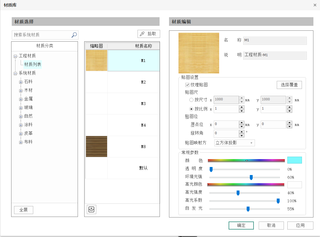
原本想要实现的效果如下(这是通过BIMBase软件的贴图库实现的效果,也是理想的状态)

最后呈现的效果如下,跟没有贴图一样

也就是说说,那个create_material()函数失效了,但函数生效的位置是在材质库里面
请问如何解决,通过python建模贴图直接贴到模型上面而不是通过软件的贴图完成模型渲染


