以前写了个通过ftl文件模板生成word,java输出word代码已经写好,现在就是富文本如何放进去显示,富文本参数如下(content)
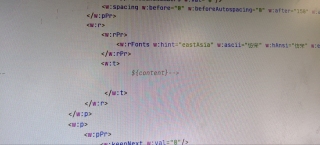

以前写了个通过ftl文件模板生成word,java输出word代码已经写好,现在就是富文本如何放进去显示,富文本参数如下(content)
 分享
分享参考GPT和自己的思路:以下是一个简单的Java示例代码,用于将富文本数据写入FTL文件。
import java.io.File;
import java.io.FileWriter;
import java.io.IOException;
import java.util.HashMap;
import java.util.Map;

import org.apache.commons.io.IOUtils;

import freemarker.template.Configuration;
import freemarker.template.Template;
import freemarker.template.TemplateException;

public class RichTextToFTL {

    public static void main(String[] args) throws IOException, TemplateException {
        // 读取FTL模板文件
        Configuration cfg = new Configuration(Configuration.VERSION_2_3_31);
        cfg.setClassForTemplateLoading(RichTextToFTL.class, "/");
        Template template = cfg.getTemplate("template.ftl");

        // 准备数据
        Map<String, Object> data = new HashMap<String, Object>();
        data.put("title", "富文本数据写入FTL文件示例");
        data.put("richText", "<p>这是一个包含富文本的字符串。</p>");

        // 渲染模板并输出到文件
        FileWriter fileWriter = new FileWriter(new File("output.ftl"));
        template.process(data, fileWriter);
        fileWriter.close();
    }

}
在上面的示例代码中,我们使用了FreeMarker模板引擎来渲染FTL模板文件。首先,我们通过Configuration类设置了模板加载路径,然后通过getTemplate()方法获取模板文件。接下来,我们准备了一个包含富文本数据的Map对象,其中包含了标题和富文本内容。最后,我们使用process()方法渲染模板并将输出写入到文件中。
在FTL模板文件中,您可以使用<#assign>指令将富文本内容保存到一个变量中,例如:
<html>
<head>
    <title>${title}</title>
</head>
<body>
    <#assign richTextVar>${richText}</#assign>
    ${richTextVar}
</body>
</html>
在这个例子中,我们使用<#assign>指令将richText变量中的富文本内容保存到richTextVar变量中,并使用${richTextVar}输出富文本内容。
当然,这只是一个简单的例子,您可以根据自己的需求修改代码和模板文件。
分享 系统已结题
3月18日
系统已结题
3月18日 已采纳回答
3月10日
修改了问题
3月10日
修改了问题
3月9日
已采纳回答
3月10日
修改了问题
3月10日
修改了问题
3月9日


