
vue中,如何实现给搜索出来的内容,单独的文字加上高亮,如下图所示
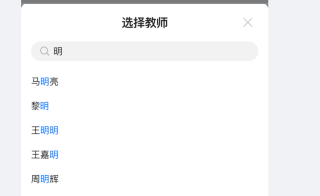

vue中,如何实现给搜索出来的内容,单独的文字加上高亮,如下图所示
 分享
分享 参考GPT的回答和自己的思路,vue中,如何实现这个搜索出来的的内容加上高亮代码如下所示:
<template>
  <div>
    <input v-model="keyword" placeholder="搜索...">
    <ul>
      <li v-for="item in searchResult" :key="item.id">
        <span v-html="highlightKeyword(item.title)"></span>
      </li>
    </ul>
  </div>
</template>

<script>
export default {
  data() {
    return {
      keyword: '',
      items: [
        { id: 1, title: 'Vue.js is a progressive JavaScript framework' },
        { id: 2, title: 'Vue.js makes building complex web applications a breeze' },
        { id: 3, title: 'Vue.js is easy to learn and use' }
      ]
    }
  },
  computed: {
    searchResult() {
      if (!this.keyword) {
        return this.items
      }
      const pattern = new RegExp(this.keyword, 'gi')
      return this.items.filter(item => item.title.match(pattern))
    }
  },
  methods: {
    highlightKeyword(title) {
      if (!this.keyword) {
        return title
      }
      const pattern = new RegExp(this.keyword, 'gi')
      const matched = title.match(pattern)
      if (!matched) {
        return title
      }
      const highlighted = title.replace(pattern, `<span class="highlight">${matched[0]}</span>`)
      return highlighted
    }
  }
}
</script>

<style>
.highlight {
  background-color: yellow;
  color: black;
}
</style>
以下是实现代码的完整思路,可以帮助您理解,
1.首先,在模板中定义一个用于展示搜索结果的列表:
<ul>
  <li v-for="item in searchResult" :key="item.id">
    <span v-html="highlightKeyword(item.title)"></span>
  </li>
</ul>
2.在Vue实例中定义一个方法highlightKeyword,该方法接收一个字符串参数,用于将关键字高亮显示。该方法的实现如下:
methods: {
  highlightKeyword(title) {
    if (!this.keyword) {
      return title
    }
    const pattern = new RegExp(this.keyword, 'gi')
    const matched = title.match(pattern)
    if (!matched) {
      return title
    }
    const highlighted = title.replace(pattern, `<span class="highlight">${matched[0]}</span>`)
    return highlighted
  }
}
在上述代码中,首先判断keyword是否存在,如果不存在则返回原始字符串title。如果keyword存在,则使用正则表达式创建一个不区分大小写的匹配模式,然后在title中查找匹配的关键字,并将其用标签包裹起来,同时为该标签添加highlight类,以便后续可以在样式表中为它设置高亮效果。
3.最后,在样式表中定义highlight类的样式,用于将高亮文本呈现为黄色背景、黑色文字:
.highlight {
  background-color: yellow;
  color: black;
}
回答不易,还请采纳!!!
分享 系统已结题
3月22日
系统已结题
3月22日 已采纳回答
3月14日
创建了问题
3月10日
已采纳回答
3月14日
创建了问题
3月10日


