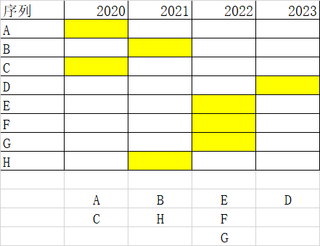
,这个怎么通过条件格式实现单元格颜色的变化,应该看的很清楚的吧,如有问题,请跟帖,歇歇。

 分享
分享
Function FindStringInFirstColumn(str As String) As Integer
    Dim ws As Worksheet
    Dim lastRow As Integer
    Dim i As Integer

    Set ws = ThisWorkbook.Sheets("Sheet1") '修改为你的工作表名称

    lastRow = ws.Cells(Rows.Count, 1).End(xlUp).Row

    For i = 1 To lastRow
        If ws.Cells(i, 1).Value = str Then
            FindStringInFirstColumn = i
            Exit Function
        End If
    Next i

    FindStringInFirstColumn = -1
End Function

Sub 宏1()
'
' 宏1 宏
'

'
    For i = 10 To 20
        For j = 1 To 10
            If FindStringInFirstColumn(Cells(i, j).Value & "") > 0 Then
                Cells(FindStringInFirstColumn(Cells(i, j).Value & ""), j).Select

                With Selection.Interior
                    .Pattern = xlSolid
                    .PatternColorIndex = xlAutomatic
                    .Color = 65535
                    .TintAndShade = 0
                    .PatternTintAndShade = 0
                End With
            End If
        Next
    Next
End Sub
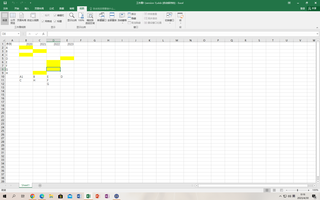
运行效果
序列    2020    2021    2022    2023
A
B
C
D
E
F
G
H
    A    B    E    D
    C    H    F
            G
 系统已结题
5月13日
系统已结题
5月13日 已采纳回答
5月5日
已采纳回答
5月5日 请采纳用户回复
5月2日
创建了问题
4月29日
请采纳用户回复
5月2日
创建了问题
4月29日


