快乐打码 2023-05-01 17:22 采纳率: 69%
浏览 30
已结题

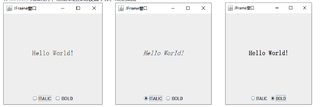
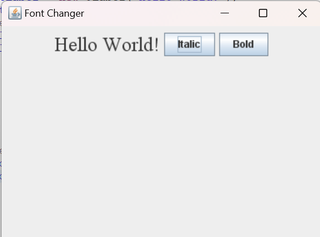
想实现图1的功能,但目前是图二的样子,要怎么改才可以改成图1的样子

img

package test1;

import java.awt.Font;
import java.awt.event.ActionEvent;
import java.awt.event.ActionListener;
import javax.swing.JButton;
import javax.swing.JFrame;
import javax.swing.JLabel;
import javax.swing.JPanel;

public class test5 extends JFrame {

    private JLabel textLabel;
    private JButton italicButton;
    private JButton boldButton;

    public test5() {
        setTitle("Font Changer");
        setSize(400, 300);
        setLocationRelativeTo(null);
        setDefaultCloseOperation(EXIT_ON_CLOSE);
        JPanel panel = new JPanel();
        textLabel = new JLabel("Hello World!");
        textLabel.setFont(new Font("Serif", Font.PLAIN, 24));
        panel.add(textLabel);
        italicButton = new JButton("Italic");
        italicButton.addActionListener(new ActionListener() {
            @Override
            public void actionPerformed(ActionEvent e) {
                
                Font font = textLabel.getFont().deriveFont(Font.ITALIC);
                textLabel.setFont(font);
            }
        });
        panel.add(italicButton);
        boldButton = new JButton("Bold");
        boldButton.addActionListener(new ActionListener() {
            @Override
            public void actionPerformed(ActionEvent e) { 
                Font font = textLabel.getFont().deriveFont(Font.BOLD);
                textLabel.setFont(font);
            }
        });
        panel.add(boldButton);
        add(panel);
    }

    public static void main(String[] args) {
            test5 fontChanger = new test5();
            fontChanger.setVisible(true);
    }
}

img

  • 写回答

2条回答 默认 最新

  • 创意程序员 2023-05-01 17:43
    关注

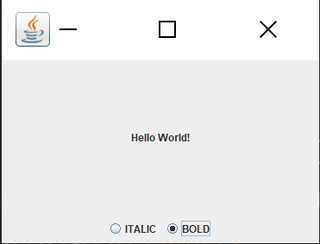
    程序修改如下:

    import javax.swing.*;
    import java.awt.*;
    import java.awt.event.ActionEvent;
    import java.awt.event.ActionListener;
    
    public class JFrame1 extends JFrame implements ActionListener {
    
        private JLabel textLabel;
        private JRadioButton italicButton;
        private JRadioButton boldButton;
    
        public JFrame1() {
            super("Font Changer");
            setSize(400, 300);
            // 创建面板和标签
            JPanel panel = new JPanel(new BorderLayout());
            textLabel = new JLabel("Hello World!", JLabel.CENTER);
            panel.add(textLabel, BorderLayout.CENTER);
    
            // 创建按钮组和单选按钮,并添加到面板中
            ButtonGroup buttonGroup = new ButtonGroup();
            italicButton = new JRadioButton("ITALIC");
            italicButton.addActionListener(this);
            buttonGroup.add(italicButton);
            boldButton = new JRadioButton("BOLD");
            boldButton.addActionListener(this);
            buttonGroup.add(boldButton);
            JPanel buttonPanel = new JPanel();
            buttonPanel.add(italicButton);
            buttonPanel.add(boldButton);
            panel.add(buttonPanel, BorderLayout.SOUTH);
    
            // 将面板添加到窗口中,并设置窗口居中显示
            add(panel);
            setLocationRelativeTo(null);
        }
    
        public void actionPerformed(ActionEvent e) {
            // 根据单选按钮的状态设置标签字体样式
            Font font = textLabel.getFont();
            if (italicButton.isSelected()) {
                font = font.deriveFont(Font.ITALIC);
            } else if (boldButton.isSelected()) {
                font = font.deriveFont(Font.BOLD);
            } else {
                font = font.deriveFont(Font.PLAIN);
            }
            textLabel.setFont(font);
        }
    
        public static void main(String[] args) {
            JFrame1 fontChanger = new JFrame1();
            fontChanger.setVisible(true);
        }
    }
    

    img

    本回答被题主选为最佳回答 , 对您是否有帮助呢?
    评论 编辑记录
查看更多回答(1条)

报告相同问题?

问题事件

  • 系统已结题 5月17日
  • 已采纳回答 5月9日
  • 创建了问题 5月1日