
最近厂里要拓展市场,要研究i3e2030.5,全英文的接口文档一脸懵逼,第二个接口就遇到难题无法通过,不知道这里是否有了解这个协议的人,先把问题描述以下:
1 文档,主要是向服务器发送一个https请求,tls1.2协议,需要用到TLS_ECDHE_ECDSA_WITH_AES_128_CCM_8 密码套间,握手成功接口就算通过了。
COMM-003 - Basic Security [C,A,S]
Purpose
Verify ability to connect to server using HTTPS and IEEE 2030.5 permissible cypher suite.
The basic security test verifies that the Client can correctly communicate with an IEEE 2030.5
server using basic security requirements. For example, the HTTPS, TLS 1.2,
TLS_ECDHE_ECDSA_WITH_AES_128_CCM_8 cipher suite. TLS authentications are tested
based on requirements specified in the IEEE 2030.5 Application Protocol Specification.
Setup
- Server and Client support the TLS based HTTP communication as specified in the
Requirements, including the use of mandatory TLS_ECDHE_ECDSA_WITH
_AES_128_CCM_8 cipher suite. - Server is configured to use either the default TLS port (443) or another port. Client is
configured to use the supported TLS port and IP address from the Server. - Client can send and receive TLS based HTTPS messages as specified in the
requirements, including the use of mandatory TLS_ECDHE_ECDSA_WITH
_AES_128_CCM_8 cipher suite.
Procedure - [T] Record the Client/Server communications.
- [C] Using the known IP address, port number, and DeviceCapability URI, send a
TLS based HTTP GET request to the Server. - [S] Successfully receive the TLS based HTTP GET request and respond with the
DeviceCapability resource payload through the TLS port number.
Pass/Fail Criteria
• [C] The Client successfully established a TLS HTTP session by conforming to the
requirements specified in RFC 5246, section 7.4. Verify by inspecting the TLS packets,
including verification that TLS_ECDHE_ECDSA_WITH _AES_128_CCM_8 cipher suite
was used. Successfully sent a TLS based HTTP GET request to the Server
DeviceCapability resource using the known IP address, port number, and
DeviceCapability URI.
• [S] Server successfully established a TLS HTTP session by conforming to the
requirements specified in RFC 5246, section 7.4. Verify by inspecting the TLS packets,
including verification that TLS_ECDHE_ECDSA_WITH _AES_128_CCM_8 cipher suite
was used. Successfully received the TLS based HTTP GET request and responded with
the DeviceCapability resource payload as the HTTP GET response.
2 开启一个测试软件的服务端,是qualityLogic,设置如下
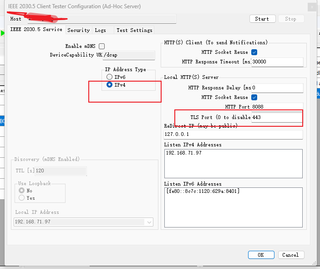
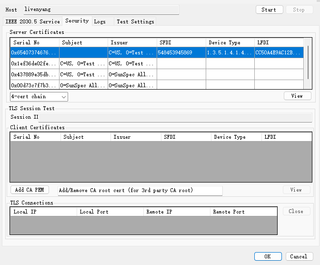
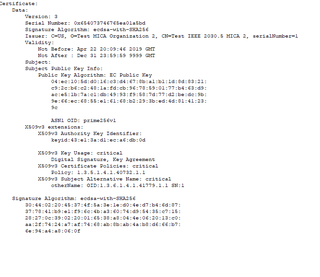
设置完以后开启一个测试,服务端就开始监听请求

3 用postman发起请求
设置如下
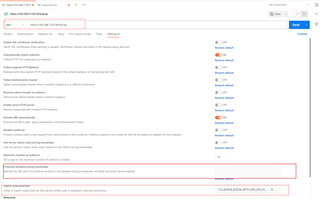
主要就是输入地址 设置tls版本 和 加入 密码套件 ,tls那里因为是排除就不做选择,套件选择文档中提到的TLS_ECDHE_ECDSA_WITH_AES_128_CCM_8
发起请求后reponse提示以下握手错误:
Error: write EPROTO 67057928:error:10000410:SSL routines:OPENSSL_internal:SSLV3_ALERT_HANDSHAKE_FAILURE:../../../../src/third_party/boringssl/src/ssl/tls_record.cc:594:SSL alert number 40
67057928:error:1000009a:SSL routines:OPENSSL_internal:HANDSHAKE_FAILURE_ON_CLIENT_HELLO:../../../../src/third_party/boringssl/src/ssl/handshake.cc:644:
4 用wireshark抓包发现
Client Hello 中有18个套件,却没有文档中的 TLS_ECDHE_ECDSA_WITH_AES_128_CCM_8
Frame 4: 571 bytes on wire (4568 bits), 571 bytes captured (4568 bits) on interface \Device\NPF_{3758D140-2713-4C3D-A966-023CC179ECCA}, id 0
Ethernet II, Src: IntelCor_7d:a2:8a (f8:9e:94:7d:a2:8a), Dst: WuhanGre_ef:00:a0 (7c:c9:26:ef:00:a0)
Internet Protocol Version 4, Src: 192.168.71.97, Dst: 115.236.121.93
Transmission Control Protocol, Src Port: 61320, Dst Port: 443, Seq: 1, Ack: 1, Len: 517
Transport Layer Security
    TLSv1.2 Record Layer: Handshake Protocol: Client Hello
        Content Type: Handshake (22)
        Version: TLS 1.0 (0x0301)
        Length: 512
        Handshake Protocol: Client Hello
            Handshake Type: Client Hello (1)
            Length: 508
            Version: TLS 1.2 (0x0303)
            Random: 2f9bc23b7e413806bc095178a8cffc00f3362eadfa418ee4e4aa0d1b4c0b4ba1
            Session ID Length: 32
            Session ID: f21127858d395008d03133322d6cf9d51dcf390d3863377ecfa2c532b5b59f1b
            Cipher Suites Length: 36
            **Cipher Suites (18 suites)
                Cipher Suite: TLS_CHACHA20_POLY1305_SHA256 (0x1303)
                Cipher Suite: TLS_AES_128_GCM_SHA256 (0x1301)
                Cipher Suite: TLS_AES_256_GCM_SHA384 (0x1302)
                Cipher Suite: TLS_ECDHE_RSA_WITH_AES_128_GCM_SHA256 (0xc02f)
                Cipher Suite: TLS_ECDHE_ECDSA_WITH_AES_128_GCM_SHA256 (0xc02b)
                Cipher Suite: TLS_ECDHE_RSA_WITH_AES_256_GCM_SHA384 (0xc030)
                Cipher Suite: TLS_ECDHE_ECDSA_WITH_AES_256_GCM_SHA384 (0xc02c)
                Cipher Suite: TLS_ECDHE_ECDSA_WITH_CHACHA20_POLY1305_SHA256 (0xcca9)
                Cipher Suite: TLS_ECDHE_RSA_WITH_CHACHA20_POLY1305_SHA256 (0xcca8)
                Cipher Suite: TLS_ECDHE_ECDSA_WITH_AES_128_CBC_SHA (0xc009)
                Cipher Suite: TLS_ECDHE_RSA_WITH_AES_128_CBC_SHA (0xc013)
                Cipher Suite: TLS_ECDHE_ECDSA_WITH_AES_256_CBC_SHA (0xc00a)
                Cipher Suite: TLS_ECDHE_RSA_WITH_AES_256_CBC_SHA (0xc014)
                Cipher Suite: TLS_RSA_WITH_AES_128_GCM_SHA256 (0x009c)
                Cipher Suite: TLS_RSA_WITH_AES_256_GCM_SHA384 (0x009d)
                Cipher Suite: TLS_RSA_WITH_AES_128_CBC_SHA (0x002f)
                Cipher Suite: TLS_RSA_WITH_AES_256_CBC_SHA (0x0035)
                Cipher Suite: TLS_RSA_WITH_3DES_EDE_CBC_SHA (0x000a)**
            Compression Methods Length: 1
            Compression Methods (1 method)
            Extensions Length: 399
            Extension: server_name (len=20)
            Extension: extended_master_secret (len=0)
            Extension: renegotiation_info (len=1)
            Extension: supported_groups (len=8)
            Extension: ec_point_formats (len=2)
            Extension: session_ticket (len=192)
            Extension: signature_algorithms (len=20)
            Extension: key_share (len=38)
            Extension: psk_key_exchange_modes (len=2)
            Extension: supported_versions (len=5)
            Extension: padding (len=67)
            [JA3 Fullstring: 771,4867-4865-4866-49199-49195-49200-49196-52393-52392-49161-49171-49162-49172-156-157-47-53-10,0-23-65281-10-11-35-13-51-45-43-21,29-23-24,0]
            [JA3: 7d52c9129b8b07502d1471697c2982dd]
Server Hello 中关于套件的是
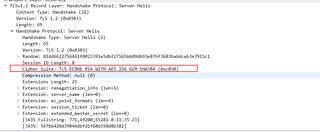
不知道是不是密码套件的原因导致也不清楚,只是觉得很奇怪,发起请求只设置了一个套件,抓包有18个且都和文档中的套件不匹配
网上有个帖子说postman对套件的格式有要求 “postman对语法是有规范的,下划线“_”不行,不能有“with”,不能有“TLS”,AES和128之间不能有“-” ”,但按照他的格式修改套件后也没用,还报无法匹配到套件的错误
另外从外商那里还拿到了一个证书文件 pem格式的,但尝试导入也无果,目前最大的可能是套件问题,不知道哪位有过类似的经验的请教一下


