求python 金融数据挖掘第9章 复习思考题2的答案!问题如图img


求python 金融数据挖掘第9章 复习思考题2的答案!问题如图img
 分享
分享
 关注
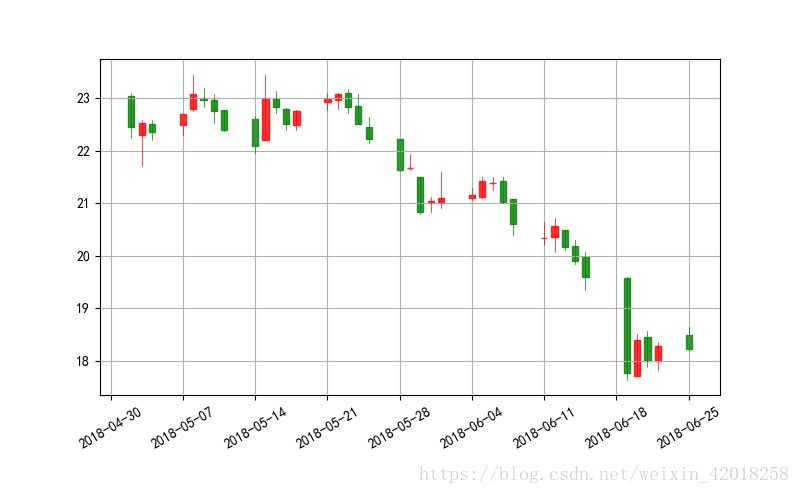
关注金融数据的蜡烛图
"""
# import matplotlib.finance as mpf # 这个方法过期了
# MatplotlibDeprecationWarning: The finance module has been deprecated in mpl 2.0 and will be removed in mpl 2.2. Please use the module mpl_finance instead. warnings.warn(message, mplDeprecation, stacklevel=1)
# 要用下面的方法 import mpl_finance as mpf
# 安装方法: >pip install https://github.com/matplotlib/mpl_finance/archive/master.zip
"""
import mpl_finance as mpf

# start = (2014, 5, 1)
# end = (2014, 6, 30)
# quotes = mpf._quotes_historical_yahoo('GDAXI', start, end)
# 由于伟大的墙,调取不到国外的数据,这里用tushare获取600118中国卫星的数据
import tushare as ts
import datetime
from matplotlib.pylab import date2num

start = '2018-05-01'
end = '2018-06-30'
k_d = ts.get_k_data('600118', start, end, ktype='D')
k_d.head()
k_d.date = k_d.date.map(lambda x: date2num(datetime.datetime.strptime(x, '%Y-%m-%d')))
quotes = k_d.values

fig, ax = plt.subplots(figsize=(8, 5))
fig.subplots_adjust(bottom=0.2)
mpf.candlestick_ochl(ax, quotes, width=0.6, colorup='r', colordown='g', alpha=0.8)
plt.grid(True)
ax.xaxis_date()
# dates on the x-axis
ax.autoscale_view()
plt.setp(plt.gca().get_xticklabels(), rotation=30)
k_d.head()输入的结果:
| date | open | close | high | low | volume | code | |
|---|---|---|---|---|---|---|---|
| 77 | 2018-05-02 | 23.05 | 22.45 | 23.10 | 22.25 | 90673.0 | 600118 |
| 78 | 2018-05-03 | 22.30 | 22.52 | 22.58 | 21.71 | 78948.0 | 600118 |
| 79 | 2018-05-04 | 22.50 | 22.35 | 22.58 | 22.21 | 58511.0 | 600118 |
| 80 | 2018-05-07 | 22.49 | 22.70 | 22.71 | 22.30 | 58248.0 | 600118 |
| 81 | 2018-05-08 | 22.80 | 23.07 | 23.45 | 22.75 | 115629.0 | 600118 |
最后的图片:
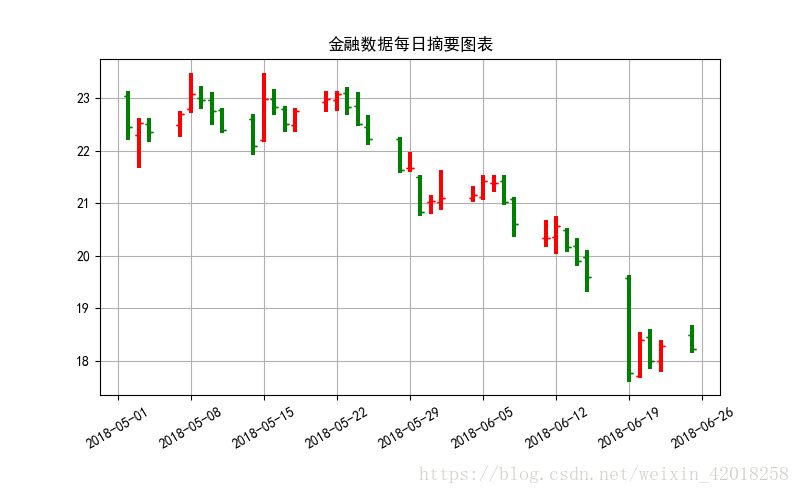
金融数据每日摘要图表
# 金融数据每日摘要图表
fig, ax = plt.subplots(figsize=(8, 5))
fig.subplots_adjust(bottom=0.2)
mpf._plot_day_summary(ax, quotes, colorup='r', colordown='g')
plt.grid(True)
ax.xaxis_date()
# dates on the x-axis
ax.autoscale_view()
plt.setp(plt.gca().get_xticklabels(), rotation=30)
plt.title('金融数据每日摘要图表')
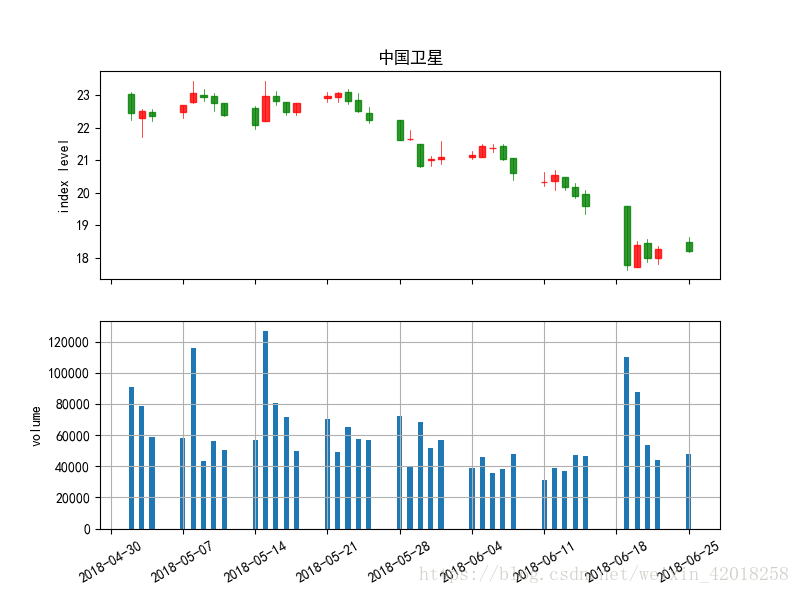
蜡烛图和成交量柱状图组合而成的图表
# 蜡烛图和成交量柱状图组合而成的图表
fig, (ax1, ax2) = plt.subplots(2, sharex=True, figsize=(8, 6))
mpf.candlestick_ochl(ax1, quotes, width=0.6, colorup='r', colordown='g', alpha=0.8)
ax1.set_title('中国卫星')
ax1.set_ylabel('index level')
plt.grid(True)
ax1.xaxis_date()
plt.bar(quotes[:,0],quotes[:,5],width=0.5)
ax2.set_ylabel('volume')
ax2.grid(True)
plt.setp(plt.gca().get_xticklabels(), rotation=30)
##5.3 3D绘图
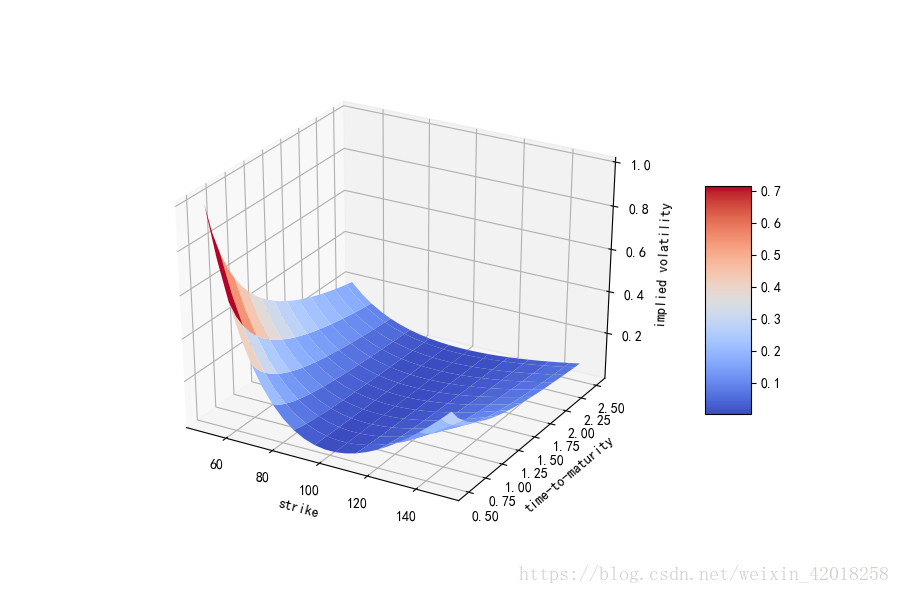
(模拟)隐含波动率的 3D 曲面图
#
strike = np.linspace(50, 150, 24)
ttm = np.linspace(0.5, 2.5, 24)
strike, ttm = np.meshgrid(strike, ttm)
iv = (strike - 100) ** 2 / (100 * strike) / ttm
# generate fake implied volatilities

from mpl_toolkits.mplot3d import Axes3D

fig = plt.figure(figsize=(9, 6))
ax = fig.gca(projection='3d')
surf = ax.plot_surface(strike, ttm, iv, rstride=2, cstride=2, cmap=plt.cm.coolwarm, linewidth=0.5, antialiased=True)
ax.set_xlabel('strike')
ax.set_ylabel('time-to-maturity')
ax.set_zlabel('implied volatility')
fig.colorbar(surf, shrink=0.5, aspect=5)
plot_surface参数
| 参数 | 描述 |
|---|---|
| X,Y,Z | 2D数组形式的数据值 |
| rstride | 数组行距(步长大小) |
| cstride | 数组列距(步长大小) |
| color | 曲面块颜色 |
| cmap | 曲面块颜色映射 |
| facecolors | 单独曲面块表面颜色 |
| norm | 将值映射为颜色的 Nonnalize实例 |
| vmin | 映射的最小值 |
| vmax | 映射的最大值 |
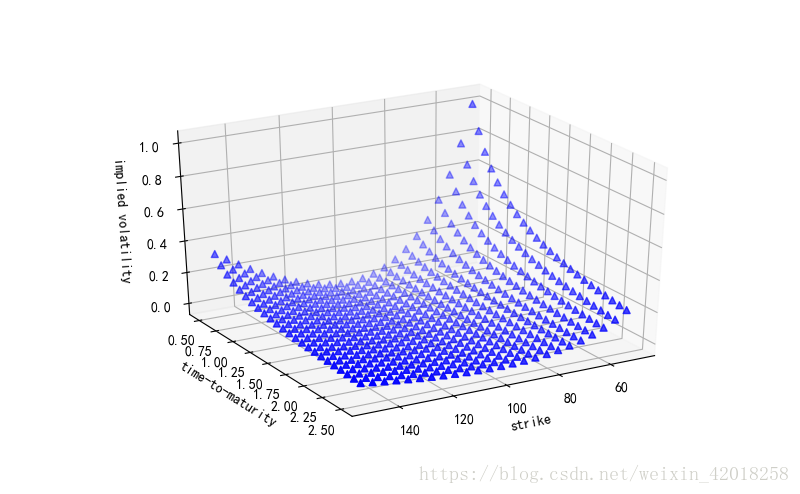
(模拟)隐含波动率的 3D 散点图
#(模拟)隐含波动率的 3D 散点图
fig = plt.figure(figsize=(8, 5))
ax = fig.add_subplot(111,projection='3d')
ax.view_init(30,60)
ax.scatter(strike, ttm, iv, zdir='z',s=25,c='b',marker='^')
ax.set_xlabel('strike')
ax.set_ylabel('time-to-maturity')
ax.set_zlabel('implied volatility')
end
分享 创建了问题
5月30日
创建了问题
5月30日