
存储空间控制面板提示错误,由于关键写入失败而处于脱机状态;添加驱动器。
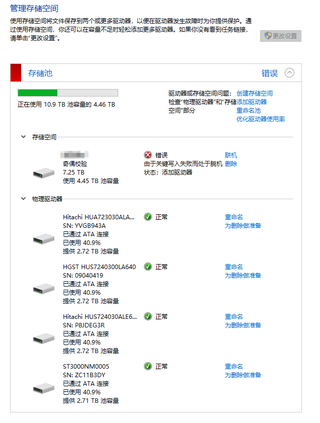
手动联机后存储池显示正常,
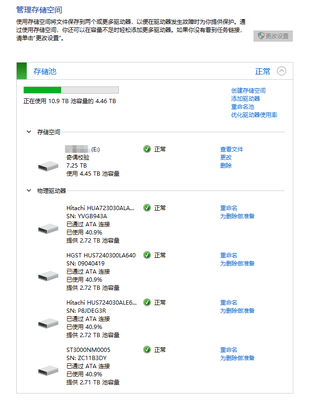
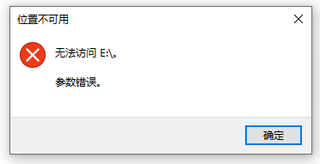
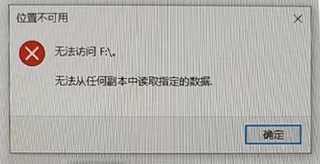
但是在资源管理器下无法访问该存储空间,弹窗显示位置不可用,无法访问,提示参数错误或无法从任何副本中读取指定的数据。
在Microsoft Learn提问得到如下回复,
Can you find anything on the client-side logging in to the Azure Storage Client Library?

Diagnosing and troubleshooting issues in a distributed application hosted in a cloud environment can be more complex than in traditional environments. Applications can be deployed in a PaaS or IaaS infrastructure, on-premises, on a mobile device, or in some combination of these environments.

Typically, your application's network traffic may traverse public and private networks, and your application may use multiple storage technologies such as Microsoft Azure Storage Tables, Blobs, Queues, or Files in addition to other data stores such as relational and document databases.

Monitor, diagnose, and troubleshoot Microsoft Azure Storage (classic) https://learn.microsoft.com/en-us/troubleshoot/azure/azure-storage/storage-monitoring-diagnosing-troubleshooting?tabs=dotnet

If the steps are not helpful then you might need to raise an ticket with the Azure support.
以下是该提问页原文链接,
https://learn.microsoft.com/en-us/answers/questions/1296368/windows-10-storage-space-cannot-be-accessed
这个答案已经超出了本人能力范围,求解决方案!


